

Washidoc: PDF Editor & Scanner
SoriStory Productivity iPhoneiPadiPod touchMac
Washidoc: PDF Editor & Scanner is a free Productivity app for iPhone and iPad by SoriStory. Rated 5.0/5 from 2 ratings. Requires iOS 17.0.
- Rating
- 5.0
- 2 ratings
- Price
- Free
- on the App Store
- Size
- 30 MB
- Age 4+
- Updated
- Oct 29
- 2026 · v1.2.5
Screenshots


About Washidoc: PDF Editor & Scanner
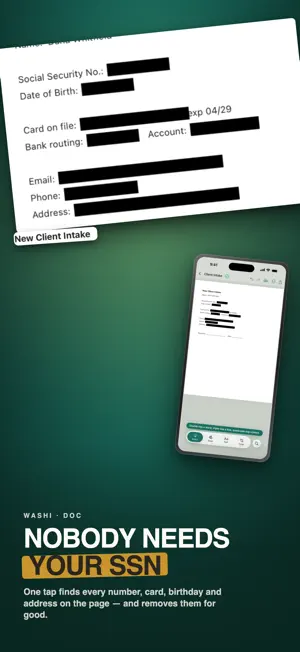
Free to use: edit the real text, sign, fill forms, redact and OCR. No account, no ads, no trial clock. A one-time unlock adds the finishing tools. Washidoc is your distraction-free desk for working with PDFs and paper documents. Designed to feel like real paper, Washidoc lets you scan, sign, annotate, organize, and protect your most important documents without bloated menus or cloud locks. KEY FEATURES: • REAL PAPER DESK: Spread out your documents, switch between pages effortlessly, and keep recent files right at hand. • FAST MOBILE SCANNER: Turn receipts, letters, and multi-page contracts into crisp, searchable PDFs with automatic edge detection. • SIGN & FILL: Keep your signature ready to drop into contracts, tax forms, and agreements with one tap. • SMART AUTO-CLASSIFICATION: Automatically sorts invoices, receipts, tax forms, and correspondence into smart collections. • ONE-TAP PRIVACY SWEEP: Detect and redact sensitive personal information (PII) like tax IDs, bank numbers, and dates of birth before sharing. • COMPRESS & FLATTEN: Shrink bloated PDFs and flatten annotations for flawless printing and emailing. • PRIVATE & OFFLINE: Work anywhere without an internet connection. Your documents stay on your device. SUBSCRIPTIONS Washidoc Cloud is an auto-renewable subscription that starts with a 7-day free trial, then $4.99/month or $39.99/year. It adds backup & sync and Convert to Word & Excel on top of everything in the one-time unlock. The free trial converts to a paid subscription unless cancelled at least 24 hours before it ends. Payment is charged to your Apple Account at confirmation of purchase, and the subscription renews automatically unless cancelled at least 24 hours before the end of the current period. Manage or cancel any time in your Apple Account subscription settings. Washidoc Pro Unlock is a separate one-time purchase and never renews. Terms of Use (EULA): https://washidoc.com/terms Privacy Policy: https://washidoc.com/privacy
What’s new
Version 1.2.5 · Updated October 29, 2026
On a large screen held sideways, your desk now stays on the left and the document you open fills the right. Expand it to see two pages at once. Documents also sit on the same warm paper as your desk.
App privacy
The developer, SoriStory, reported these privacy practices to Apple.
Data Linked to You
The following data, which may be collected and linked to your identity, may be used for the following purposes:
- Usage Data: Product Interaction
- Purchases: Purchase History
- Contact Info: Email Address, Name
- User Content: Photos or Videos, Other User Content
- Identifiers: User ID
Used for: Analytics, App Functionality
Data Not Linked to You
The following data, which may be collected but is not linked to your identity, may be used for the following purposes:
- Diagnostics: Crash Data
Used for: App Functionality
Alternatives to Washidoc: PDF Editor & Scanner
Looking for apps like Washidoc: PDF Editor & Scanner? Here are 6 similar apps on the App Store. The highest rated is PDF Genius: AI PDF Text Editor (5.0/5), and all 6 are free to download.
-
 PDF Toolbox: All tool in one
-
 Doc Fill
-
 AI PDF - PDF EDITOR & SCAN
4.0
AI PDF - PDF EDITOR & SCAN
4.0
-
 PDF Editor : Editor
4.2
PDF Editor : Editor
4.2
-
 PDF Genius: AI PDF Text Editor
5.0
PDF Genius: AI PDF Text Editor
5.0
-
 additem.to: AI Home Inventory
5.0
additem.to: AI Home Inventory
5.0
| App | Rating | Price | Last updated | Compare |
|---|---|---|---|---|
| Washidoc: PDF Editor & Scanner | 5.0 / 5 (2 ratings) | Free | October 29, 2026 | |
| PDF Toolbox: All tool in one | – | Free | Aug 4, 2026 | Compare |
| Doc Fill | – | Free | Oct 14, 2026 | Compare |
| AI PDF - PDF EDITOR & SCAN | 4.0 / 5 (1) | Free | Apr 30, 2026 | Compare |
| PDF Editor : Editor | 4.3 / 5 (4) | Free | Aug 20, 2026 | Compare |
| PDF Genius: AI PDF Text Editor | 5.0 / 5 (1) | Free | Oct 14, 2026 | Compare |
| additem.to: AI Home Inventory | 5.0 / 5 (6) | Free | Oct 28, 2026 | Compare |