

TrimSafe: Keep Video Metadata
Charwa Photo & Video iPhoneiPadiPod touch
TrimSafe: Keep Video Metadata is a free Photo & Video app for iPhone and iPad by Charwa. Requires iOS 18.0. Updated October 23, 2026.
- Price
- Free
- on the App Store
- Size
- 4 MB
- Age 4+
- Updated
- Oct 23
- 2026 · v2.0.3
Screenshots


About TrimSafe: Keep Video Metadata
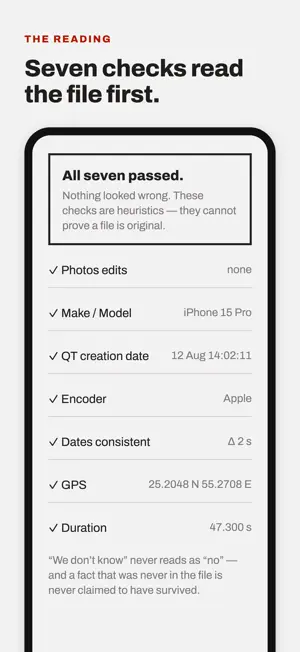
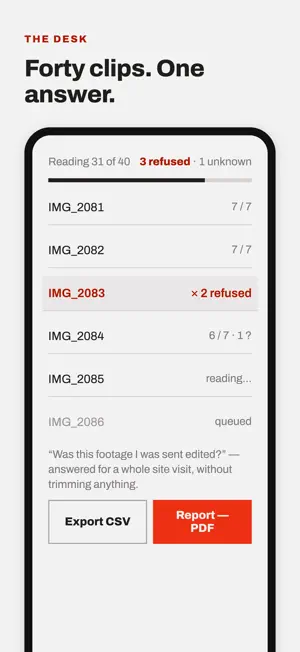
Shorten a video without destroying what it says about itself. Most trimming apps re-encode your clip and hand back a file stamped with today's date, no coordinates, and no camera. The picture survives. The record doesn't. If your footage has to show where and when it was shot, that is the whole problem. TrimSafe cuts the window you want and writes the original GPS coordinates, capture date, and camera make and model back onto the output. Then it reopens the saved file and reads them back, so what you see is what is actually in the bytes — not a report from the process that wrote them. WHAT IT DOES • Frame-accurate trimming at any length, nudged one frame at a time • Original GPS, capture date, and device written back on every export • Post-export verification that reopens the file rather than trusting the write • Capture times kept in the clock they were shot in, offset intact • Audio passed through untouched; 10-bit HLG and PQ keep their depth • Files named by their coordinates • Export to Files or iCloud Drive • Every check reported, pass or fail, and copied out as plain text BEFORE IT TRIMS TrimSafe runs seven checks on the source and refuses anything it cannot read as an iPhone camera original — a Photos edit, a missing capture date, a foreign encoder, a container whose dates disagree. All seven run whatever they find. A refused clip comes back as a report rather than an error: a check and its value for every fact that held, a cross for each that refused, and grey for a check that could not be answered at all. Copy report puts the lot on the clipboard as plain text — which matters most in exactly the case where the clip did not pass, and someone has to be told why. These are heuristics. They can flag signs of editing; they cannot prove a file is original. The app says so on the screen where it matters, and in detail on its About screen. TrimSafe records what a file said about itself when it was read. It is not a chain of custody, and it is not evidence. PRIVACY Nothing leaves your phone: no uploads, no accounts, no analytics, no tracking. Photo access reads the video and its metadata and asks the library whether it holds an edit; nothing is written back unless you tap Save to Photos, and that copy is the library's to keep — the file saved to Files is the verified one.
What’s new
Version 2.0.3 · Updated October 23, 2026
Rate TrimSafe from About. See a sample Pro report before you buy. The evidence bundle is now the handover bundle: same contents, plainer name.
App privacy
The developer, Charwa, reported these privacy practices to Apple.
Data Not Collected
The developer does not collect any data from this app.
Alternatives to TrimSafe: Keep Video Metadata
Looking for apps like TrimSafe: Keep Video Metadata? Here are 6 similar apps on the App Store. The highest rated is HashPhotos (4.7/5), and all 6 are free to download.
-
 Geopix - GPS Photo Tagger
-
 Exif Gps Recorder
-
 SnapGeo - AI Location Finder
4.2
-
 EXIF Viewer LITE by Fluntro
4.5
-
 Exif Metadata
4.6
-
 HashPhotos
4.7
| App | Rating | Price | Last updated | Compare |
|---|---|---|---|---|
| TrimSafe: Keep Video Metadata | – | Free | October 23, 2026 | |
| Geopix - GPS Photo Tagger | – | Free | Apr 8, 2026 | Compare |
| Exif Gps Recorder | – | Free | Oct 10, 2024 | Compare |
| SnapGeo - AI Location Finder | 4.2 / 5 (50) | Free | Feb 26, 2026 | Compare |
| EXIF Viewer LITE by Fluntro | 4.5 / 5 (598) | Free | Nov 1, 2026 | Compare |
| Exif Metadata | 4.6 / 5 (6,083) | Free | May 3, 2026 | Compare |
| HashPhotos | 4.7 / 5 (2,497) | Free | Oct 22, 2026 | Compare |