

Fueru - Block Apps & Focus
Yu Ishikami Productivity iPhoneiPadiPod touch
Fueru - Block Apps & Focus is a free Productivity app for iPhone and iPad by Yu Ishikami. Requires iOS 26.0. Updated October 6, 2026.
- Price
- Free
- on the App Store
- Size
- 21 MB
- Age 4+
- Updated
- Oct 6
- 2026 · v2.1
Screenshots

About Fueru - Block Apps & Focus
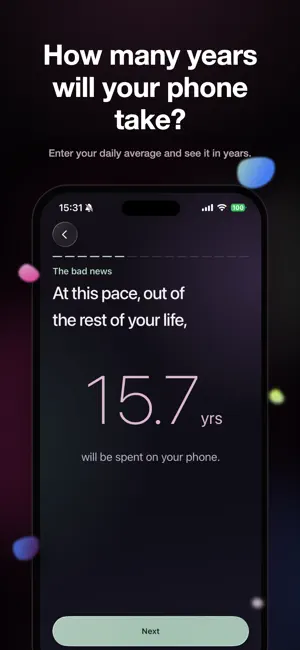
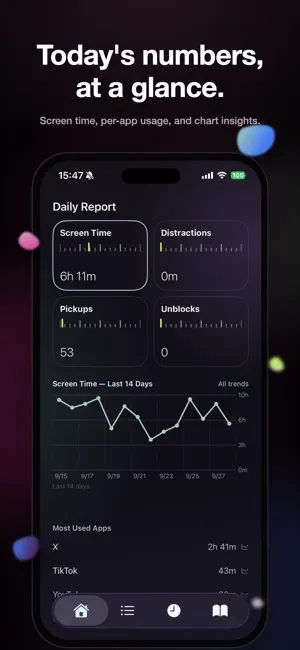
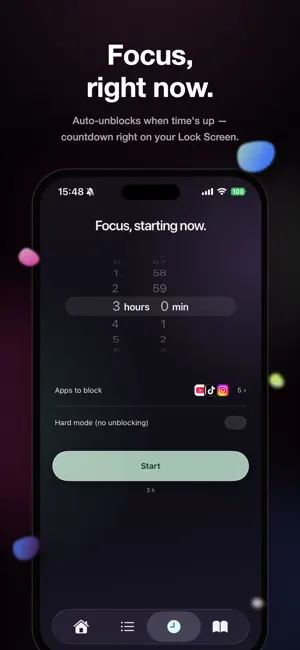
Fueru helps you take back the hours your phone has been stealing. ■ How many years of your life will your phone take? 5 hours a day adds up to about 18 years of an entire life. Fueru shows the time you reclaim, growing every single day. ■ Features (every feature is unlimited from the start) - App blocking: block social media and video apps, always-on or on a schedule - 4 rule types: Always on / Schedule / Daily time limit / Open limit - Sessions: one-off blocks to focus right now. Set 1 minute to 23h 59m on the dial, with a Lock Screen countdown - Friend Mode: a block only someone with the passcode can lift (up to 24 hours) - FueruAI (beta): describe it in plain words and the on-device AI builds the rule - Pause before you unblock: a short ad (or a breathing countdown) stops impulsive unlocks - Choose what to unblock: everything, or just the apps you pick - Hard mode: no unblocking, period (app deletion is blocked too) - Time Reclaimed: every minute below your old average keeps adding up — for years - Daily report: always on your Home screen — screen time, distractions, pickups, unblocks, and 14-day trends - Weekly report: your week in a story-style recap, anytime from Settings - Columns: short reads on your phone habits and how to use the time you take back ■ Every feature is free No paywalls, no subscriptions. Just watch a short ad to unblock. ■ Privacy All Screen Time data is processed on your device and never leaves your phone.
What’s new
Version 2.1 · Updated October 6, 2026
- A clearer first-run setup - Choose how much you want to cut back from your current phone time - A new tutorial walks you through creating your first rule - Set your daily goal in Settings with an hours-and-minutes dial, down to the minute - Friend Mode now lives on the Session tab - The "About ads" message is easier to read
App privacy
The developer, Yu Ishikami, reported these privacy practices to Apple.
Data Used to Track You
The following data may be used to track you across apps and websites owned by other companies:
- Location: Coarse Location
- Identifiers: Device ID
- Usage Data: Advertising Data
Data Not Linked to You
The following data, which may be collected but is not linked to your identity, may be used for the following purposes:
- Location: Coarse Location
- Identifiers: Device ID
- Usage Data: Advertising Data, Product Interaction
- Diagnostics: Crash Data, Performance Data, Other Diagnostic Data
Used for: Third-Party Advertising, Analytics, App Functionality
Alternatives to Fueru - Block Apps & Focus
Looking for apps like Fueru - Block Apps & Focus? Here are 6 similar apps on the App Store. The highest rated is DayLift - Habit Tracker (5.0/5), and all 6 are free to download.
-
 TomaReco
-
 okorusan - スマホ依存を叱るコーチ
-
 ScreenTimeBlocker
-
 SeeLock: Screen Time Blocker
-
 DayLift - Habit Tracker
5.0
DayLift - Habit Tracker
5.0
-
 NANISHINI: App Blocker & Focus
| App | Rating | Price | Last updated | Compare |
|---|---|---|---|---|
| Fueru - Block Apps & Focus | – | Free | October 6, 2026 | |
| TomaReco | – | Free | Apr 16, 2026 | Compare |
| okorusan - スマホ依存を叱るコーチ | – | Free | Jun 16, 2026 | Compare |
| ScreenTimeBlocker | – | Free | Oct 6, 2026 | Compare |
| SeeLock: Screen Time Blocker | – | Free | Sep 24, 2026 | Compare |
| DayLift - Habit Tracker | 5.0 / 5 (1) | Free | Jul 20, 2026 | Compare |
| NANISHINI: App Blocker & Focus | – | Free | Sep 28, 2026 | Compare |