

Spent Money: Expense Tracker
SAMVEL SARGSYAN Finance iPhoneiPadiPod touch
Spent Money: Expense Tracker is a free Finance app for iPhone and iPad by SAMVEL SARGSYAN. Requires iOS 16.4. Updated September 29, 2026.
- Price
- Free
- on the App Store
- Size
- 63 MB
- Age 4+
- Updated
- Sep 29
- 2026 · v1.3.0
Screenshots
About Spent Money: Expense Tracker
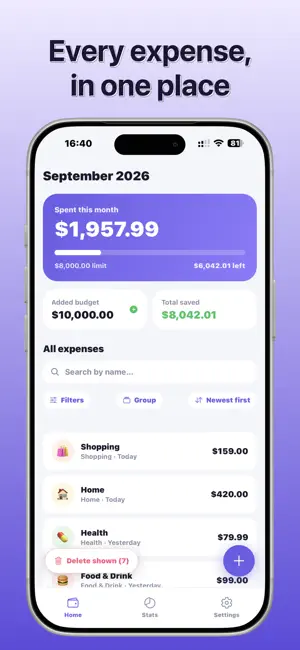
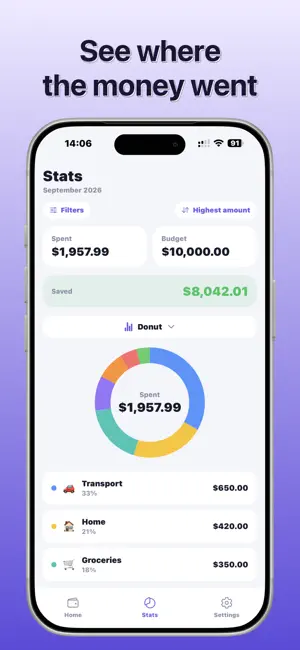
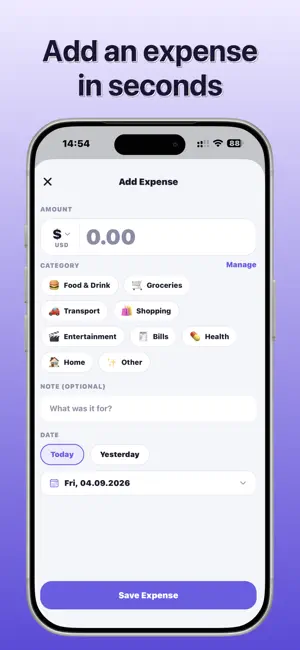
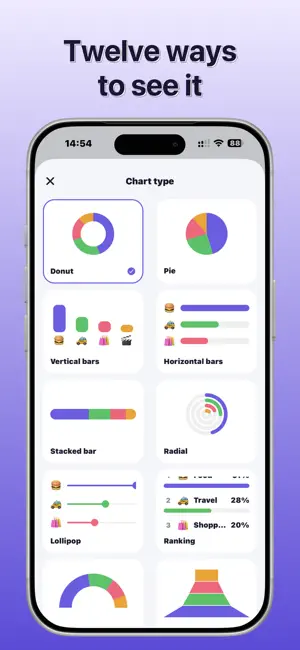
Spent Money is an expense and budget tracker that keeps everything on your phone. No Ads. No account. No sign-up. No Permissions. No cloud sync. Your expenses are stored on your device, and nowhere else, so there is nothing to log into and nothing to leak. TRACK WHAT YOU SPEND Add an expense in a couple of taps, with a category, a note, and a date. Add your income as it arrives - salary, a bonus, anything - and the app shows what is left and what you saved. SET A MONTHLY LIMIT Give yourself a spending cap and the home screen tells you where you stand: amber as you approach it, red once you pass it. You can also give any single category its own budget. SEE WHERE THE MONEY WENT Statistics with real charts, not just a list. Filter by category, search, sort, and group your expenses by day, week, month, or category. MAKE IT YOURS Recolor the whole app with an accent color, and switch between light, dark, or system themes. MADE FOR YOUR LANGUAGE AND YOUR MONEY 37 languages, including full right-to-left layouts for Arabic, Persian and Urdu. 156 currencies, and your own number and date formats. Choose the Gregorian or the Solar Hijri calendar, and the whole app follows it - not just the dates, but the months your limit, budgets and charts are counted in. KEEP IT PRIVATE Lock the app with a PIN. Export a backup file whenever you like, and protect it with a password if you want - the file is encrypted on your device before it leaves the app. WHAT IS FREE, FOREVER Unlimited expenses and income. The monthly limit. Search, filters, and sorting. The PIN lock. All 37 languages and all 156 currencies. Light, dark, and system themes, with a set of purple accent colors. Monthly statistics. Backup and restore. The free version shows one small banner ad, and Pro removes it. SPENT MONEY PRO An optional upgrade for people who want more out of the same data: - Any currency for expenses and budget, converted at the day's rate - All 12 chart styles - Every accent color - Day, week, and year statistics - Group by day, week, month, or category - Unlimited categories of your own - A budget for every category - Password-protected backups Pro is available monthly, yearly, or as a one-time purchase for permanent access. Every option unlocks exactly the same features. Subscriptions renew automatically unless cancelled at least 24 hours before the end of the current period. Payment is charged to your Apple ID account at confirmation. Manage or cancel in your device's Settings. Terms of Use: https://www.spentmoney.app/en/terms/ Privacy Policy: https://www.spentmoney.app/en/privacy/
What’s new
Version 1.3.0 · Updated September 29, 2026
Your totals stay right when you delete a category Deleting a category now moves its expenses to Uncategorized, or to another category you choose, instead of deleting them - so what you have saved always matches your real money. Select several expenses at once Tap Select next to All expenses, tick what you want and delete it in one go. A new look on iOS 26 and later Buttons, fields and cards use Apple's Liquid Glass, and you can turn it off in Settings if you prefer the plain look. Swiping a row shows a full-width Edit or Delete colour that follows your finger, and everything moves with smooth transitions. Solar Hijri calendar Settings -> Calendar switches the whole app to the Solar Hijri (Persian) calendar - dates, monthly limit, budgets, totals and charts all follow the calendar you pick. Also: Arabic, Persian and Urdu confirmations now always appear, and the add button sits in the middle of the screen. Your expenses still live only on your phone.
App privacy
The developer, SAMVEL SARGSYAN, reported these privacy practices to Apple.
Data Not Linked to You
The following data, which may be collected but is not linked to your identity, may be used for the following purposes:
- Purchases: Purchase History
Used for: Analytics, App Functionality
Alternatives to Spent Money: Expense Tracker
Looking for apps like Spent Money: Expense Tracker? Here are 6 similar apps on the App Store. The highest rated is Expenses Pro: Budget Tracker (5.0/5), and all 6 are free to download.
-
 Expenses Pro: Budget Tracker
5.0
Expenses Pro: Budget Tracker
5.0
-
 Budget Tracker - iExpenses
-
 Jotfi - Quick Expense Tracker
-
 Tijaorii
-
 Subscription Manager: SubKit
-
 Expense Tracker: SpendVoice
5.0
Expense Tracker: SpendVoice
5.0
| App | Rating | Price | Last updated | Compare |
|---|---|---|---|---|
| Spent Money: Expense Tracker | – | Free | September 29, 2026 | |
| Expenses Pro: Budget Tracker | 5.0 / 5 (2) | Free | Sep 17, 2026 | Compare |
| Budget Tracker - iExpenses | – | Free | Aug 29, 2026 | Compare |
| Jotfi - Quick Expense Tracker | – | Free | May 13, 2026 | Compare |
| Tijaorii | – | Free | Sep 22, 2026 | Compare |
| Subscription Manager: SubKit | – | Free | Aug 6, 2026 | Compare |
| Expense Tracker: SpendVoice | 5.0 / 5 (1) | Free | Jun 24, 2026 | Compare |