

Expenses Pro: Budget Tracker
Md Mominul Islam Finance iPhoneiPadiPod touch
Expenses Pro: Budget Tracker is a free Finance app for iPhone and iPad by Md Mominul Islam. Rated 5.0/5 from 2 ratings. Requires iOS 17.6.
- Rating
- 5.0
- 2 ratings
- Price
- Free
- on the App Store
- Size
- 33 MB
- Age 4+
- Updated
- Sep 17
- 2026 · v1.0.3
Screenshots


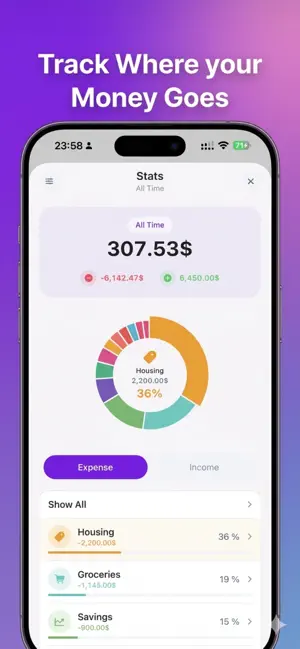
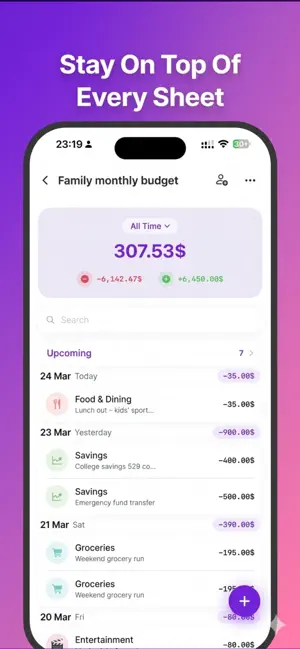
About Expenses Pro: Budget Tracker
Take control of your finances with Expenses Pro — the beautifully designed expense tracker built for people who want simplicity without sacrificing power. TRACK EVERYTHING IN SECONDS • Add expenses, income, and transfers with a built-in calculator keypad — type "20+30+10" and it does the math • Organize transactions into unlimited sheets — one for groceries, one for travel, one for your side hustle • Set recurring entries for rent, subscriptions, and bills — they appear automatically • Mark entries as pending and confirm them when the payment clears • Attach photos of receipts and invoices to any entry • Future-dated entries appear in the Upcoming view with projected balances MULTIPLE SHEETS FOR EVERY PART OF YOUR LIFE • Create separate sheets for personal, business, trips, or monthly budgets • Pin your most-used sheets to the top for instant access • Each sheet has its own currency, period filter, and balance card • Move entries between sheets with automatic currency conversion MULTI-CURRENCY & EXCHANGE RATES • 150+ currencies with real-time exchange rates • Cross-currency transfers with automatic conversion • Original amount, rate, and converted amount tracked per entry • Built-in currency converter — perfect for travelers and freelancers POWERFUL STATS & TRENDS • Category breakdown with interactive pie charts • See where your money goes — Food 34%, Transport 21%, Bills 18%... • Daily, weekly, monthly, and yearly trend charts • Filter by any period: This Week, This Month, This Year, All Time • Drill down into any category to see every transaction RECURRING TRANSACTIONS • Daily, weekly, monthly, yearly — or fully custom intervals • Smart scheduling: the next occurrence appears automatically • Edit one occurrence or all future occurrences at once • Move or duplicate all recurring entries to another sheet in one tap SYNC & SHARE • iCloud sync across iPhone, iPad, and Mac • Share any sheet with family, roommates, or business partners • Real-time updates with view-only or full edit permissions • Works offline — changes sync when you're back online EXPORT, IMPORT & PRINT • Export to CSV for Excel, Google Sheets, or Numbers • Generate beautiful A4 PDF reports with category breakdowns • Export all sheets as a ZIP file • Import transactions from CSV — great for migrating from other apps PRIVACY & SECURITY • Face ID, Touch ID, and passcode lock • Sensitive Mode hides all amounts — perfect for checking in public • Your data stays on your device or your iCloud — never our servers • Zero third-party analytics. Zero tracking. DESIGNED FOR YOUR LIFE • 36 category icons with customizable colors, or create your own • Siri shortcuts: "Hey Siri, add $12 to lunch" — works immediately • iPhone, iPad, and Mac with native UI for each platform • Clean, modern design with smooth swipe gestures throughout WHY EXPENSES PRO? Unlike bloated finance apps, Expenses Pro focuses on one thing: making expense tracking so fast and simple that you actually stick with it. No bank connections. No complicated frameworks. Just open the app, tap +, and you're done. Download Expenses Pro today — your future self will thank you. Terms of Service: https://expenses-pro.netlify.app/terms
What’s new
Version 1.0.3 · Updated September 17, 2026
• Your chosen time period now stays selected after closing the app • Fixed text display on the Pro screen • Improved ad layout • Bug fixes and performance improvements
App privacy
The developer, Md Mominul Islam, reported these privacy practices to Apple.
Data Used to Track You
The following data may be used to track you across apps and websites owned by other companies:
- Identifiers: Device ID
Data Linked to You
The following data, which may be collected and linked to your identity, may be used for the following purposes:
- Identifiers: Device ID
Used for: Third-Party Advertising, Analytics
Data Not Linked to You
The following data, which may be collected but is not linked to your identity, may be used for the following purposes:
- Diagnostics: Crash Data
Used for: Analytics
Alternatives to Expenses Pro: Budget Tracker
Looking for apps like Expenses Pro: Budget Tracker? Here are 6 similar apps on the App Store. The highest rated is Sem: Budgeting (5.0/5), and all 6 are free to download.
-
 Spent Money: Expense Tracker
-
 Subscription Tracker : SubWise
-
 Sem: Budgeting
5.0
Sem: Budgeting
5.0
-
 Noma - Multi-Currency Budget
-
 Xpenza: Expense Tracker
-
 Walletly: Expense & Budget
| App | Rating | Price | Last updated | Compare |
|---|---|---|---|---|
| Expenses Pro: Budget Tracker | 5.0 / 5 (2 ratings) | Free | September 17, 2026 | |
| Spent Money: Expense Tracker | – | Free | Sep 29, 2026 | Compare |
| Subscription Tracker : SubWise | – | Free | Apr 28, 2026 | Compare |
| Sem: Budgeting | 5.0 / 5 (1) | Free | Apr 15, 2025 | Compare |
| Noma - Multi-Currency Budget | – | Free | Sep 30, 2026 | Compare |
| Xpenza: Expense Tracker | – | Free | Jul 7, 2026 | Compare |
| Walletly: Expense & Budget | – | Free | Sep 28, 2026 | Compare |