

SnapCal — Photo to Calendar
changhyeon lee Productivity iPhoneiPadiPod touch
SnapCal — Photo to Calendar is a free Productivity app for iPhone and iPad by changhyeon lee. Requires iOS 17.0. Updated September 25, 2026.
- Price
- Free
- on the App Store
- Size
- 6 MB
- Age 4+
- Updated
- Sep 25
- 2026 · v1.0.1
Screenshots


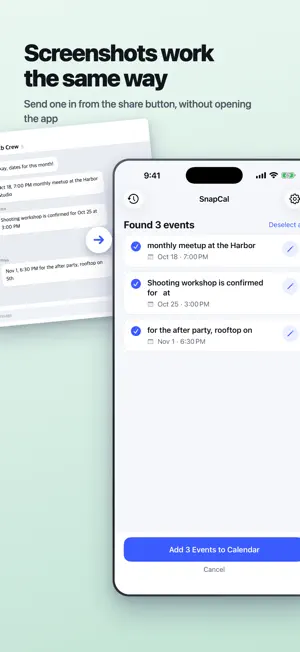
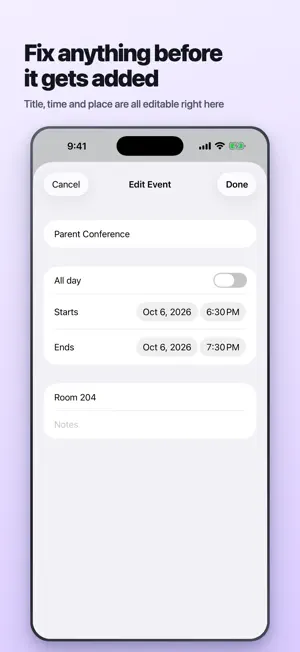
About SnapCal — Photo to Calendar
Someone hands you a school calendar with eleven dates on it. You stick it on the fridge and tell yourself you'll put them in your phone later. You never do. SnapCal is for that piece of paper. Photograph it, or share a screenshot into SnapCal from whatever app you're in, and you get back a list of what it found: dates, times, titles, places. Uncheck anything you don't want. Tap once. All of it is in Apple Calendar. One photo, ten events A term calendar with ten dates on it becomes ten events. You are not confirming them one at a time, and you are not typing any of them. Works with what you already have A photo you just took. A screenshot of the group chat where the dates got decided. A poster you snapped on the way past. Anything already sitting in your photo library. And if the image is already open somewhere else, the share button sends it to SnapCal without opening the app first. Korean and English in the same image "8월 17일 오후 7시" and "August 17, 7:00 PM" are both read, in the same photo, and there is no language setting to go and find. It asks instead of guessing "8/10" might be August 10. It might be October 8. SnapCal marks it and lets you flip it rather than quietly picking one and being wrong. If there is no time printed on the page, you get an all-day event. It will not invent 9:00 AM for you. Your photos don't go anywhere There is no server behind this app. Text recognition happens on your device, there is no account to create, and nothing is uploaded. It works in airplane mode, which is a reasonable way to check that last claim yourself. Not another calendar SnapCal doesn't keep its own copy of your schedule. Events go straight to Apple Calendar, and the app only asks for permission to create them. It cannot read what is already in there. That is deliberate. Free, with ads Every feature is free and there is no subscription. Ads pay for the app, and they stay off the screens where you are reviewing and editing events.
What’s new
Version 1.0.1 · Updated September 25, 2026
Two fixes for Korean schedules, both of which were quietly producing wrong events: • An afternoon time written as "오후 6:30" was being read as 6:30 in the morning. • In table-style handouts, each event was picking up its title and place from the row above it. The store page got a rewrite too, with new screenshots that show a real photo going in and the real events coming out. Your photos still never leave your device.
App privacy
The developer, changhyeon lee, reported these privacy practices to Apple.
Data Used to Track You
The following data may be used to track you across apps and websites owned by other companies:
- Location: Coarse Location
- Identifiers: Device ID
- Usage Data: Product Interaction, Advertising Data
- Diagnostics: Crash Data, Performance Data
Data Linked to You
The following data, which may be collected and linked to your identity, may be used for the following purposes:
- Location: Coarse Location
- Identifiers: Device ID
- Usage Data: Product Interaction, Advertising Data
- Diagnostics: Crash Data, Performance Data
Used for: Third-Party Advertising
Alternatives to SnapCal — Photo to Calendar
Looking for apps like SnapCal — Photo to Calendar? Here are 6 similar apps on the App Store. The highest rated is Lumical - Scan to Calendar (5.0/5), and all 6 are free to download.
-
 ShiftScan: Shift Work Calendar
-
 Jungle Calendar
3.7
Jungle Calendar
3.7
-
 Torki: AI Chat, Image & Photo
-
 Link Drawer: Save Links
2.0
Link Drawer: Save Links
2.0
-
 Lumical - Scan to Calendar
5.0
Lumical - Scan to Calendar
5.0
-
 SnapCal - for Google Calendar
4.0
SnapCal - for Google Calendar
4.0
| App | Rating | Price | Last updated | Compare |
|---|---|---|---|---|
| SnapCal — Photo to Calendar | – | Free | September 25, 2026 | |
| ShiftScan: Shift Work Calendar | – | Free | Aug 31, 2026 | Compare |
| Jungle Calendar | 3.7 / 5 (3) | Free | Oct 14, 2025 | Compare |
| Torki: AI Chat, Image & Photo | – | Free | Jul 15, 2026 | Compare |
| Link Drawer: Save Links | 2.0 / 5 (1) | Free | Apr 13, 2026 | Compare |
| Lumical - Scan to Calendar | 5.0 / 5 (4) | Free | Sep 9, 2026 | Compare |
| SnapCal - for Google Calendar | 4.0 / 5 (2) | Free | Oct 5, 2026 | Compare |