

Lumical - Scan to Calendar
Arunavo Ray Productivity iPhoneiPadiPod touch
Lumical - Scan to Calendar is a free Productivity app for iPhone and iPad by Arunavo Ray. Rated 5.0/5 from 4 ratings. Requires iOS 18.1.
- Rating
- 5.0
- 4 ratings
- Price
- Free
- on the App Store
- Size
- 27 MB
- Age 12+
- Updated
- Sep 9
- 2026 · v1.2.4
Screenshots

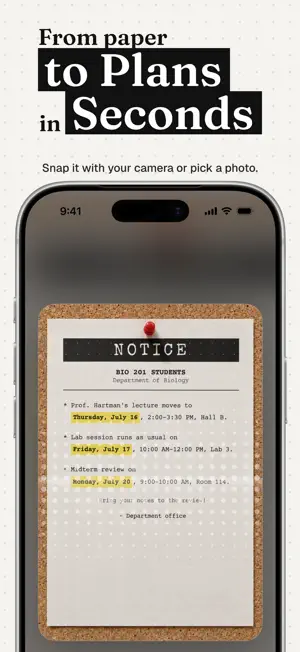


About Lumical - Scan to Calendar
SCAN. REVIEW. SAVE. IT'S THAT SIMPLE. Turn any paper schedule, meeting invite, poster, or flyer into calendar events in seconds. No typing required. Point your camera, let Lumical's AI extract the details, and save to your Apple Calendar. WHY LUMICAL? WHOLE SCHEDULES IN ONE SCAN Photograph your weekly roster and Lumical extracts every shift as its own event. Review them all, grouped by day, and save the lot with one tap. DIGITIZE PAPER SCHEDULES Perfect for nurses, retail staff, and shift workers. Take a photo of your paper roster and Lumical reads the dates, times, and shift codes instantly. INSTANT EVENT CAPTURE Point your camera at concert posters, wedding invites, conference agendas, or email screenshots. AI POWERED OCR Advanced technology reads titles, dates, times, locations, and notes, even from handwritten invites and complex tables. APPLE CALENDAR SYNC Every event goes straight into Apple Calendar on your iPhone. No export, no extra app to open. PRIVACY-FIRST Your schedule is private. All processing happens locally or anonymously. Images are processed and immediately deleted, never stored. PERFECT FOR: - SHIFT WORKERS: Digitize paper rosters and work schedules in seconds. - STUDENTS: Snap a picture of class timetables or exam schedules. - PROFESSIONALS: Capture details from conference badges and agendas. - PARENTS: Digitize school flyers and sports schedules instantly. HOW IT WORKS: 1. TAP: Open Lumical and tap the camera. 2. SCAN: Point at any roster, timetable, flyer, or invite. 3. REVIEW: every event extracted, grouped by day. 4. SAVE: add them all to Apple Calendar in one tap. KEY FEATURES: - Whole-schedule scanning: every shift or class becomes its own event - Batch review: check, edit, and save all events at once - Camera-based scanning for instant capture - Local storage - data stays on your device - Dark mode support - No ads, no tracking, no account required REQUIREMENTS: - iOS 18.1 or later - iPhone with camera - Apple Calendar access SUPPORT: Contact us at [email protected] --- Lumical is free to download with optional Lumical Pro subscription for unlimited scans. Terms: https://lumical.app/terms Privacy: https://lumical.app/privacy
What’s new
Version 1.2.4 · Updated September 9, 2026
Scans show events as they are found, and a stuck scan stops after 30 seconds instead of three minutes. When a photo has no dates in it, the app now says why. Lumical Pro unlocks saving scans to your calendar.
App privacy
The developer, Arunavo Ray, reported these privacy practices to Apple.
Data Not Linked to You
The following data, which may be collected but is not linked to your identity, may be used for the following purposes:
- Diagnostics: Other Diagnostic Data, Crash Data
- Purchases: Purchase History
Used for: Analytics, App Functionality
Alternatives to Lumical - Scan to Calendar
Looking for apps like Lumical - Scan to Calendar? Here are 6 similar apps on the App Store. The highest rated is Notice: Workspace For Clarity (5.0/5), and all 6 are free to download.
-
 Snap2Plan: Photo to Calendar
-
 Notice: Workspace For Clarity
5.0
Notice: Workspace For Clarity
5.0
-
 PicCal: Calendar Event Scanner
5.0
PicCal: Calendar Event Scanner
5.0
-
 CV Creator : AI Resume Builder
4.5
CV Creator : AI Resume Builder
4.5
-
 toolslink: private bookmarks
5.0
toolslink: private bookmarks
5.0
-
 Save It Later Bookmark Manager
3.0
Save It Later Bookmark Manager
3.0
| App | Rating | Price | Last updated | Compare |
|---|---|---|---|---|
| Lumical - Scan to Calendar | 5.0 / 5 (4 ratings) | Free | September 9, 2026 | |
| Snap2Plan: Photo to Calendar | – | Free | Aug 11, 2026 | Compare |
| Notice: Workspace For Clarity | 5.0 / 5 (1) | Free | Jul 22, 2026 | Compare |
| PicCal: Calendar Event Scanner | 5.0 / 5 (9) | Free | Jun 12, 2026 | Compare |
| CV Creator : AI Resume Builder | 4.5 / 5 (8) | Free | Nov 5, 2025 | Compare |
| toolslink: private bookmarks | 5.0 / 5 (2) | Free | Jun 12, 2026 | Compare |
| Save It Later Bookmark Manager | 3.0 / 5 (4) | Free | Aug 10, 2026 | Compare |