

Photo Cleaner: Sort by Size
Yuya Takamoto Photo & Video iPhoneiPadiPod touch
Photo Cleaner: Sort by Size is a free Photo & Video app for iPhone and iPad by Yuya Takamoto. Requires iOS 17.0. Updated October 7, 2026.
- Price
- Free
- on the App Store
- Size
- 5 MB
- Age 4+
- Updated
- Oct 7
- 2026 · v1.1
Screenshots

About Photo Cleaner: Sort by Size
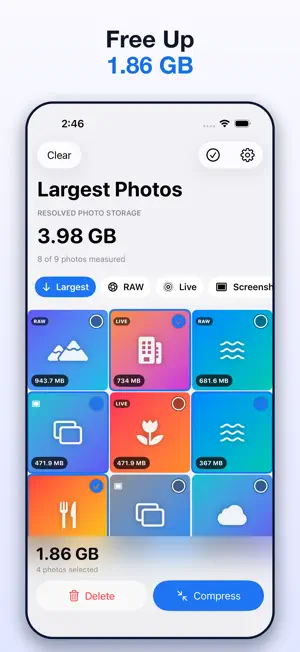
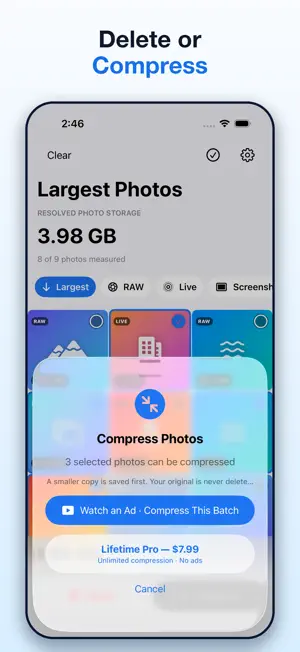
Find the photos using the most storage—without guessing. Photo Cleaner: Sort by Size analyzes still-photo resources on your iPhone and places the largest resolved photos first. See the storage impact of regular photos, RAW and ProRAW files, Live Photos, and screenshots in one clean, photo-focused library. LARGEST PHOTOS FIRST • Sort photos using resolved storage information • See a storage-size badge on every photo • Select multiple photos and view their combined size • Use dedicated Largest, RAW, Live, and Screenshots filters PHOTO-SPECIFIC DETAILS • View file size, dimensions, format, and date • Recognize RAW and ProRAW photo resources • Include paired motion resources when calculating supported Live Photo totals • Preview photos in full screen before taking action DELETE FOR FREE Browsing, sorting, previewing, selecting, and deleting photos are free. Deletion always uses Apple’s system confirmation. Deleted items may remain in the Recently Deleted album until you remove them there. SAVE-FIRST COMPRESSION Create a smaller copy of a supported photo while keeping the original. The original is never deleted automatically. Batch compression is available through an optional rewarded ad or Lifetime Pro when those options are available. DESIGNED FOR LARGE LIBRARIES Photo sizes are resolved progressively so the interface stays responsive. The App avoids uncontrolled downloads of iCloud-only photos. If an accurate size is not available locally, the App clearly shows that the size is unavailable instead of reporting 0 B. PRIVATE BY DESIGN Photo analysis is performed on your device. Your photos are not uploaded to servers operated by us. Limited Photos Access is supported. Lifetime Pro is a one-time purchase that includes unlimited supported compression, batch compression, and no ads. No weekly subscription.
What’s new
Version 1.1 · Updated October 7, 2026
Improved purchase status checks, price display and ad reliability.
App privacy
The developer, Yuya Takamoto, reported these privacy practices to Apple.
Data Not Linked to You
The following data, which may be collected but is not linked to your identity, may be used for the following purposes:
- Location: Coarse Location
- Identifiers: Device ID
- Usage Data: Product Interaction, Advertising Data
- Diagnostics: Performance Data
Used for: Third-Party Advertising
Alternatives to Photo Cleaner: Sort by Size
Looking for apps like Photo Cleaner: Sort by Size? Here are 6 similar apps on the App Store. The highest rated is PhotoSize - Storage Manager (5.0/5), and 5 of the 6 are free to download.
-
 PhotoSize - Storage Manager
5.0
PhotoSize - Storage Manager
5.0
-
 Photo Sorter: Size & Storage
3.7
Photo Sorter: Size & Storage
3.7
-
 Large Video Tool
3.7
Large Video Tool
3.7
-
 ClearSpace - Organize photos
-
 Swipellio: Photo Cleaner
5.0
Swipellio: Photo Cleaner
5.0
-
 Backspace - Photo Cleaner
| App | Rating | Price | Last updated | Compare |
|---|---|---|---|---|
| Photo Cleaner: Sort by Size | – | Free | October 7, 2026 | |
| PhotoSize - Storage Manager | 5.0 / 5 (1) | Free | Oct 16, 2026 | Compare |
| Photo Sorter: Size & Storage | 3.7 / 5 (6) | Free | Jan 19, 2026 | Compare |
| Large Video Tool | 3.7 / 5 (3) | 0.99 USD | Oct 17, 2026 | Compare |
| ClearSpace - Organize photos | – | Free | Sep 24, 2026 | Compare |
| Swipellio: Photo Cleaner | 5.0 / 5 (1) | Free | Sep 24, 2026 | Compare |
| Backspace - Photo Cleaner | – | Free | Aug 31, 2026 | Compare |