

Photo Sorter: Clean Up Storage
Daniel Ramirez Photo & Video iPhoneiPadiPod touch
Photo Sorter: Clean Up Storage is a free Photo & Video app for iPhone and iPad by Daniel Ramirez. Rated 3.7/5 from 6 ratings. Requires iOS 17.6.
- Rating
- 3.7
- 6 ratings
- Price
- Free
- on the App Store
- Size
- 25 MB
- Age 4+
- Updated
- Nov 2
- 2026 · v1.0.16
Screenshots
About Photo Sorter: Clean Up Storage
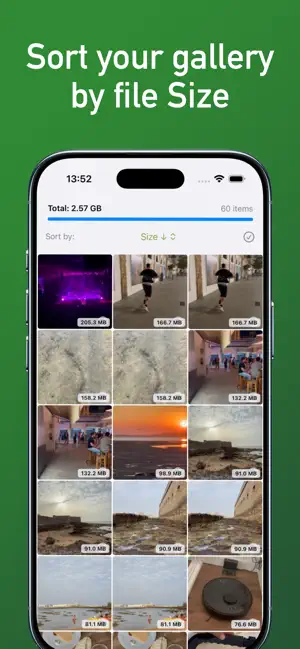
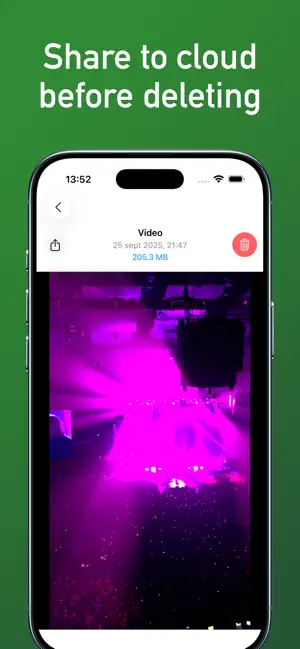
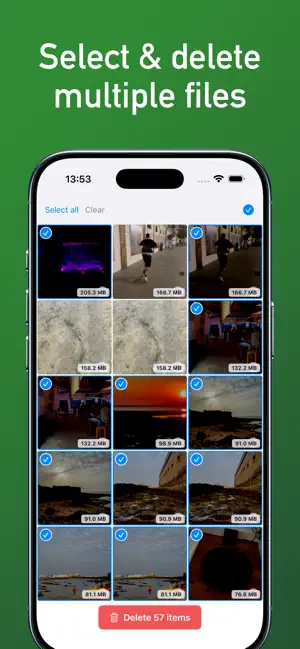
iPhone storage full? Photo Sorter sorts every photo and video by file size so you can instantly see what takes up the most space and delete it in seconds. The iOS Photos app can't sort by size. This app can. HOW IT WORKS • Scans your library and measures every photo, video, Live Photo and burst. • Sort by size or by date, in either direction. • Filter by videos, screenshots, Live Photos, bursts or files larger than 50 MB. • Preview each file full screen before you delete it. • Select many items at once, even by dragging your finger, and delete them. • Share to iCloud, Dropbox, Google Drive or AirDrop before deleting. • When you're done, we show you how much space you freed. Deleted items go to "Recently Deleted" in the Photos app. Empty that album to get the space back right away; otherwise iOS removes them after 30 days. YOUR PRIVACY The scan runs on your iPhone. Your photos and videos are never uploaded to any server. FREE AND PREMIUM You can delete up to 10 items a day for free. Need more? Watch an ad to unlock more deletions that day, or go Premium to delete with no daily limit and no ads. Premium is available as a monthly or yearly subscription. Payment is charged to your Apple Account at confirmation of purchase. The subscription renews automatically unless you cancel at least 24 hours before the end of the current period. You can manage or cancel it in your App Store account settings. Privacy Policy: https://photocleaneriphone.com/privacy-policy.html Terms of Use (EULA): https://photocleaneriphone.com/termsofuse.html
Ratings & reviews
3.7
6 ratings
What’s new
Version 1.0.16 · Updated November 2, 2026
- Faster and more stable with very large photo libraries. - Fixed an unexpected crash when storage is almost full. - New: send us suggestions from the app. - We'll let you know if your subscription payment fails, so you don't lose Premium.
App privacy
The developer, Daniel Ramirez, reported these privacy practices to Apple.
Data Used to Track You
The following data may be used to track you across apps and websites owned by other companies:
- Identifiers: Device ID
Data Linked to You
The following data, which may be collected and linked to your identity, may be used for the following purposes:
- Identifiers: Device ID
Used for: Third-Party Advertising, Analytics
Data Not Linked to You
The following data, which may be collected but is not linked to your identity, may be used for the following purposes:
- Diagnostics: Crash Data, Performance Data, Other Diagnostic Data
- User Content: Other User Content
- Identifiers: User ID
Used for: Developer’s Advertising or Marketing, Analytics, App Functionality
Alternatives to Photo Sorter: Clean Up Storage
Looking for apps like Photo Sorter: Clean Up Storage? Here are 6 similar apps on the App Store. The highest rated is VidClean: Delete Large Videos (5.0/5), and all 6 are free to download.
-
 Video Cleaner: Sort by Size
3.0
-
 Photo Cleaner: Sort by Size
-
 PhoTop - Check Image Size
4.1
-
 PhotoSort – Photo Cleaner
-
 VidClean: Delete Large Videos
5.0
-
 PhotoSize - Storage Manager
5.0
| App | Rating | Price | Last updated | Compare |
|---|---|---|---|---|
| Photo Sorter: Clean Up Storage | 3.7 / 5 (6 ratings) | Free | November 2, 2026 | |
| Video Cleaner: Sort by Size | 3.0 / 5 (2) | Free | Oct 6, 2026 | Compare |
| Photo Cleaner: Sort by Size | – | Free | Oct 7, 2026 | Compare |
| PhoTop - Check Image Size | 4.1 / 5 (146) | Free | Feb 19, 2024 | Compare |
| PhotoSort – Photo Cleaner | – | Free | Jul 24, 2026 | Compare |
| VidClean: Delete Large Videos | 5.0 / 5 (9) | Free | Jan 2, 2026 | Compare |
| PhotoSize - Storage Manager | 5.0 / 5 (1) | Free | Oct 16, 2026 | Compare |