

Bible-StudyGuide: Study Notes
CRIBINC, LLC Reference iPhoneiPadiPod touch
Bible-StudyGuide: Study Notes is a free Reference app for iPhone and iPad by CRIBINC, LLC. Requires iOS 18.0. Updated September 29, 2026.
- Price
- Free
- on the App Store
- Size
- 18 MB
- Age 4+
- Updated
- Sep 29
- 2026 · v1.0
Screenshots


About Bible-StudyGuide: Study Notes
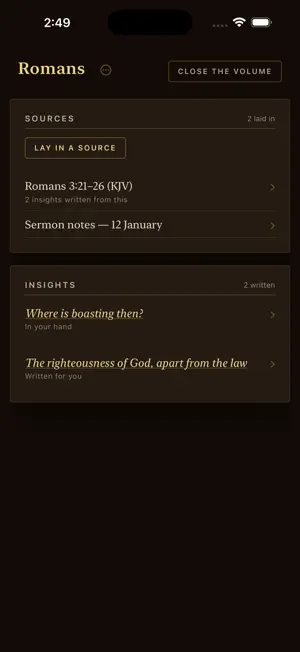
Your study should look the way a study looks. Open Bible-StudyGuide and you are standing at a shelf. Your notebooks are leather-bound volumes with their titles tooled on the spines. Tap one. It comes down off the shelf, the cover swings open, and the volume lies open at its spread — sources laid in on the left page, insights written on the right. That is the whole idea. The real sources on one side. What you found in them on the other. FOUR DOORS FOR A SOURCE Lay a source into an open volume four ways: Write — type or paste a passage, sermon notes, a quotation. Link — paste a web address; the page's text is fetched and laid in. File — bring a PDF, EPUB, Word, Markdown or plain text file. Scan — point the camera at printed pages and the words are read into text. The commentary open on your desk, the study Bible's notes, the conference handout, the photocopied chapter someone gave you in 1998. If it is printed, it can be laid into a volume. SCANNING IS READ ON YOUR DEVICE The camera finds the page edges and the words are read on your iPhone or iPad. You see the transcript before anything is laid in, and the photographs never leave the device — only the finished text goes into your volume. THE STUDY MARGIN Every source's leaf ends in its Study margin, and the same is reachable from the leaf's header. Choose a way of study — Study & Exegesis, Devotional & Application, Teaching Prep, Key Insights, Reflection Questions and more — and an insight is written from that source, onto that leaf. Choose several and they are written one after another. Then you decide. Write it into the book and it becomes a page of the volume, listed on the spread's insights page. Discard it and it is gone. Nothing enters your book without your hand on it. And the insights are written from your sources — the ones you chose and laid in — not from somewhere else. BRING YOUR OWN KEY Bible-StudyGuide does not resell you AI. You connect your own provider key — OpenAI, Anthropic, Google, or a model running on your own machine — and you pay that provider directly, at their price, for exactly what you use. The subscription is for the app itself: the shelf, the volumes, the scanner, the study margin, the sync. ONE SUBSCRIPTION, SHELF AND DESK Your library lives in your account and opens in two places: this app, and the web app at app.cribinc.com. One subscription covers both. WHO IT IS FOR Pastors working a passage toward Sunday. Teachers building a series. Small-group leaders who want the week's questions to come from the text. Lay students with a shelf of good books and no good way to hold what they find in them. WHAT IT IS NOT No feed. No streak. No badges. Nothing between you and the page. THE SUBSCRIPTION $4.99 a month or $49.99 a year, after a 7-day free trial. Subscribe in the app (Account, or the unsubscribed shelf footer) via In-App Purchase, or on the web at app.cribinc.com. One subscription covers both. Reading, scanning, laying in sources and writing notes in your own hand need no key of your own; insights are written by the provider you connect. Terms of Use (EULA): https://www.apple.com/legal/internet-services/itunes/dev/stdeula/ Privacy Policy: https://cribinc.com/bible-studyguide/privacy Terms: https://cribinc.com/bible-studyguide/terms From CRIBINC — cribinc.com
App privacy
The developer, CRIBINC, LLC, reported these privacy practices to Apple.
Data Linked to You
The following data, which may be collected and linked to your identity, may be used for the following purposes:
- Contact Info: Email Address
- User Content: Other User Content
- Identifiers: User ID
Used for: App Functionality
Alternatives to Bible-StudyGuide: Study Notes
Looking for apps like Bible-StudyGuide: Study Notes? Here are 6 similar apps on the App Store. The highest rated is Bible Threads (5.0/5), and all 6 are free to download.
-
 Bible Threads
5.0
-
 Sacred Lineage — Family Tree
5.0
-
 Bible Connect: Insights
5.0
-
 Study Research
-
 Scriptorium TR
5.0
-
 Scripture Connections
| App | Rating | Price | Last updated | Compare |
|---|---|---|---|---|
| Bible-StudyGuide: Study Notes | – | Free | September 29, 2026 | |
| Bible Threads | 5.0 / 5 (3) | Free | Aug 27, 2026 | Compare |
| Sacred Lineage — Family Tree | 5.0 / 5 (1) | Free | Oct 29, 2026 | Compare |
| Bible Connect: Insights | 5.0 / 5 (2) | Free | Apr 13, 2026 | Compare |
| Study Research | – | Free | Mar 17, 2026 | Compare |
| Scriptorium TR | 5.0 / 5 (4) | Free | Oct 27, 2026 | Compare |
| Scripture Connections | – | Free | Mar 24, 2026 | Compare |