

LockScreen Notes Calendar
Huy Van Productivity iPhoneiPadiPod touch
LockScreen Notes Calendar is a free Productivity app for iPhone and iPad by Huy Van. Requires iOS 17. Updated October 6, 2026.
- Price
- Free
- on the App Store
- Size
- 106 MB
- Age 4+
- Updated
- Oct 6
- 2026 · v1.1.38
Screenshots

About LockScreen Notes Calendar
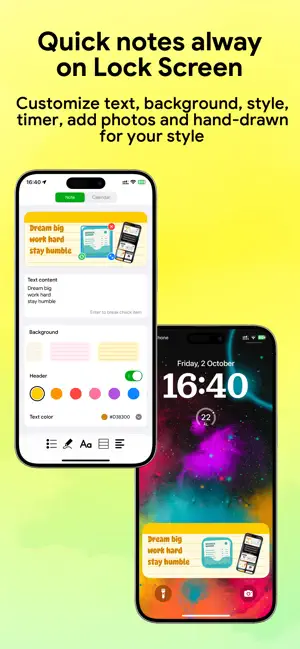
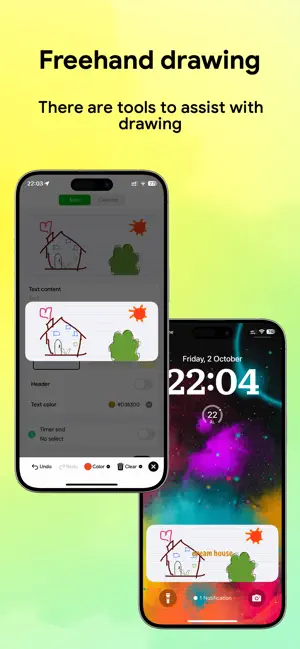
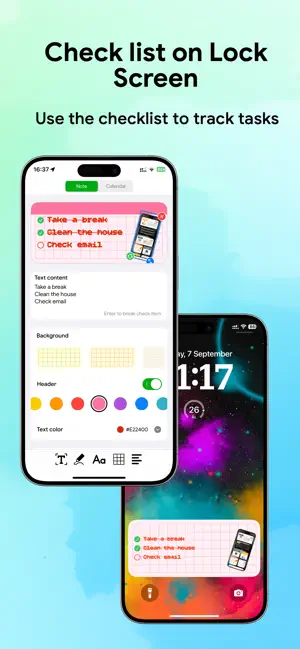
Turn your lock screen into a powerful productivity assistant with LockScreenColor—the ultimate solution to cure the 'note and forget' habit. Important information stays front and center every time you pick up your phone, ensuring you never miss a plan. Instant Lock Screen Interaction • Quick Actions: Check off tasks or shopping items directly from your lock screen without opening the app. • Rapid Note-Taking: Tap any note to bring up the editor. Everything auto-saves instantly, letting you focus entirely on writing without worrying about losing data. Personalized Customization • Flexible Design: Customize paper colors, font shades, line styles, and templates to seamlessly complement your lock screen wallpaper. • Expressive Writing: Write by hand, doodle freely, or underline key points just like on a physical sticky note. • Images & Typography: Add photos from your gallery, insert favorite character stickers, and select fonts that match your mood. Productivity Booster • Lock Screen Calendar: Pin your calendar directly to your lock screen with customizable layouts and flexible date ranges. • Integrated Timer: Built-in timer tool helps you maintain focus and maximize efficiency. Private & Frictionless No registration or login required. LockScreenColor collects no personal data, letting you start using it immediately after installation. Terms of Use (EULA): https://www.apple.com/legal/internet-services/itunes/dev/stdeula/ Privacy Policy: https://www.freeprivacypolicy.com/live/6f1babf4-af0b-49d2-b061-fd4047d3ec1b
What’s new
Version 1.1.38 · Updated October 6, 2026
Fixes the issue of missing notes and calendar lock screen Added header and background colors Fixed other bugs and improved performance
App privacy
The developer, Huy Van, reported these privacy practices to Apple.
Data Used to Track You
The following data may be used to track you across apps and websites owned by other companies:
- Identifiers: Device ID
Data Not Linked to You
The following data, which may be collected but is not linked to your identity, may be used for the following purposes:
- Identifiers: Device ID
Used for: Third-Party Advertising
Alternatives to LockScreen Notes Calendar
Looking for apps like LockScreen Notes Calendar? Here are 6 similar apps on the App Store. The highest rated is Ozzy: ADHD Focus Pal (5.0/5), and all 6 are free to download.
-
 FlowDoro - Pomodoro Timer
-
 Detox: Screen Time App Blocker
-
 Jotcal: Calm Calendar
-
 Pomodoro Timer - Pomoro
-
 Ozzy: ADHD Focus Pal
5.0
Ozzy: ADHD Focus Pal
5.0
-
 Lesscreen: Screen Time Limit
| App | Rating | Price | Last updated | Compare |
|---|---|---|---|---|
| LockScreen Notes Calendar | – | Free | October 6, 2026 | |
| FlowDoro - Pomodoro Timer | – | Free | Mar 27, 2026 | Compare |
| Detox: Screen Time App Blocker | – | Free | Jun 3, 2026 | Compare |
| Jotcal: Calm Calendar | – | Free | Oct 13, 2026 | Compare |
| Pomodoro Timer - Pomoro | – | Free | Apr 13, 2026 | Compare |
| Ozzy: ADHD Focus Pal | 5.0 / 5 (3) | Free | Oct 16, 2026 | Compare |
| Lesscreen: Screen Time Limit | – | Free | Oct 1, 2026 | Compare |