

Lesscreen: Screen Time Limit
Shenzhen Jirry Jirry Technology Co., Ltd. Productivity iPhoneiPadiPod touch
Lesscreen: Screen Time Limit is a free Productivity app for iPhone and iPad by Shenzhen Jirry Jirry Technology Co., Ltd. Requires iOS 16.0.
- Price
- Free
- on the App Store
- Size
- 10 MB
- Age 4+
- Updated
- Oct 1
- 2026 · v1.0.2
Screenshots
About Lesscreen: Screen Time Limit
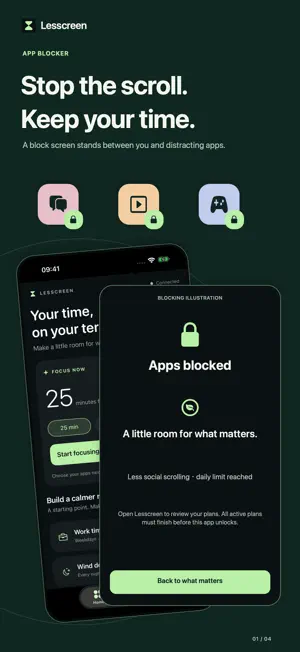
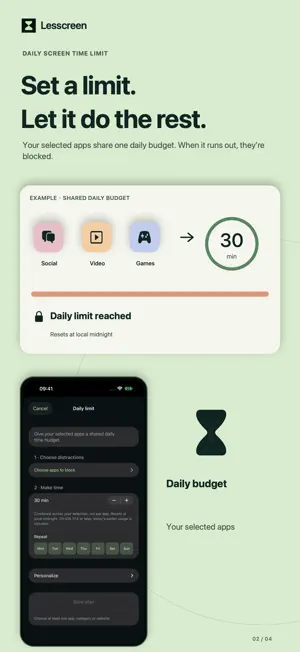
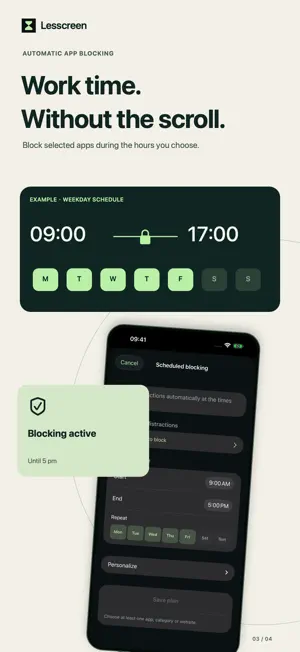
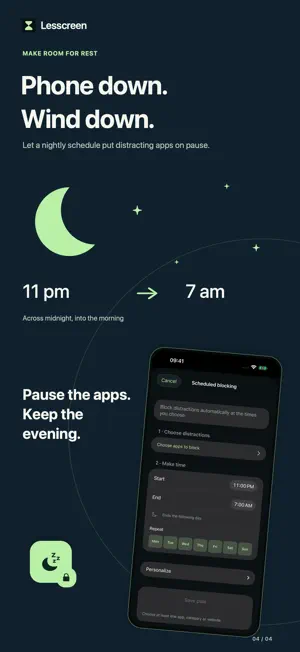
Lesscreen helps you reduce screen time and block distracting apps, so you can make room for what matters. Start a focus session, schedule regular breaks from apps, or set a shared daily time limit. FOCUS WHEN YOU CHOOSE Choose the apps, categories or websites you want to block, then set a focus duration. Start with 25, 45 or 60 minutes, or adjust the session to suit your day. BUILD A ROUTINE Schedule blocking for work, study or bedtime. Choose your start time, end time and days of the week. Overnight schedules can continue into the next morning. SET A DAILY LIMIT Give your selected apps a shared daily time budget. When the budget is reached, that selection is blocked for the rest of the day. The limit resets at local midnight. START WITH A TEMPLATE Work time, Wind down and Less social scrolling give you a starting point you can make your own. PROTECT YOUR PLANS An optional setting prevents you from stopping, editing or deleting a plan inside Lesscreen while it is actively blocking. You remain in control of Screen Time permission in iOS Settings. CLEAR, SIMPLE CONTROLS Manage your routines in one place and see which plans are active. If plans overlap, an app unlocks only when no active plan is still blocking it. No account is required. Your selected apps and plans are stored on your device. Lesscreen uses Apple's Screen Time features and requires permission to block your selection. Daily limits are shared across each plan's selection, not separate limits for every app. On iOS 17.4 and later, earlier usage from the same day is included. Available in English, Spanish, French, German, Simplified Chinese and Vietnamese. Requires iOS 16 or later.
What’s new
Version 1.0.2 · Updated October 1, 2026
Meet Lesscreen — the new name for Screen Time Limit-Free Control. • A new hourglass icon and a redesigned Home, Plans and Settings experience. • Clearer setup for focus sessions, scheduled blocking and shared daily limits. • Templates for work time, winding down and less social scrolling. • Improved handling of overlapping plans, overnight schedules and monitoring errors. • Added Spanish, French, German, Simplified Chinese and Vietnamese, with English as the default. This redesign starts fresh: previous-version plans are not carried over. Please reconnect Screen Time and create your plans again.
App privacy
The developer, Shenzhen Jirry Jirry Technology Co., Ltd., reported these privacy practices to Apple.
Data Not Collected
The developer does not collect any data from this app.
Alternatives to Lesscreen: Screen Time Limit
Looking for apps like Lesscreen: Screen Time Limit? Here are 6 similar apps on the App Store. The highest rated is Timeout: App Blocker (5.0/5), and all 6 are free to download.
-
 Zenze - App Time Limit
4.2
Zenze - App Time Limit
4.2
-
 Timeout: App Blocker
5.0
Timeout: App Blocker
5.0
-
 Limit – Control the Scroll
4.6
Limit – Control the Scroll
4.6
-
 LIMIT: Screen Time Control
4.3
LIMIT: Screen Time Control
4.3
-
 Barrier: Screen Time For Focus
4.6
Barrier: Screen Time For Focus
4.6
-
 Limit: Screen Time for Focus
3.9
Limit: Screen Time for Focus
3.9
| App | Rating | Price | Last updated | Compare |
|---|---|---|---|---|
| Lesscreen: Screen Time Limit | – | Free | October 1, 2026 | |
| Zenze - App Time Limit | 4.2 / 5 (31) | Free | Oct 21, 2026 | Compare |
| Timeout: App Blocker | 5.0 / 5 (7) | Free | Mar 17, 2025 | Compare |
| Limit – Control the Scroll | 4.6 / 5 (261) | Free | May 28, 2026 | Compare |
| LIMIT: Screen Time Control | 4.3 / 5 (22) | Free | Oct 17, 2024 | Compare |
| Barrier: Screen Time For Focus | 4.6 / 5 (338) | Free | Jul 1, 2026 | Compare |
| Limit: Screen Time for Focus | 3.9 / 5 (11) | Free | Oct 13, 2026 | Compare |