

Transcripts
DOUGLAS HATCHER Productivity iPhoneiPadiPod touchMac
Transcripts is a free Productivity app for iPhone and iPad by DOUGLAS HATCHER. Rated 5.0/5 from 1 ratings. Requires iOS 17.0. Updated September 28, 2026.
- Rating
- 5.0
- 1 ratings
- Price
- Free
- on the App Store
- Size
- 4 MB
- Age 4+
- Updated
- Sep 28
- 2026 · v1.1.2
Screenshots
About Transcripts
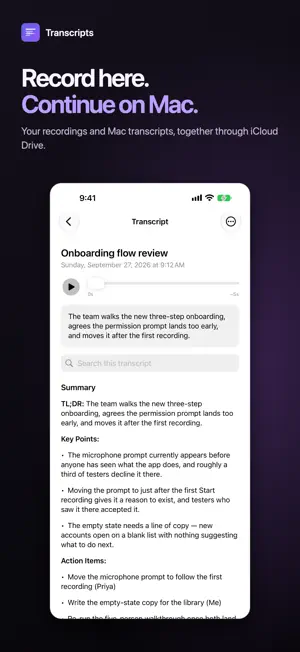
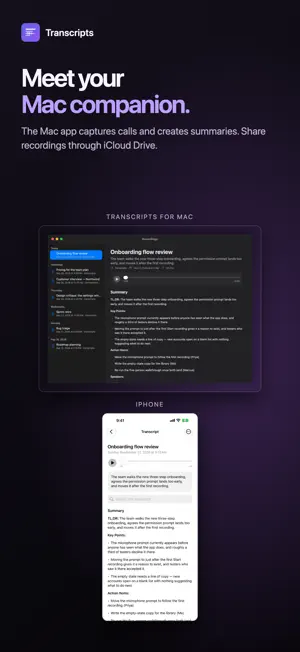
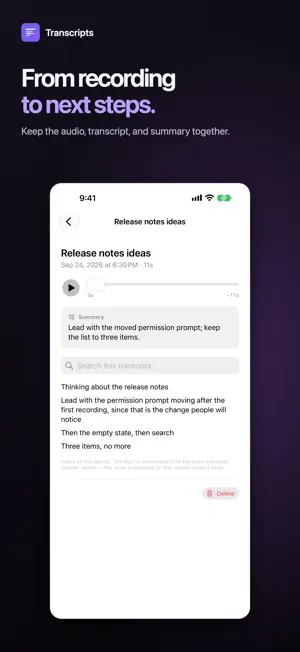
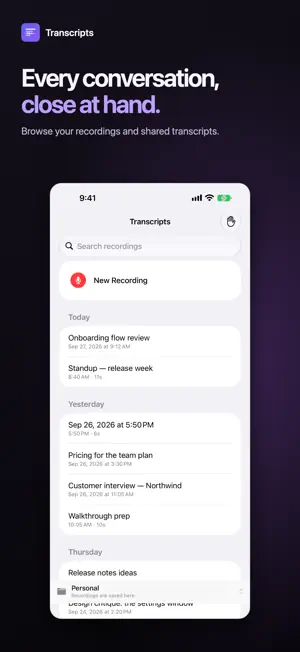
Transcripts records and transcribes on your iPhone or iPad, and works with Transcripts for Mac to turn those recordings into meeting notes. Continue on your Mac Get Transcripts for Mac from the Mac App Store. Point both apps at the same Transcripts folder in iCloud Drive. The Mac processes your finished mobile recordings, adds speaker names and summaries, and saves the results back to the shared folder for you to read on iPhone or iPad. The Mac app also captures your microphone and the other side of a call, shows a live transcript, and files the finished notes where you keep them. Recording and speech processing happen on your devices; iCloud Drive syncs the files you choose to share. Your iPhone and iPad remain complete recorders on their own. A Mac is optional. Read it while you record Words appear on screen as you speak, using on-device speech recognition. No waiting for a file to upload and come back as text. It keeps recording Lock the screen, switch apps, take a call — capture continues, and a Live Activity on the Lock Screen and Dynamic Island shows it is still running. Your files, your folder Recordings are saved as ordinary .m4a audio with a plain-text transcript beside each one. Choose where they go: iCloud Drive, OneDrive, Dropbox, or just on your device. There is no proprietary library to escape from and nothing to export — the files are already yours. Genuinely private No servers, no accounts, no analytics, no advertising. Transcripts sends your audio nowhere: it requires on-device speech recognition and switches live text off rather than fall back to a server. Your recordings go only where you put them. Open source The app is open source under the MIT licence, so the privacy claims above are checkable rather than promised. Recording laws vary by location, and some places require the consent of everyone in a conversation. Please make sure you may lawfully record before you do.
What’s new
Version 1.1.2 · Updated September 28, 2026
This release accompanies Transcripts 1.1.2 for Mac, which improves how the Mac completes sessions recorded on iPhone and iPad. Update the Mac app to receive those session improvements.
App privacy
The developer, DOUGLAS HATCHER, reported these privacy practices to Apple.
Data Not Collected
The developer does not collect any data from this app.
Alternatives to Transcripts
Looking for apps like Transcripts? Here are 6 similar apps on the App Store. The highest rated is Open Transcription (5.0/5), and 5 of the 6 are free to download.
-
 LectoNote: Class Transcription
-
 Open Transcription
5.0
Open Transcription
5.0
-
 Transcripts | Audio to text
-
 Podcript - Podcast Transcripts
-
 AI Notes: BYOK Transcription
4.8
AI Notes: BYOK Transcription
4.8
-
 REDREC - Offline Transcription
5.0
REDREC - Offline Transcription
5.0
| App | Rating | Price | Last updated | Compare |
|---|---|---|---|---|
| Transcripts | 5.0 / 5 (1 rating) | Free | September 28, 2026 | |
| LectoNote: Class Transcription | – | Free | Oct 14, 2025 | Compare |
| Open Transcription | 5.0 / 5 (5) | Free | Oct 5, 2026 | Compare |
| Transcripts | Audio to text | – | Free | May 8, 2025 | Compare |
| Podcript - Podcast Transcripts | – | Free | Oct 7, 2026 | Compare |
| AI Notes: BYOK Transcription | 4.8 / 5 (6) | Free | Oct 10, 2026 | Compare |
| REDREC - Offline Transcription | 5.0 / 5 (1) | 2.99 USD | Oct 10, 2026 | Compare |
Compare Transcripts with the top alternatives: ratings, updates, ASO score and keyword gaps →