

why? – screen time control
Comma Labs Productivity iPhoneiPadiPod touch
why? – screen time control is a free Productivity app for iPhone and iPad by Comma Labs. Requires iOS 18.0. Updated August 31, 2026.
- Price
- Free
- on the App Store
- Size
- 9 MB
- Age 4+
- Updated
- Aug 31
- 2026 · v1.2
Screenshots

About why? – screen time control
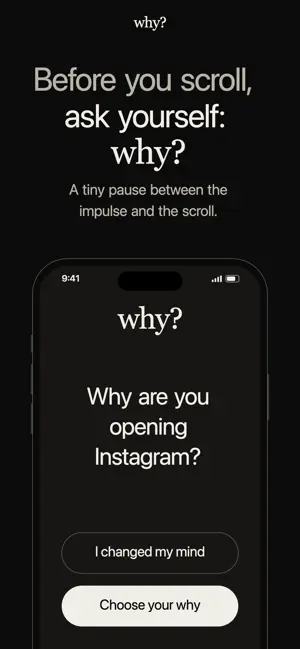
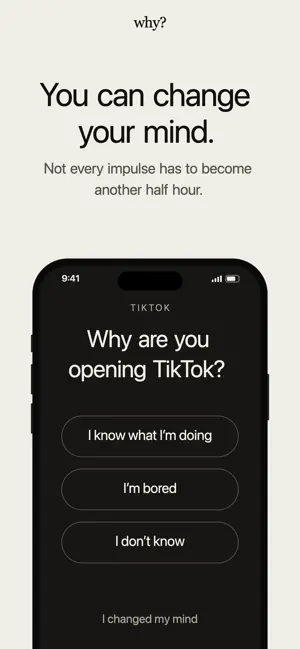
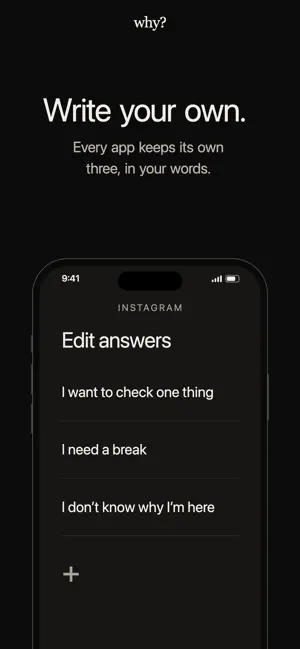
why? We don’t think your phone is the enemy. And we don’t think every minute on your screen is a minute wasted. Sometimes you open Instagram because you need to reply to someone. Sometimes you open YouTube because you want to watch something. Sometimes you just want to do nothing. That’s okay. The problem isn’t using your phone. The problem is using it without choosing to. We unlock. We tap. We scroll. And somewhere along the way, we stop knowing why we started. So we built why? Not to block you. Not to shame you. Not to tell you how many hours of your life you’ve wasted. Just one small question, at the moment it matters: Why? Why are you opening this? What are you looking for? What do you actually want to do? Sometimes, asking the question is enough. Sometimes, you’ll realize you do want to continue. Good. Continue. Sometimes you’ll realize you don’t. Good. Close it. Both are wins. Because the goal isn’t less screen time. The goal isn’t perfect discipline. The goal isn’t becoming someone who never scrolls. The goal is something much simpler: To put you back in the driver’s seat. A phone should be a tool you pick up, not a place you disappear into. So pause. Ask yourself. And choose. Why? FREE & PRO why? is free for two apps. Pro removes the two-app limit. The yearly plan includes a 7-day free trial. Monthly and yearly subscriptions renew automatically unless cancelled at least 24 hours before the end of the current subscription period. Payment is charged to your Apple Account at confirmation of purchase and, for renewals, within 24 hours before the end of the current subscription period. You can manage or cancel your subscription in your Apple Account settings after purchase. Lifetime is a one-time purchase and does not renew. REQUIREMENTS why? requires Screen Time access, which iOS requests during setup. You can withdraw this permission at any time. Showing all three answers together requires iOS 26.4 or later. On earlier versions, the question still appears with one answer and a way back. Fifteen minutes is the shortest access window Apple’s system allows. PRIVACY No account. No sign-up. No ads. No tracking. Your data stays on your device. TERMS Privacy Policy: commalabs.co/why/privacy Terms of Use: commalabs.co/why/terms Apple Standard EULA: apple.com/legal/internet-services/itunes/dev/stdeula/
What’s new
Version 1.2 · Updated August 31, 2026
Performance and UI/UX improvements for a smoother experience.
App privacy
The developer, Comma Labs, reported these privacy practices to Apple.
Data Not Linked to You
The following data, which may be collected but is not linked to your identity, may be used for the following purposes:
- Purchases: Purchase History
Used for: App Functionality
Alternatives to why? – screen time control
Looking for apps like why? – screen time control? Here are 6 similar apps on the App Store. The highest rated is Zyve: Plan, Sync, Live (5.0/5), and all 6 are free to download.
-
 EasyScan: Doc Scan & Share
-
 Darro Captain
-
 Dimly: Screen Time App Blocker
-
 VowPlan
-
 Odak - Social Media Blocker
-
 Zyve: Plan, Sync, Live
5.0
Zyve: Plan, Sync, Live
5.0
| App | Rating | Price | Last updated | Compare |
|---|---|---|---|---|
| why? – screen time control | – | Free | August 31, 2026 | |
| EasyScan: Doc Scan & Share | – | Free | Sep 2, 2026 | Compare |
| Darro Captain | – | Free | Sep 13, 2026 | Compare |
| Dimly: Screen Time App Blocker | – | Free | Oct 7, 2026 | Compare |
| VowPlan | – | Free | Oct 7, 2026 | Compare |
| Odak - Social Media Blocker | – | Free | Sep 11, 2026 | Compare |
| Zyve: Plan, Sync, Live | 5.0 / 5 (3) | Free | Oct 5, 2026 | Compare |