

Proref: Art Reference Boards
John Oliver Atienza Graphics & Design iPhoneiPadiPod touch
Proref: Art Reference Boards is a free Graphics & Design app for iPhone and iPad by John Oliver Atienza. Requires iOS 15.0. Updated October 21, 2026.
- Price
- Free
- on the App Store
- Size
- 44 MB
- Age 4+
- Updated
- Oct 21
- 2026 · v1.5.0
Screenshots

About Proref: Art Reference Boards
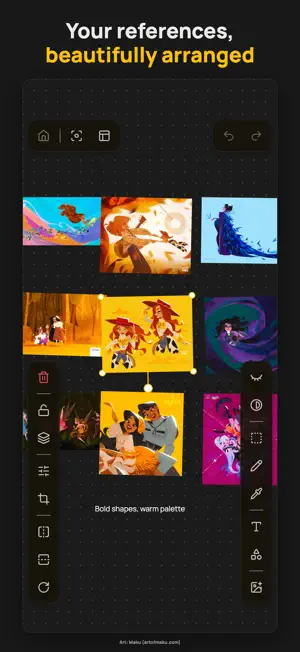
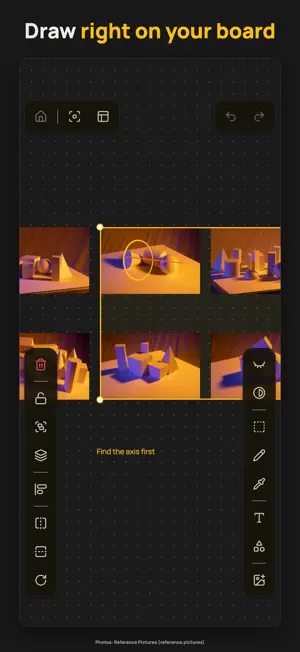
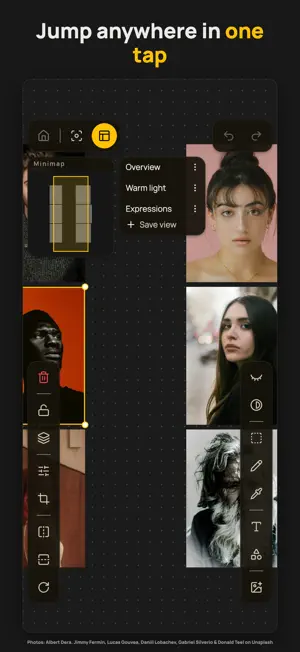
Proref is where your references live while you draw — and where the finished piece goes afterwards. GATHER YOUR REFERENCES Drop everything you're looking at onto one huge canvas and arrange it into a board. Import from Photos, your camera, Files, a web link, the share sheet, or by dragging straight in from Safari. Zoom from 2% to 25,600%, so the board grows with the project. WORK BESIDE THEM Proref is built for Split View: your references on one side, your drawing app on the other. Sketch and annotate over them with Apple Pencil, with pressure. Tune brightness, contrast and saturation, or crop non-destructively — the original is always recoverable. A minimap shows where you are, and saved views jump you back to any spot in one tap. KEEP THE PIECE, AND THE LESSON When something's finished, keep it. Attach a piece to the board it came from, open it full screen, and see everything you've made on a dated timeline — as a gallery to swipe or a list to scan. Note what worked and what didn't while it's fresh, star the things to carry forward, and those notes sit in a pane on the board while you draw the next one. If you'd rather Proref stayed purely a reference app, turn the art journey off in Settings and it does. PRIVATE BY DEFAULT No accounts. No sign-in. No server. No tracking, no analytics, no ads. Your boards, your artworks and your critique notes stay on your device. FREE, WITH A ONE-TIME UNLOCK Proref is free to use with 2 boards, 10 images per board, 3 saved views, 5 finished artworks, and 3 focused critique notes per piece. Proref Pro removes those limits and unlocks every feature — a single one-time purchase, not a subscription. Buy it once and restore it on your other devices.
What’s new
Version 1.5.0 · Updated October 21, 2026
• Added: export a board as an image and share it anywhere — pick what it covers, the space around your work, the size, and a clear or coloured background, with a live preview • Added: choose how an attached artwork fills its board card (Settings) • Improved: photos keep their full resolution when you add them • Improved: photos referenced from your library stay sharp when you zoom in or export
App privacy
The developer, John Oliver Atienza, reported these privacy practices to Apple.
Data Not Collected
The developer does not collect any data from this app.
Alternatives to Proref: Art Reference Boards
Looking for apps like Proref: Art Reference Boards? Here are 6 similar apps on the App Store. The highest rated is Art Reference Board: Mica (5.0/5), and 5 of the 6 are free to download.
-
 Art Reference Board: Mica
5.0
Art Reference Board: Mica
5.0
-
 ArtDeck: Reference Board
4.8
ArtDeck: Reference Board
4.8
-
 Gesture Drawing Timer
-
 Color Palette: Picker Analysis
-
 Trichromacy Color Tool
5.0
Trichromacy Color Tool
5.0
-
 Paper: 3D Drawing Studio
5.0
Paper: 3D Drawing Studio
5.0
| App | Rating | Price | Last updated | Compare |
|---|---|---|---|---|
| Proref: Art Reference Boards | – | Free | October 21, 2026 | |
| Art Reference Board: Mica | 5.0 / 5 (1) | Free | Oct 12, 2026 | Compare |
| ArtDeck: Reference Board | 4.8 / 5 (5) | Free | Sep 15, 2026 | Compare |
| Gesture Drawing Timer | – | Free | Aug 27, 2026 | Compare |
| Color Palette: Picker Analysis | – | Free | Aug 7, 2026 | Compare |
| Trichromacy Color Tool | 5.0 / 5 (1) | Free | May 8, 2026 | Compare |
| Paper: 3D Drawing Studio | 5.0 / 5 (2) | 6.99 USD | Oct 9, 2026 | Compare |