

TakeALook: Safe Photo Handoff
Torn Metal LLC Photo & Video iPhoneiPadiPod touch
TakeALook: Safe Photo Handoff is a free Photo & Video app for iPhone and iPad by Torn Metal LLC. Rated 5.0/5 from 3 ratings. Requires iOS 26.0.
- Rating
- 5.0
- 3 ratings
- Price
- Free
- on the App Store
- Size
- 34 MB
- Age 4+
- Updated
- Oct 21
- 2026 · v2.0
Screenshots



About TakeALook: Safe Photo Handoff
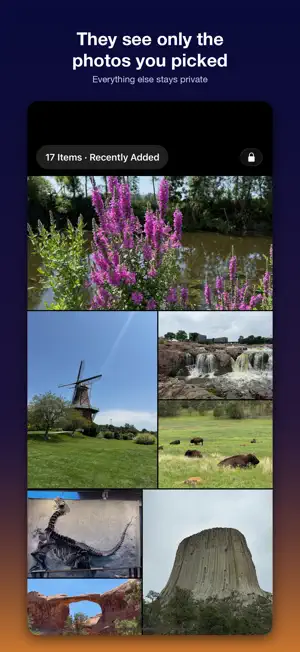
Hand someone your iPhone or iPad without handing over your whole camera roll. TakeALook turns an album, a date range, or a handful of photos into a protected viewing session. Your guest swipes through exactly what you chose, and nothing else. HOW IT WORKS 1. Pick an album, a date and time range, or just a few photos. 2. Review the selection and exclude anything you would rather not show. 3. Tap Hand It Over. 4. Pass the device across the table. 5. End the session using your chosen exit protection. FIND THE SET INSTEAD OF SCROLLING FOR IT Describe what you want to show. Speak or type "the waterfall last summer" or "photos from Arches", and TakeALook assembles the set and hands it to you to review before anyone else sees it. Siri can help prepare a selection for you too. On iOS 27, a Shortcuts action can also send selected photos straight into TakeALook. Spoken requests are transcribed by Apple's speech recognition; you can always type instead. Enhanced Search is a single switch. Turn it on and TakeALook builds a private index on this device: dates, places, media types, favorites, objects and scenes in small thumbnails, and camera and lens details. On iOS 27, it can also include captions and keywords you add in Photos. Your photos and your search index never leave this device. Turn on Remember Last Selection to return to your recent album and date filter. To keep a set of photos from your library, Save to Album adds it to a new or existing Photos album, in the order shown. WHAT YOUR GUEST CAN DO • Swipe through the photos and videos you selected • Pinch and double-tap to zoom • Play videos with simple controls • Watch a slideshow, sliding or fading between items • Press and hold to play Live Photos, and watch animated GIFs • See when and where a photo was taken, with its local time zone when available • Open an interactive map of that location WHAT YOUR GUEST CANNOT DO • Reach any photo outside your selection • Change the album or add to the session • Edit, delete, or share anything • Open Settings or any owner control without your passcode TWO LEVELS OF PROTECTION Quick Handoff hides everything outside your selection and requires a deliberate press-and-hold, or your passcode, to leave. Normal iOS gestures can still exit the app. Locked Handoff pairs the same viewer with Apple's Guided Access, which confines the device to TakeALook until you end it. TakeALook explains exactly how to set that up, and never claims to lock your device when Guided Access is not running. PRIVACY YOU CAN CHECK • No account and no sign-in • No ads, no analytics, no tracking, and no third-party SDKs • Your photos and videos never leave your device • Search runs here, on an index that stays on this device • Guests can't change your library. TakeALook never edits or deletes photos, and adds to an album only when you choose Save to Album • With location display on, photo coordinates go to Apple Maps for place names, time zones, and maps. You can turn it off entirely. FREE AND PAID Free covers your Recently Added photos, any handful of photos you pick yourself, and the Show in TakeALook share extension — with the complete viewing experience: zoom, video, Live Photos, GIFs, slideshows, dates, places, maps, Guided Access support, and every protection. The one-time upgrade unlocks every other album and collection, including shared albums, date and time range sessions, and finding photos by describing them. One payment, no subscription, Family Sharing included. BUILT FOR IPHONE AND IPAD Full layouts in both orientations, Dynamic Type, VoiceOver, Reduce Motion support, and generous touch targets throughout. On iPhone Duo, show a page on each side like a book, keep the photo on the standing half in tabletop, or stand it as a tent facing your guest. TakeALook is a handoff viewer. It is not a vault, a cloud service, or a replacement for the Photos app.
What’s new
Version 2.0 · Updated October 21, 2026
TakeALook 2.0 adds a slideshow, Save to Album, and support for iPhone Duo. Here is everything new since 1.1. SLIDESHOW Tap play in the viewer to show items one after another. Choose how long each item stays, from 3 seconds to 5 minutes, and whether items slide or fade into the next. Turn on Start Automatically to open a handoff with the slideshow already playing. A swipe pauses it. IPHONE DUO Open it like a book and each side shows its own page; Sync Pages turns both pages together. In tabletop, the photo stays on the standing half with controls, info, and the map on the flat half. In tent mode, turn on Start in Tent Mode and the slideshow starts by itself. SAVE TO ALBUM From Hand It Over, save the selection to a new or existing Photos album, in the order shown. Only photos already in your library can be saved; photos shared in with Show in TakeALook can't, and the app explains why. TakeALook never edits or deletes photos. IN THE HANDOFF • Press and hold to play Live Photos; animated GIFs play too. • Capture times use the photo's local time zone, with the zone and GMT offset. • A blurred backdrop fills the space around photos and videos. • Pinch zoom follows your fingers, and a zoomed photo zooms out before a pinch returns to the overview. • When a handoff ends, TakeALook returns to Hand It Over. SETUP AND SETTINGS • Remember Last Selection brings back your last album and date filter. • Enhanced Search is now a single switch and builds its index faster. • Home shows the exit passcode status next to Guided Access, and Settings puts protection first. ON iOS 27 Search can use captions and keywords from Photos, a Shortcuts action sends selected photos to TakeALook, and Siri can help set up Guided Access automation. TakeALook still supports iOS 26.
App privacy
The developer, Torn Metal LLC, reported these privacy practices to Apple.
Data Not Collected
The developer does not collect any data from this app.
Alternatives to TakeALook: Safe Photo Handoff
Looking for apps like TakeALook: Safe Photo Handoff? Here are 6 similar apps on the App Store. The highest rated is XPlayer2: XREAL 3D Player (5.0/5), and all 6 are free to download.
-
 Strata: Shared Photo Albums
-
 Revivo - AI Photo Restoration
-
 Scanomy - 3D Product Explainer
2.0
Scanomy - 3D Product Explainer
2.0
-
 Peek-a-View
4.6
Peek-a-View
4.6
-
 XPlayer2: XREAL 3D Player
5.0
XPlayer2: XREAL 3D Player
5.0
-
 Zee Cast: Stream Media to TV
4.4
Zee Cast: Stream Media to TV
4.4
| App | Rating | Price | Last updated | Compare |
|---|---|---|---|---|
| TakeALook: Safe Photo Handoff | 5.0 / 5 (3 ratings) | Free | October 21, 2026 | |
| Strata: Shared Photo Albums | – | Free | Oct 8, 2026 | Compare |
| Revivo - AI Photo Restoration | – | Free | Sep 18, 2026 | Compare |
| Scanomy - 3D Product Explainer | 2.0 / 5 (1) | Free | Mar 14, 2026 | Compare |
| Peek-a-View | 4.6 / 5 (298) | Free | May 6, 2025 | Compare |
| XPlayer2: XREAL 3D Player | 5.0 / 5 (3) | Free | Oct 2, 2026 | Compare |
| Zee Cast: Stream Media to TV | 4.4 / 5 (7) | Free | Oct 22, 2026 | Compare |