

Zee Cast: Stream Media to TV
Eslam Hamouda Photo & Video iPhoneiPadiPod touch
Zee Cast: Stream Media to TV is a free Photo & Video app for iPhone and iPad by Eslam Hamouda. Rated 4.4/5 from 7 ratings. Requires iOS 17.6.
- Rating
- 4.4
- 7 ratings
- Price
- Free
- on the App Store
- Size
- 3 MB
- Age 4+
- Updated
- Oct 26
- 2026 · v2.16.1
Screenshots
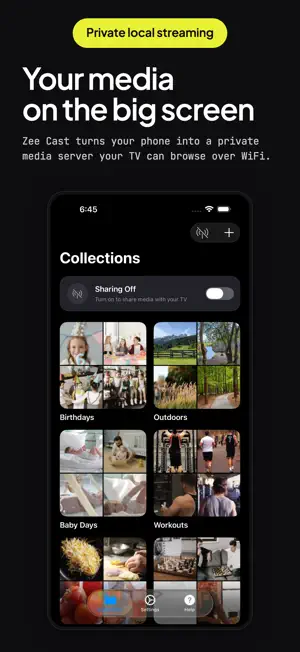


About Zee Cast: Stream Media to TV
Stream your phone's photos and videos to your TV privately, over your home WiFi. No cloud. No uploads. Nothing leaves your network. Zee Cast turns your iPhone into a private media server. Add photos and videos to a collection, turn on sharing, and your smart TV can browse and play them instantly. No extra app needed on your TV. PRIVATE BY DESIGN Your media streams directly from your phone to your TV over WiFi. Nothing is uploaded to any server or cloud service. No account required. No data collection. WORKS WITH YOUR TV Zee Cast uses DLNA/UPnP, a standard built into most smart TVs. Compatible with: - Samsung Smart TVs - LG Smart TVs - VLC on iPad - Any DLNA-compatible media player HOW IT WORKS 1. Add photos and videos to a collection 2. Turn on sharing 3. On your TV, open the media player and find "Zee Cast" 4. Browse and play your media on the big screen FEATURES - Stream photos and videos to any DLNA-compatible TV - Create multiple collections to organize your media - Full video streaming with seeking support - Works over WiFi, no internet required - Background streaming, switch apps while your TV plays - No transcoding, serves your original quality files ZEE CAST PRO One-time purchase, shared with your family through Family Sharing. Unlock: - Custom display name and icon - Auto start on app launch - Custom port - Device approval, control which devices can access your media NO ADS. NO ALGORITHMS. NO UPLOADS. You decide what plays on your screen. Not a recommendation engine. Not an algorithm. You. Perfect for watching family videos, school content, and personal photos on the big screen without uploading anything to the cloud. Works without WiFi too, use your iPhone's Personal Hotspot and connect your TV to it. Great for travel, hotels, or anywhere without WiFi.
Ratings & reviews
4.4
7 ratings
What’s new
Version 2.16.1 · Updated October 26, 2026
- Optimized onboarding experience for returning Pro users: automatically detects active Pro edition and celebrates existing supporters. - Refined onboarding copy to highlight instant TV streaming, privacy, and phone multitasking without negative phrasing. - Fixed onboarding flow navigation and improved UI button clearance.
App privacy
The developer, Eslam Hamouda, reported these privacy practices to Apple.
Data Not Collected
The developer does not collect any data from this app.
Alternatives to Zee Cast: Stream Media to TV
Looking for apps like Zee Cast: Stream Media to TV? Here are 6 similar apps on the App Store. The highest rated is AmberTime: USB Photo Backup (5.0/5), and all 6 are free to download.
-
 Squeeze - Video Compressor
4.8
Squeeze - Video Compressor
4.8
-
 Watermelon Backup
4.5
Watermelon Backup
4.5
-
 AmberTime: USB Photo Backup
5.0
AmberTime: USB Photo Backup
5.0
-
 Modipix: Film Lab & 3D LUT
4.6
Modipix: Film Lab & 3D LUT
4.6
-
 Retro Cam Neo - Vintage Camera
3.4
Retro Cam Neo - Vintage Camera
3.4
-
 Auto Photo: Clap Camera Timer
4.8
Auto Photo: Clap Camera Timer
4.8
| App | Rating | Price | Last updated | Compare |
|---|---|---|---|---|
| Zee Cast: Stream Media to TV | 4.4 / 5 (7 ratings) | Free | October 26, 2026 | |
| Squeeze - Video Compressor | 4.8 / 5 (35) | Free | Aug 15, 2026 | Compare |
| Watermelon Backup | 4.5 / 5 (13) | Free | Oct 19, 2026 | Compare |
| AmberTime: USB Photo Backup | 5.0 / 5 (13) | Free | Oct 15, 2026 | Compare |
| Modipix: Film Lab & 3D LUT | 4.6 / 5 (14) | Free | Oct 21, 2026 | Compare |
| Retro Cam Neo - Vintage Camera | 3.4 / 5 (15) | Free | Sep 11, 2026 | Compare |
| Auto Photo: Clap Camera Timer | 4.8 / 5 (4) | Free | Oct 8, 2026 | Compare |