
The Pillar Bible Study
thefrenchpressedone LLC Reference iPhoneiPadiPod touch
The Pillar Bible Study is a free Reference app for iPhone and iPad by thefrenchpressedone LLC. Rated 5.0/5 from 5 ratings. Requires iOS 18.0.
- Rating
- 5.0
- 5 ratings
- Price
- Free
- on the App Store
- Size
- 199 MB
- Age 4+
- Updated
- Oct 11
- 2026 · v1.6
Screenshots
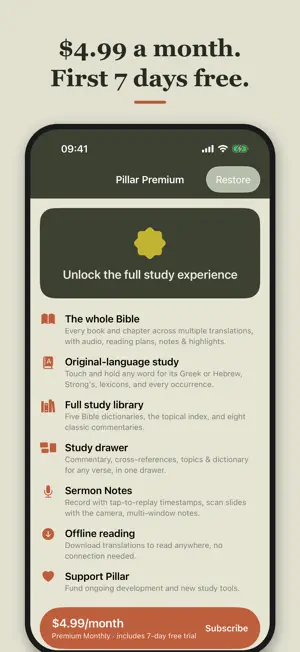
About The Pillar Bible Study
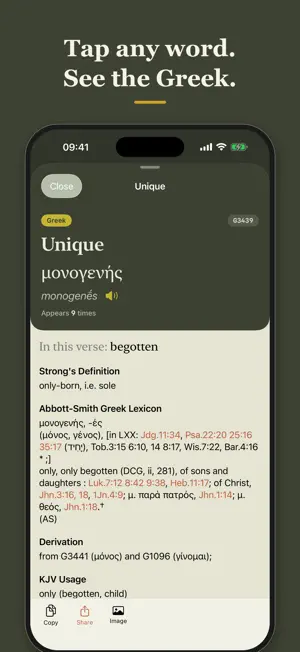
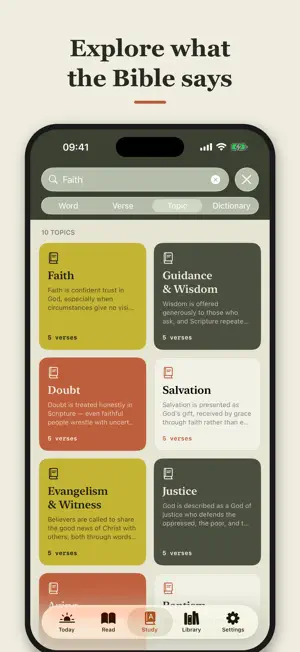
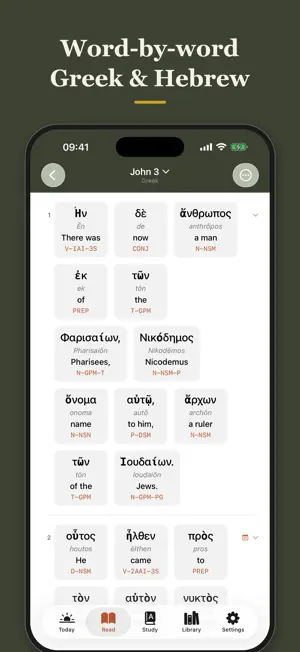
The Pillar is a Bible study app for those longing to understand the Word more clearly, and to read it with more confidence — the original languages, commentary, and reference material gathered around the text instead of scattered across a shelf. Pillar Premium unlocks the whole app: $4.99/month or $39.99/year, with a 7-day free trial. TRANSLATIONS Read the New King James Version, King James Version, New Living Translation, NASB 2020, Christian Standard Bible and The Message — alongside the American Standard Version, Berean Standard Bible, World English Bible, Geneva 1599, Douay-Rheims, Darby and Young's Literal. In Spanish, the Reina-Valera 1909, Palabra de Dios para Ti and Nueva Biblia Viva; in Arabic, the Van Dyck. Compare any two side by side in Parallel View. THE ORIGINAL LANGUAGES Tap a word to see the Greek or Hebrew behind it, its Strong's number, a full lexicon entry from Abbott-Smith or Brown-Driver-Briggs, and every other place that word appears in Scripture. Interlinear reading shows the original text word by word, with grammatical parsing in plain English. WRITE IN IT — iPad AND APPLE PENCIL Bring back the margins. On iPad, an Apple Pencil writes anywhere on the page — beside a verse, across a phrase, down the edge of the column — and every stroke stays anchored to the verse it belongs to rather than to a spot on the screen. Change the type size, come back a year later: your notes are still beside the verse you wrote them about. Your finger still scrolls and still selects; there is no mode to enter. Notes in the margin travel with the verse into every translation; notes written over the words stay in the translation and orientation you wrote them in, the way they would on a printed page. A STUDY LIBRARY AROUND THE VERSE Eight classic commentaries, five Bible dictionaries, Nave's and Torrey's topical indexes, and cross-references — every one reachable from the verse you are reading. The dictionaries and topical indexes need no connection. MAPS Tap a place name in the text and the map opens on it. Every chapter has one — the places named there, numbered in the order Scripture names them. The Atlas lists more than 1,200 places alphabetically. Where a location is uncertain, the map shows it as uncertain rather than guessing. Maps work with no connection at all. AUDIO Listen to any chapter of the Berean Standard Bible read aloud by a human narrator, with lock-screen controls and a choice of three readers. YOUR OWN WORK Notes typed or handwritten with Apple Pencil, anchored to the verse they belong to and linkable to each other. Highlights in colors you name yourself. Reading plans with daily reminders and a streak that tracks your reading. Sermon notes with tap-to-replay timestamps and camera text capture. Everything exports as Markdown, and everything stays yours, on your device and in your own iCloud. OFFLINE The complete King James Version ships inside the app, and every chapter you read is saved as you go — so Pillar keeps working with no connection at all. A note on what needs a connection: the New King James Version, NASB 2020, New Living Translation, Christian Standard Bible and The Message are shown live and never stored on your device, as their licenses require. Commentaries and cross-references are fetched as you read them. Audio is the Berean Standard Bible only. SUBSCRIPTION DETAILS Pillar Premium — monthly ($4.99) or annual ($39.99), each with a 7-day free trial. Payment is charged to your Apple Account at confirmation of purchase. The subscription renews automatically unless it is cancelled at least 24 hours before the end of the current period, and your account is charged for renewal within 24 hours before the period ends. You can manage or cancel your subscription in your Apple Account settings after purchase. Terms of Use (EULA): https://www.apple.com/legal/internet-services/itunes/dev/stdeula/ Privacy Policy: https://www.thepillarapp.com/privacy
Ratings & reviews
5.0
5 ratings
What’s new
Version 1.6 · Updated October 11, 2026
• The welcome now ends with a look inside the study drawer: tap the verse number on John 1:1 and see the commentary, cross-references and Greek for that verse before you decide anything. • On iPad, turning to the next chapter opens it at the top, not at the depth you left the last one. • Margin notes written down the side of a chapter now show a pencil marker on every verse they run beside, and tapping a marker shows the lines beside that verse. Before, a long note put one marker on its first verse. • Fixed: handwriting could be lost when a verse from "Explore in Scripture" or a cross-reference opened the chapter you were already writing in. Both pages now keep every stroke. • A safeguard now refuses any save that would remove most of a chapter's handwriting without the eraser, and puts back what was already saved. • Settings has a Handwriting Log, a short record of what the app did with your Pencil notes, with nothing you wrote in it. If notes ever go missing, send it to [email protected].
App privacy
The developer, thefrenchpressedone LLC, reported these privacy practices to Apple.
Data Not Collected
The developer does not collect any data from this app.
Alternatives to The Pillar Bible Study
Looking for apps like The Pillar Bible Study? Here are 6 similar apps on the App Store. The highest rated is BibleScribe (5.0/5), and all 6 are free to download.
-
 gramma Bible
-
 Selah: Prayer Journal & Bible
-
 KJV Word Study
-
 KalamosBible
-
 BibleScribe
5.0
BibleScribe
5.0
-
 BibleGraph
5.0
BibleGraph
5.0
| App | Rating | Price | Last updated | Compare |
|---|---|---|---|---|
| The Pillar Bible Study | 5.0 / 5 (5 ratings) | Free | October 11, 2026 | |
| gramma Bible | – | Free | Oct 5, 2026 | Compare |
| Selah: Prayer Journal & Bible | – | Free | Oct 9, 2026 | Compare |
| KJV Word Study | – | Free | Oct 3, 2026 | Compare |
| KalamosBible | – | Free | Jul 23, 2026 | Compare |
| BibleScribe | 5.0 / 5 (1) | Free | Oct 5, 2026 | Compare |
| BibleGraph | 5.0 / 5 (1) | Free | Aug 20, 2026 | Compare |