

gramma Bible
Stephan Schmid-Eilber Education iPhoneiPadiPod touchMac
gramma Bible is a free Education app for iPhone and iPad by Stephan Schmid-Eilber. Requires iOS 15.0. Updated October 24, 2026.
- Price
- Free
- on the App Store
- Size
- 36 MB
- Age 4+
- Updated
- Oct 24
- 2026 · v1.1.6
Screenshots

About gramma Bible
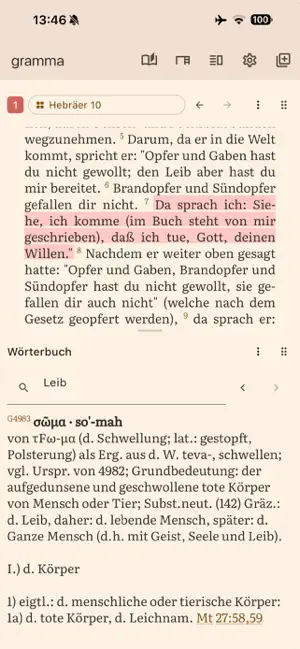
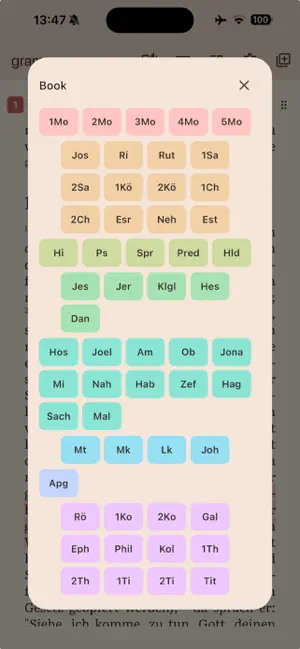
gramma sets Scripture the way fine books are set. Its typesetting engine builds on the line-breaking tradition of TeX: justified, hyphenated paragraphs at the text size and line length you choose — one column on the phone, more on tablet and desktop. READING • Endless scrolling through whole books, in columns on larger screens • Side-by-side views that follow each other: text beside text, commentary, or footnotes • Desks — saved workspace layouts for study, comparison, devotion • Careful typography: Gentium and Literata faces; text size, line length, column gap, spacing, and weight are yours to set STUDY • Imports standard SWORD modules (e.g. from CrossWire) and OSIS files: Bibles, commentaries, dictionaries, devotionals, and books — and reads PDF, EPUB, and ODT documents into the same library • Strong's numbers: tap a word for its lexicon entry, follow a number into a concordance built from tagged texts • Fast search with language-aware matching • Reading plans imported from simple JSON files YOUR NOTES, YOURS • Word-precise marks and notes, anchored to verses, with eight pens you define — hue, strength, wash or underline — or a note shown by a small icon alone • A notes overview across everything you have marked • Sync between your own devices as end-to-end-encrypted files in a folder you choose (your iCloud Drive, Dropbox, or any synced folder) — no gramma server, no account FREE AND OPEN • Completely free, no purchases, no ads, no analytics • Open source (MIT): github.com/sse1234/gramma • The app ships without Bible texts; you import the modules you have the right to use
What’s new
Version 1.1.6 · Updated October 24, 2026
Added - "p" opens the reading plan on the desktop. - Reference links in headings show in the number color, like the markers and verse numbers that open something too. Fixed - Footnotes views follow a jump at once: the text view reports the column it landed on, not the target it was sent to. - A jump to a verse whose chapter was not yet typeset landed on the chapter's first line; it now completes on the verse when the layout arrives (seen mostly on phones). - Multi-column views no longer leave a chapter heading at the foot of a column behind the reading position (ADR 0028, amended). - A footnote marker at the end of a line is no longer cut by the edge: its box carries the italic overhang. - PDF import: a footnote broken by a page turn continues on the next page instead of ending mid-word and spilling into the text. - Hiding or showing the chrome no longer moves the single-column reader by up to a page: the text keeps its pixel position. - Footnotes views letter notes exactly as the text's markers run: a note on a verse the translation omits (such as Acts 8:37) no longer shifts the letters of the notes after it; it shows its verse number instead.
App privacy
The developer, Stephan Schmid-Eilber, reported these privacy practices to Apple.
Data Not Collected
The developer does not collect any data from this app.
Alternatives to gramma Bible
Looking for apps like gramma Bible? Here are 6 similar apps on the App Store. The highest rated is Milta - The Word (5.0/5), and all 6 are free to download.
-
 Milta - The Word
5.0
Milta - The Word
5.0
-
 Selah: Prayer Journal & Bible
-
 Bless Up: Jamaican Bible Study
-
 My Bible Beacon
5.0
My Bible Beacon
5.0
-
 KJV Word Study
-
 AnyTorah
| App | Rating | Price | Last updated | Compare |
|---|---|---|---|---|
| gramma Bible | – | Free | October 24, 2026 | |
| Milta - The Word | 5.0 / 5 (1) | Free | Oct 25, 2026 | Compare |
| Selah: Prayer Journal & Bible | – | Free | Oct 9, 2026 | Compare |
| Bless Up: Jamaican Bible Study | – | Free | Oct 17, 2026 | Compare |
| My Bible Beacon | 5.0 / 5 (6) | Free | Oct 26, 2026 | Compare |
| KJV Word Study | – | Free | Oct 3, 2026 | Compare |
| AnyTorah | – | Free | Jul 21, 2026 | Compare |
Compare gramma Bible with the top alternatives: ratings, updates, ASO score and keyword gaps →