

Warranty Tracker: VaultKeeper
Ashok Kumar Productivity iPhoneiPadiPod touch
Warranty Tracker: VaultKeeper is a free Productivity app for iPhone and iPad by Ashok Kumar. Requires iOS 26.0. Updated August 21, 2026.
- Price
- Free
- on the App Store
- Size
- 10 MB
- Age 4+
- Updated
- Aug 21
- 2026 · v1.0.0
Screenshots



About Warranty Tracker: VaultKeeper
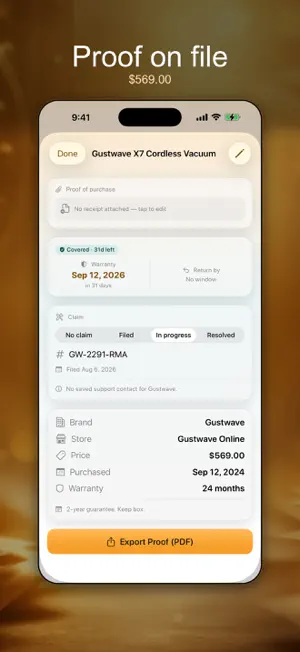
WarrantyVault keeps the receipt and the warranty for everything you buy, and warns you before a return window or a warranty runs out. You scan the receipt with the camera, confirm what it read, and the app counts down the coverage on that item until the day you need it. Something breaks fourteen months after you bought it. Was it one year of cover or two? Where is the receipt? It is in a drawer somewhere, or in an email you cannot find, and after forty minutes you give up and pay for the repair yourself. Return windows close quietly: thirty days go by while the box sits in the hall. And when you finally start a claim they ask for proof of purchase - store, date, price - and a faded thermal receipt is not proof of anything. WHAT YOU CAN DO Scan a receipt and have the item, store and total read on your device Check every field first - nothing is stored until you tap Save Keep the receipt image with the item Keep the receipt image with the item, ready when you claim See one timeline of everything you own, soonest deadline first Be warned before a warranty or return window closes - a month, a week, or right before Track a store plan or card purchase protection alongside the maker's Call the maker's support line straight from the item Record where a claim has got to, with its case or RMA number Search items, stores and notes for a serial number or anything See what your covered items are worth, by category Export a claim-ready PDF Start a receipt scan by asking Siri WHO IT'S FOR The dishwasher stopped and you do not know if it is still covered You buy a lot of electronics and the receipts pile up in a drawer You have thirty days to decide and you know you will forget You paid extra for a plan and cannot remember when it ends You buy tools that get used hard and want the dates in one place HOW IT WORKS 1. Scan the receipt, or add the item by hand. 2. Check what was read - item, store, price, date - and save it. 3. Set the warranty length and, if there is one, the return window. 4. WarrantyVault counts down and speaks up while you can still act. QUESTIONS PEOPLE ASK Does it read the receipt for me? Yes. Lay it flat in good light and WarrantyVault reads the item, store and total on your device, then asks you to confirm before saving. One-tap reading with Apple Intelligence arrives in a future update. What if the scan gets something wrong? You correct any field before you save, and you can edit an item at any time afterwards. Does it remind me about return windows as well as warranties? Yes, and separately. An item can carry both, and each gets its own countdown and its own warning. Can I track a plan I bought on top of the warranty? Yes. Add the provider and the extra length; the extended end date is tracked alongside the manufacturer one. How many items can I keep without paying? As many as you like. The vault is never capped. Can I produce something to send with a claim? Yes. Pro exports a PDF headed as proof of purchase, with the item, store, date and price. PRIVACY No account. Your receipts stay on your device. The camera is used only to read the receipt in front of you, the receipt photo is stored with the item, and nothing is uploaded. An export leaves only at the moment you choose to share it. Without Pro the app shows ads, personalized only if you allow tracking. PRO Unlimited items, receipt scanning, the timeline, expiry and return reminders and brand support lookup are included at no cost. Pro adds an AI re-read of the scan that suggests the warranty length, the claim-ready PDF export, mixed currencies in one vault, and the value breakdown by category with a ninety-day look ahead. Privacy Policy: https://dreamsgenius.com/apps/warrantyvault/privacy Support: https://dreamsgenius.com/apps/warrantyvault/support https://www.apple.com/legal/internet-services/itunes/dev/stdeula/
App privacy
The developer, Ashok Kumar, reported these privacy practices to Apple.
Data Used to Track You
The following data may be used to track you across apps and websites owned by other companies:
- Identifiers: Device ID
Data Linked to You
The following data, which may be collected and linked to your identity, may be used for the following purposes:
- Location: Coarse Location
- Identifiers: Device ID
- Usage Data: Product Interaction, Advertising Data
Used for: Third-Party Advertising, Developer’s Advertising or Marketing, Analytics
Data Not Linked to You
The following data, which may be collected but is not linked to your identity, may be used for the following purposes:
- Diagnostics: Performance Data, Other Diagnostic Data, Crash Data
Used for: Third-Party Advertising, Developer’s Advertising or Marketing, Analytics
Alternatives to Warranty Tracker: VaultKeeper
Looking for apps like Warranty Tracker: VaultKeeper? Here are 6 similar apps on the App Store. The highest rated is Scanner App: Scan to PDF, Edit (4.6/5), and all 6 are free to download.
-
 kept · Document Organizer
-
 Scanner App: Scan to PDF, Edit
4.6
-
 AI Transcribe - Meeting Notes
4.2
-
 Daytrip Driver
3.0
-
 DYMO® LabelManager® Connect
1.8
-
 Speech to Text & AI Note Taker
4.2
| App | Rating | Price | Last updated | Compare |
|---|---|---|---|---|
| Warranty Tracker: VaultKeeper | – | Free | August 21, 2026 | |
| kept · Document Organizer | – | Free | Sep 24, 2026 | Compare |
| Scanner App: Scan to PDF, Edit | 4.6 / 5 (21) | Free | Oct 22, 2026 | Compare |
| AI Transcribe - Meeting Notes | 4.2 / 5 (172) | Free | Oct 31, 2026 | Compare |
| Daytrip Driver | 3.0 / 5 (10) | Free | Nov 2, 2026 | Compare |
| DYMO® LabelManager® Connect | 1.8 / 5 (5) | Free | Jan 28, 2025 | Compare |
| Speech to Text & AI Note Taker | 4.2 / 5 (38) | Free | Nov 3, 2026 | Compare |