

Scanner App: Scan to PDF, Edit
090Bravo Hong Kong Limited Productivity iPhoneiPadiPod touch
Scanner App: Scan to PDF, Edit is a free Productivity app for iPhone and iPad by 090Bravo Hong Kong Limited. Rated 4.6/5 from 21 ratings. Requires iOS 16.0.
- Rating
- 4.6
- 21 ratings
- Price
- Free
- on the App Store
- Size
- 194 MB
- Age 17+
- Updated
- Oct 22
- 2026 · v1.0.7
Screenshots


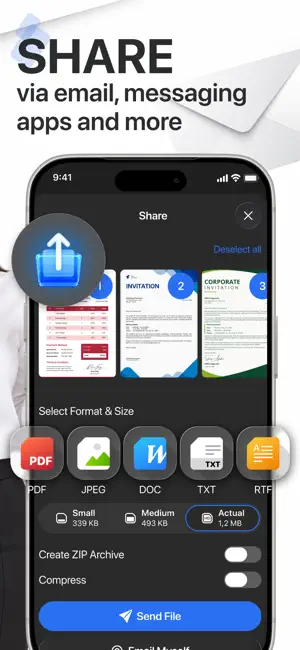

About Scanner App: Scan to PDF, Edit
Scanner App: Scan to PDF, Edit Turn your iPhone into a powerful PDF scanner with Scanner App, an all-in-one document scanning and PDF converter solution. Scan documents, receipts, invoices, IDs, contracts, notes, and paperwork anywhere. Convert scans into clear, high-quality PDFs in seconds. Whether you're a student, professional, business owner, or remote worker, scan documents, convert images to PDF, edit files, and organize paperwork on your phone. A camera scanner, image-to-PDF converter, PDF editing tools, and electronic signatures help you scan, convert, organize, and share files. POWERFUL PDF SCANNER FEATURES – PDF Scanner – Scan Documents: Scan receipts, bills, invoices, IDs, contracts, letters, and notes with your iPhone camera. Save as PDF or JPEG. – Image to PDF Converter: Convert photos, screenshots, and gallery images to PDF. Combine several images into one document. – Sign PDF – Electronic Signature: Sign contracts, forms, and agreements directly on your phone without printing. – PDF Editor & Annotation Tools: Highlight information, add notes, and annotate documents. – Multi-Page Document Scanner: Scan and merge multiple pages into a single PDF. – High-Quality PDF Scanning: Choose color, grayscale, or black-and-white output. – Fast Camera Scanner: Digitize paper documents in seconds. – PDF File Organizer: Keep receipts, contracts, records, and other files easy to find. SCAN AND CONVERT ALL TYPES OF DOCUMENTS – Receipts, invoices, and bills – ID cards and personal documents – Contracts, agreements, and business forms – Letters, reports, and official paperwork – Books, articles, and printed pages – Assignments, notes, and worksheets – Business cards and office documents – Photos, screenshots, and images MORE SMART TOOLS & UTILITIES – AR Ruler: Measure objects and distances with augmented reality. – Object Counter: Count multiple objects in real time with your camera. – ID Photo Maker: Create ID photos for passports, visas, and more; check local requirements. – Math & Science Solver: Scan handwritten or printed equations for solutions. – Invoice Creator: Create professional invoices on the go. – Tax Form Filler: Fill out and export tax documents. – Text Extractor (OCR): Extract editable text from photos and scans. – E-Sign Documents: Digitally sign contracts and official documents. – PDF Converter: Convert PDFs to and from Word, Excel, PowerPoint, images, and other formats in the app. YOUR ALL-IN-ONE PDF SCANNER APP Scanner App combines a document scanner, PDF converter, image-to-PDF tool, PDF editor, and electronic signatures in one easy-to-use app. Scan a receipt, convert a photo, sign a contract, or organize business documents wherever you are. Download Scanner App and simplify your digital paperwork. Upgrade to Premium to unlock unlimited conversions You can choose: – Yearly Subscription – Weekly Subscription – Weekly with 3-day free trial – Payment will be charged to iTunes Account at confirmation of purchase (after free trial period if offered). – Subscription automatically renews unless auto-renew is turned off at least 24-hours before the end of the current period. – Account will be charged for renewal within 24-hours prior to the end of the current period, and identify the cost of the renewal. – Subscriptions may be managed by the user and auto-renewal may be turned off by going to the user’s Account Settings after purchase. – Any unused portion of a free trial period, if offered, will be forfeited when the user purchases a subscription to that publication, where applicable. Download Scanner App: Scan to PDF, Edit now! Privacy Policy: https://sites.google.com/view/pdf-converter-file-to-pdf/privacy-policy Terms of Service: https://www.apple.com/legal/internet-services/itunes/dev/stdeula/ Support: https://sites.google.com/view/pdf-converter-file-to-pdf/support
Ratings & reviews
4.6
21 ratings
What’s new
Version 1.0.7 · Updated October 22, 2026
Bug fixes and performance improvements for a smoother scanning experience. Thank you for using Scanner App!
App privacy
The developer, 090Bravo Hong Kong Limited, reported these privacy practices to Apple.
Data Used to Track You
The following data may be used to track you across apps and websites owned by other companies:
- Other Data: Other Data Types
Data Not Linked to You
The following data, which may be collected but is not linked to your identity, may be used for the following purposes:
- Other Data: Other Data Types
Used for: Other Purposes
Alternatives to Scanner App: Scan to PDF, Edit
Looking for apps like Scanner App: Scan to PDF, Edit? Here are 6 similar apps on the App Store. The highest rated is PDF Converter – Convert PDF (5.0/5), and all 6 are free to download.
-
 PDF Converter.ㅤ
1.0
-
 Photo to PDF Converter - Pic2P
4.8
-
 PDF Converter – Convert PDF
5.0
-
 PDF to Word Converter - Docx
4.5
-
 PDF View-Picture Create
5.0
-
 Word to PDF Converter: PDF Pro
4.7
| App | Rating | Price | Last updated | Compare |
|---|---|---|---|---|
| Scanner App: Scan to PDF, Edit | 4.6 / 5 (21 ratings) | Free | October 22, 2026 | |
| PDF Converter.ㅤ | 1.0 / 5 (1) | Free | Jul 30, 2026 | Compare |
| Photo to PDF Converter - Pic2P | 4.8 / 5 (18) | Free | May 1, 2026 | Compare |
| PDF Converter – Convert PDF | 5.0 / 5 (1) | Free | Jan 7, 2026 | Compare |
| PDF to Word Converter - Docx | 4.5 / 5 (318) | Free | Nov 11, 2026 | Compare |
| PDF View-Picture Create | 5.0 / 5 (3) | Free | Nov 6, 2026 | Compare |
| Word to PDF Converter: PDF Pro | 4.7 / 5 (38) | Free | Aug 31, 2026 | Compare |