

Symptom Tracker: SymptomDiary
Ashok Kumar Medical iPhoneiPadiPod touch
Symptom Tracker: SymptomDiary is a free Medical app for iPhone and iPad by Ashok Kumar. Requires iOS 26.0. Updated September 2, 2026.
- Price
- Free
- on the App Store
- Size
- 10 MB
- Age 12+
- Updated
- Sep 2
- 2026 · v1.0.0
Screenshots


About Symptom Tracker: SymptomDiary
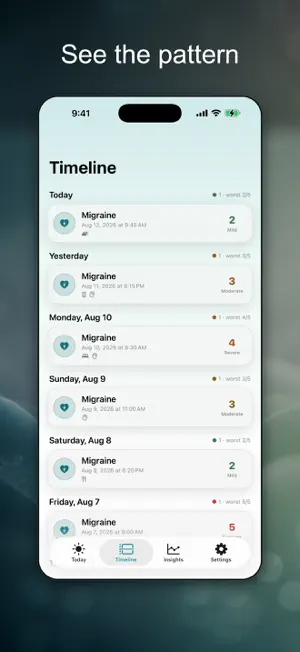
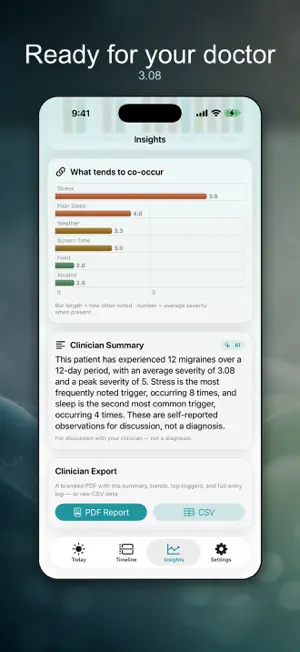
SymptomDiary is a symptom tracking journal for people living with migraine, IBS, eczema, joint pain, fatigue and other conditions that come and go. You record how bad a symptom is and what may have set it off, and the app turns months of entries into a clear summary you can read to your clinician. Appointments are short. You get ten minutes to describe six weeks you can barely remember, and the question you can never answer is how often, how bad, and what was going on beforehand. Sleep, stress, weather, a particular food - you suspect something, but a suspicion is not a record. And the paper notebook stops getting filled in, because mid-flare, writing a paragraph is the last thing you can do. WHAT YOU CAN DO Log a symptom in seconds - just tap how bad it is Tag triggers: sleep, stress, weather, food, alcohol, exercise, hormones Note what you tried - a medication, an ice pack, rest Attach a photo of a rash or swelling Watch 14 days of severity build into a chart, with flares picked out Read a plain-language summary to say aloud or paste into a portal Take a PDF report to the appointment, or export a spreadsheet Build your own symptom types, or start from a common one Turn on one gentle daily reminder, and log from the widget or Siri Read recent sleep from Apple Health, if you allow it WHO IT'S FOR Your neurologist keeps asking how many migraine days a month You are working out which foods set off your IBS Your eczema flares and you want a photo record of it Chronic joint pain or fatigue, and appointments start from nothing You began a treatment and want to see if the bad days got fewer HOW IT WORKS 1. Create a symptom type - Migraine, IBS flare, Joint pain. 2. When it happens, tap how bad it is and tag what you noticed. 3. Trends, triggers and flares build themselves as entries add up. 4. Before the appointment, generate the summary and take it. QUESTIONS PEOPLE ASK Will this tell me what is wrong with me? No. SymptomDiary is for tracking your symptoms, not for diagnosis. It shows what you logged and what tends to appear alongside it, and labels a correlation as a correlation, never a cause. Always consult a qualified clinician. Do I need an account? No. There is no sign-up and no server holding your health log. Does it need Apple Intelligence? No. Where the built-in AI is available it writes your summary in plain sentences. Where it is not, the app computes one instead, and the charts and exports work the same. Can I give this to my doctor? Yes. A summary, your trends, your most-noted triggers and the full entry log, as a report you can print or send. What does it read from Apple Health? Recent sleep, and only if you turn it on. Read-only and optional. Can I track more than one condition? Every symptom type is free and unlimited. PRIVACY Your health log stays on your device. There is no account and nothing is uploaded; photos are saved with the entry. The Apple Health connection is optional, read-only and limited to recent sleep. Without Pro the app shows ads, personalized only if you allow tracking; logging is never behind an ad or a purchase. PRO Logging, the 14-day severity chart, trigger tagging and the spreadsheet export are included at no cost. Pro unlocks the clinician summary, the branded PDF report, the 12-week rollup with a day-of-week and time-of-day heatmap, the before-and-after comparison for a treatment you logged, and your full flare history. It is sold as a lifetime unlock or a subscription and removes ads. SymptomDiary is for tracking your symptoms, not for diagnosis. Always consult a qualified clinician about your health. Privacy Policy: https://dreamsgenius.com/apps/symptomdiary/privacy Support: https://dreamsgenius.com/apps/symptomdiary/support https://www.apple.com/legal/internet-services/itunes/dev/stdeula/
App privacy
The developer, Ashok Kumar, reported these privacy practices to Apple.
Data Used to Track You
The following data may be used to track you across apps and websites owned by other companies:
- Identifiers: Device ID
Data Linked to You
The following data, which may be collected and linked to your identity, may be used for the following purposes:
- Location: Coarse Location
- Identifiers: Device ID
- Usage Data: Product Interaction, Advertising Data
Used for: Third-Party Advertising, Developer’s Advertising or Marketing, Analytics
Data Not Linked to You
The following data, which may be collected but is not linked to your identity, may be used for the following purposes:
- Diagnostics: Performance Data, Other Diagnostic Data, Crash Data
Used for: Third-Party Advertising, Developer’s Advertising or Marketing, Analytics
Alternatives to Symptom Tracker: SymptomDiary
Looking for apps like Symptom Tracker: SymptomDiary? Here are 6 similar apps on the App Store.
-
 FindAir Viewer
-
 Click Pain: Symptom Tracker
-
 Migraine Log - Pain Tracker
-
 MIgraine Companion
-
 Symptom Tracker: Flare Diary
-
 MyPersonalDiet
| App | Rating | Price | Last updated | Compare |
|---|---|---|---|---|
| Symptom Tracker: SymptomDiary | – | Free | September 2, 2026 | |
| FindAir Viewer | – | Free | Jul 22, 2026 | Compare |
| Click Pain: Symptom Tracker | – | Free | Sep 4, 2026 | Compare |
| Migraine Log - Pain Tracker | – | Free | Jun 12, 2026 | Compare |
| MIgraine Companion | – | Free | Oct 18, 2026 | Compare |
| Symptom Tracker: Flare Diary | – | Free | Sep 8, 2026 | Compare |
| MyPersonalDiet | – | Free | Dec 9, 2025 | Compare |