

nuVPN — Private & Secure
NU - V.P.N LTD Utilities iPhoneiPadiPod touchMac
nuVPN — Private & Secure is a free Utilities app for iPhone and iPad by NU - V.P.N LTD. Requires iOS 15.0. Updated October 14, 2026.
- Price
- Free
- on the App Store
- Size
- 63 MB
- Age 17+
- Updated
- Oct 14
- 2026 · v0.1.10
Screenshots

About nuVPN — Private & Secure
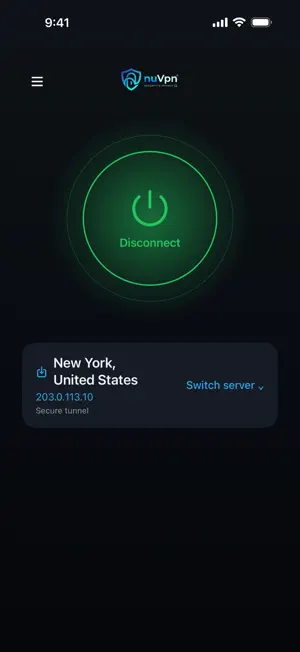
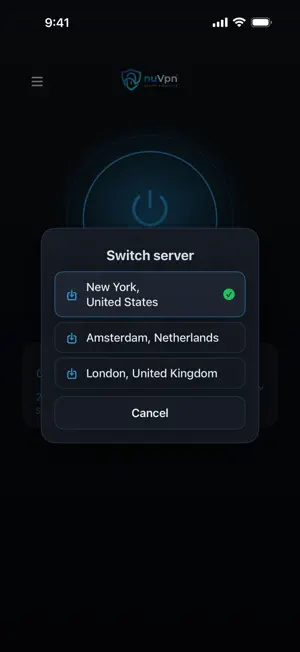
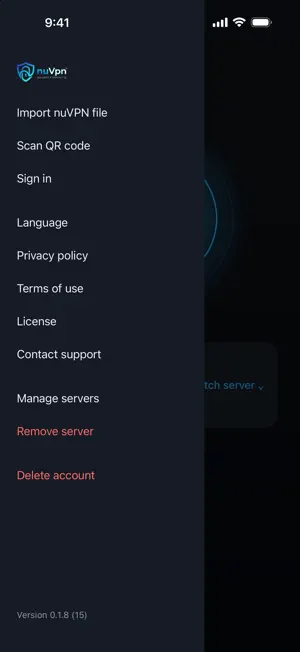
nuVPN keeps your connection private and protects your data. Designed to be lightweight and simple: open the app, choose a server and connect with one tap. WHY nuVPN - No-logs by design: we don't track your online activity. - Optional Kill Switch: when enabled, it blocks traffic if the tunnel disconnects, until the connection is restored. - DNS leak protection: requests stay inside the encrypted tunnel. - Connect with one tap and switch between your servers from the main screen. TWO WAYS TO ADD YOUR SERVERS - Sign in to an existing nuVPN account: your account's servers load automatically. - Without signing in: import the server file you received from nuVPN (.nuvpn) from the Files app, an email or the share menu, or use your camera to scan its QR code. Every nuVPN server file is digitally signed. The app only imports files issued by nuVPN. It rejects edited files and configuration files not issued by nuVPN. PRIVATE BY DEFAULT Strong, modern encryption protects your data on public Wi-Fi, at work or while traveling. No activity logs. LIGHTWEIGHT AND FOCUSED A VPN client, nothing more: no bloat, no ads, no tracking. Questions? Contact support from within the app.
What’s new
Version 0.1.10 · Updated October 14, 2026
Support for corporate networks with nuVPN Gateway: authenticate in the app using Face ID, Touch ID or a code, with a key stored on the device itself. Authentication is required only when the device has no valid authorization: on the first connection, after a manual disconnect or when the authentication period expires. It is not required when you open the app, when the connection drops or when you switch networks. You can also use your phone to approve sign-in to the gateway’s management console. Added a “Stay connected” setting. If the office gateway is unavailable or authorization is revoked, the VPN disconnects and internet access continues as usual. The kill switch is now an optional setting for each location and is off by default. If the kill switch is off and the VPN server stops responding, the connection closes and internet access continues. The connection status reflects the actual connection: “Waiting for network” or “Reconnecting”, and “Connected” only when the tunnel is active. A clear message appears when there is no internet connection. Brief switches between networks do not change the status.
App privacy
The developer, NU - V.P.N LTD, reported these privacy practices to Apple.
Data Linked to You
The following data, which may be collected and linked to your identity, may be used for the following purposes:
- Contact Info: Email Address
- Identifiers: User ID, Device ID
- Usage Data: Other Usage Data
Used for: App Functionality
Alternatives to nuVPN — Private & Secure
Looking for apps like nuVPN — Private & Secure? Here are 6 similar apps on the App Store. The highest rated is GustVPN (5.0/5), and all 6 are free to download.
-
 Rheonth Connect
1.5
Rheonth Connect
1.5
-
 Flux VPN: Smart Route
-
 GustVPN
5.0
GustVPN
5.0
-
 NvoVPN
-
 Thanos VPN | Private Internet
-
 Hub VPN: Fast & Secure VPN
| App | Rating | Price | Last updated | Compare |
|---|---|---|---|---|
| nuVPN — Private & Secure | – | Free | October 14, 2026 | |
| Rheonth Connect | 1.5 / 5 (2) | Free | Sep 28, 2026 | Compare |
| Flux VPN: Smart Route | – | Free | Oct 14, 2026 | Compare |
| GustVPN | 5.0 / 5 (2) | Free | Oct 13, 2026 | Compare |
| NvoVPN | – | Free | Oct 12, 2026 | Compare |
| Thanos VPN | Private Internet | – | Free | Sep 17, 2026 | Compare |
| Hub VPN: Fast & Secure VPN | – | Free | Sep 28, 2026 | Compare |