

OmniPiano
Fatoumata Tirera Education iPhoneiPadiPod touch
OmniPiano is a free Education app for iPhone and iPad by Fatoumata Tirera. Requires iOS 18.6. Updated October 19, 2026.
- Price
- Free
- on the App Store
- Size
- 85 MB
- Age 4+
- Updated
- Oct 19
- 2026 · v1.7
Screenshots



About OmniPiano
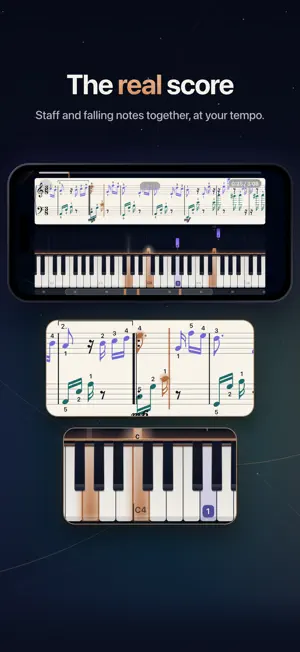
OmniPiano — the piano that guides you. Learn piano by playing: one full-screen stage brings together a cascade of notes, an 88-key keyboard and finger guidance. Complete courses, scores by the great composers, harmony analysis and a built-in composer — everything you need to progress, from your first chord to the great works. THE PLAY STAGE • Every exercise, piece and lesson happens on the same full-screen stage: note cascade, 88-key keyboard and a clean control bar. • Fingering appears right when you need it, with anticipation — you always know which finger to use, before you have to use it. • Wait mode: the score waits for the right note. Perfect for stress-free sight-reading, at your own pace. • On iPhone, the stage switches to landscape for a wider keyboard. THREE MODES FOR EVERY PIECE • Listen: the whole piece, to keep the music in your head. • Play: the score scrolls by while the app evaluates every note and each hand. • Understand: automatic harmony analysis splits the piece into segments and names every chord. Work chord by chord and earn medals for accuracy. THE A-B LOOP • Isolate any passage and practice it in a loop, in pieces as well as in your own compositions. • Looped runs are never recorded: your progress statistics stay honest. THE COMPOSER • Create your own pieces on the very stage you play on: a chord deck matched to your chosen scale and tonic, with three chord families a scroll away. • Place each chord with the placement column: pick a duration, add after or replace in place. • MIDI keyboard connected? Play your melody directly — recording never erases what is already there. THE LIBRARY • Shelves, composer portraits, search: find the great public-domain works in a single gesture. • Every piece has its own page: information, harmony analysis and settings in one place. COURSES AND PATHS • Complete courses in five languages: French, English, Spanish, Japanese and Arabic. • Three guided paths accompany your first steps right from the home screen. • Quizzes on the stage to anchor what you have just learned. YOUR MIDI KEYBOARD • Plug in any MIDI keyboard: the app listens to your playing, note by note, hand by hand. • Nine MIDI settings to adapt the app to your instrument. • No keyboard? The on-screen piano responds to touch. BUILT TO LAST • A refined visual identity, illustrated covers, full dark mode; play screens keep a night ambience designed for focus. • On iPhone, iPad and Mac, with a single purchase — no subscription. Plug in your keyboard, open a score, and play.
What’s new
Version 1.7 · Updated October 19, 2026
Fixes and improvements: • Music repertoire: several minor issues fixed. • Stability improvements and small fixes throughout the app. Thank you for using OmniPiano!
App privacy
The developer, Fatoumata Tirera, reported these privacy practices to Apple.
Data Not Collected
The developer does not collect any data from this app.
Alternatives to OmniPiano
Looking for apps like OmniPiano? Here are 6 similar apps on the App Store. The highest rated is Chessdock (5.0/5), and all 6 are free to download.
-
 Touche au but
-
 Chessdock
5.0
Chessdock
5.0
-
 Aphantasia
5.0
Aphantasia
5.0
-
 Paper Trained
-
 Klavia - Learn to Play Piano
-
 Keystrike: Piano Sight Reading
| App | Rating | Price | Last updated | Compare |
|---|---|---|---|---|
| OmniPiano | – | Free | October 19, 2026 | |
| Touche au but | – | Free | Sep 5, 2026 | Compare |
| Chessdock | 5.0 / 5 (1) | Free | Jul 15, 2026 | Compare |
| Aphantasia | 5.0 / 5 (1) | Free | May 30, 2026 | Compare |
| Paper Trained | – | Free | Apr 17, 2026 | Compare |
| Klavia - Learn to Play Piano | – | Free | Oct 19, 2026 | Compare |
| Keystrike: Piano Sight Reading | – | Free | Oct 10, 2026 | Compare |
Compare OmniPiano with the top alternatives: ratings, updates, ASO score and keyword gaps →