

LinkPal: Your Link Manager
容 杨 Utilities iPhoneiPadiPod touchMac
LinkPal: Your Link Manager is a free Utilities app for iPhone and iPad by 容 杨. Rated 5.0/5 from 1 ratings. Requires iOS 17.5. Updated October 20, 2026.
- Rating
- 5.0
- 1 ratings
- Price
- Free
- on the App Store
- Size
- 11 MB
- Age 4+
- Updated
- Oct 20
- 2026 · v1.3.0
Screenshots


About LinkPal: Your Link Manager
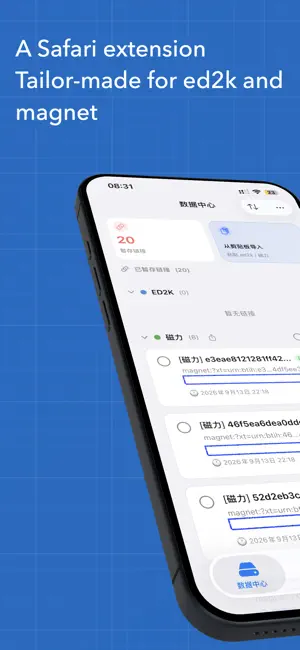
LinkPal is a link extractor and manager built for iPhone, iPad, and Mac. With the built-in Safari extension, one tap on any web page automatically detects and extracts ed2k and magnet links, stashing them in the App's data center for unified management. All data is stored locally on your device — no network required, no privacy trade-offs. One-Tap Extraction, Auto Detection The Safari extension scans the current page (including dynamically loaded content), intelligently recognizes ed2k / magnet links, and auto-dedupes and validates them — invalid links are filtered out, only usable resources remain. Copy and stash buttons appear right beside each detected link; the copy button gives instant visual feedback. Organized Management The data center keeps all stashed links in one place with at-a-glance statistics. · Groups: create, rename, delete, and reorder groups freely, file links into them, or auto-archive all ungrouped links by type in one tap. · Automation rules: automatically file newly stashed links into designated groups by domain or link text; rules can be reordered, disabled anytime, or applied to existing links in one tap. · Search & filters: find links by time, name, or size; source / time / size quick-filter chips stay pinned above the list — filter without searching, reset in one tap; groups without matches hide automatically while searching. · Batch actions: single / multi / select-all / invert selection, with batch copy, delete, move-to-group, and favorite. QRify — Web Page QR Codes Turn the current page into a QR code right in Safari, or generate one from manually entered URLs or text; customize foreground color, background color, size, and error-correction level — fully offline. Share with AirDrop Share selected links to nearby devices via AirDrop, or share an entire group at once; the recipient opens the file to preview and import, with duplicates and invalid links skipped automatically. Encrypted Backup — Your Data Stays Yours Encrypt your links, groups, and favorites into a backup file with your own password, and export it anytime; restore after reinstalling or switching devices with the same password. Decryption happens entirely on device. The password is verified locally only — keep it safe, a forgotten password cannot be recovered. Home Screen Widget & Shortcuts A home screen widget shows your stashed count and latest link; system Shortcuts and Siri let you stash a link to LinkPal with a single sentence. Seamless Across Devices Adaptive layouts for iPhone, iPad, and Mac: a three-column hub on iPad, dual-pane landscape on iPhone, and ⌘F to focus search on macOS — one consistent experience. Privacy Protection · All data stored offline; nothing is uploaded to any server. · Device lock: Face ID / Touch ID authentication required to open the App (iOS). · Privacy shield: content auto-hides when switching to the background. · Multiple built-in security protections keep on-device data safe. Clipboard Import Links copied from any source can be imported directly from the clipboard, using the exact same extraction, validation, and dedup logic as the extension. Languages 8 languages with the extension following along: Simplified Chinese, English, Japanese, Korean, Russian, Thai, Traditional Chinese (Taiwan), and Traditional Chinese (Hong Kong). Pricing Core features are free: stash up to 10 links and create up to 5 custom groups. Membership unlocks unlimited stashing, unlimited groups, privacy lock, and privacy protection: 7-day free trial, then monthly or yearly subscription, or a one-time lifetime purchase — cancel anytime. The QR code extension, Efficiency Pack (widget & Shortcuts), and Data Sovereignty Pack (encrypted backup & automation rules) can also be purchased separately; one-time purchases support Family Sharing. Optional tips are available and unlock nothing. Terms of Use: https://www.apple.com/legal/internet-services/itunes/dev/stdeula/
What’s new
Version 1.3.0 · Updated October 20, 2026
What's New in 1.3.0 【New Features】 · Added QRify, a web QR-code extension: generate a QR code for the current page's link with one tap in Safari, or enter a URL or text manually; customize foreground color, background color, size and error-correction level; works fully offline with no network access · Added an 'Invite to Rate' card in Settings that guides you to the App Store to rate LinkPal · Added batch automation rules: newly stashed links are automatically grouped by domain or by text in the link; rules can be reordered by dragging, turned off at any time, and applied to your existing ungrouped links in one tap. Automation rules can now be set per-rule whether they apply to one-tap stash: when off, the rule won't group new links from one-tap stash; importing and Apply to Ungrouped Links still apply it. · Added encrypted backup and export: your links, groups and favorites are encrypted into a backup file with a password of your choice, ready to export at any time and restore after a reinstall or on a new device; the password is verified on this device only, so keep it safe — if you forget it, the data cannot be recovered · Added the Data Sovereignty Pack: a one-time purchase that unlocks encrypted backup and batch automation rules — included automatically with any Pro subscription or lifetime purchase · Pro benefits updated: unlimited stashing, unlimited groups, App Lock and Privacy Shield, and "Your data stays yours — purchased rights never expire with a subscription"; the lifetime purchase unlocks the entire Pro suite, while the QR code extension, Efficiency Pack and Data Sovereignty Pack can each be bought separately; one-time purchases support Family Sharing · New quick filters: source, date, and size filter chips now stay at the top of the link list, so you can filter directly without searching and reset everything with one tap 【Improvements】 · The link-detection logic of the Safari extension and the App is further unified, so clipboard import and on-page extraction use the same criteria and deduplication rules for all link types · Streamlined the group header by removing the 'Move to Group' button · Improved app security performance · When searching or filtering links, groups without matching links are hidden automatically and every group with matches is expanded; clearing the search or filters restores your original collapsed groups · iPhone landscape two-column mode: the search field now has a button to dismiss it; pressing the Search key only dismisses the keyboard instead of making the whole field disappear; dismissing the field also clears the active filters, so the list never stays in an invisible filtered state · The “More” menu in the iPhone Data Center now includes “Import from Clipboard”, so ed2k / magnet links can be imported from the clipboard in one tap even while search is expanded · macOS: added the Command+F shortcut to focus the search field at any time, matching the iPad version · The sort menu now shows an icon next to each sort option on all platforms 【Bug Fixes】 · Fixed ed2k links copied from Safari's address bar or a page (which the browser auto-escapes, turning characters such as the pipe into percent-encoded form) being completely undetectable. Both the Safari extension and the App's clipboard import now recognize these links, and different forms are merged into one entry so they are not stored twice · Fixed an issue where the privacy shield covered the payment sheet while it was being presented; the shield no longer appears during payment, and everything works as usual after you cancel or complete the payment · Fixed the “Select All / Deselect All” button on iPad group headers still showing Chinese text in non-Chinese interface languages · Fixed the “Deselect All” button remaining tappable — and doing nothing — when no links are selected
App privacy
The developer, 容 杨, reported these privacy practices to Apple.
Data Not Collected
The developer does not collect any data from this app.
Alternatives to LinkPal: Your Link Manager
Looking for apps like LinkPal: Your Link Manager? Here are 6 similar apps on the App Store. The highest rated is Magnet Link Handler - Magnetar (5.0/5), and 5 of the 6 are free to download.
-
 Magnet Link Handler - Magnetar
5.0
-
 ClipDock: Videos to USB Drive
-
 Fetcha: Download Station
-
 RQmote
-
 马克一下
-
 WIMS: Where is My Sun?
| App | Rating | Price | Last updated | Compare |
|---|---|---|---|---|
| LinkPal: Your Link Manager | 5.0 / 5 (1 rating) | Free | October 20, 2026 | |
| Magnet Link Handler - Magnetar | 5.0 / 5 (10) | Free | Oct 10, 2026 | Compare |
| ClipDock: Videos to USB Drive | – | Free | Oct 22, 2026 | Compare |
| Fetcha: Download Station | – | Free | Sep 20, 2026 | Compare |
| RQmote | – | Free | Aug 26, 2026 | Compare |
| 马克一下 | – | 9.99 USD | Oct 23, 2026 | Compare |
| WIMS: Where is My Sun? | – | Free | Sep 11, 2026 | Compare |