

Fetcha: Download Station
AIDE(KR) Utilities iPhoneiPadiPod touch
Fetcha: Download Station is a free Utilities app for iPhone and iPad by AIDE(KR). Requires iOS 17.0. Updated September 20, 2026.
- Price
- Free
- on the App Store
- Size
- 1 MB
- Age 4+
- Updated
- Sep 20
- 2026 · v1.0.2
Screenshots


About Fetcha: Download Station
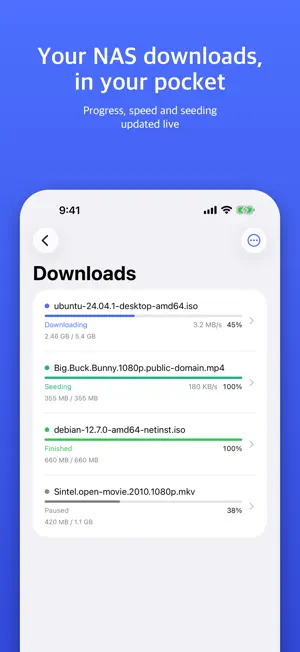
You find a magnet link on the train home. Instead of waiting to boot the PC, you tap it. The Synology NAS at home picks up the download right away. Nothing lands on the phone; the iPhone is only the remote. By the time you are through the door, the 4 GB ISO is done. Your NAS login stays in this device's Keychain and goes to your NAS and nowhere else. There is no Fetcha server. Watching progress is free, and the 7-day trial starts only when you press the button. ■ What it does · Tap a magnet link in Safari and it is added · Send from any app's share sheet · .torrent files and plain download URLs · Live progress, speed and seeding state · Pick only the files you want inside a torrent · Connect by QuickConnect ID, IP or domain (DSM 7, two-factor supported) ■ Who it is for · People who run Download Station on a Synology NAS · Anyone who queues downloads while out · Anyone tired of opening the DSM web UI on a phone I built it after one too many evenings of walking home just to switch on a PC. Watching every download is free. Adding magnets, torrents and URLs, and picking files, needs Fetcha Pro or the 7-day free trial. ■ Fetcha Pro (in-app purchase) · Fetcha Pro Monthly — auto-renewing subscription, 1 month · Fetcha Pro Yearly — auto-renewing subscription, 1 year · Fetcha Pro Lifetime — one-time purchase, no renewal Prices are shown in the App Store and on the in-app purchase screen. Payment is charged to your Apple ID account at confirmation of purchase. A subscription renews automatically unless auto-renew is turned off at least 24 hours before the end of the current period, and the renewal is charged within 24 hours before that period ends. Manage or cancel any time in Settings > Apple ID > Subscriptions. Terms of Use (EULA): https://www.apple.com/legal/internet-services/itunes/dev/stdeula/ Privacy Policy: https://ssacksru.github.io/fetcha/privacy Fetcha is an independent third-party app and is not affiliated with Synology Inc. Synology, Download Station and QuickConnect are trademarks of Synology Inc.
What’s new
Version 1.0.2 · Updated September 20, 2026
New screenshots and a rewritten description. The app itself is unchanged from 1.0.
App privacy
The developer, AIDE(KR), reported these privacy practices to Apple.
Data Not Collected
The developer does not collect any data from this app.
Alternatives to Fetcha: Download Station
Looking for apps like Fetcha: Download Station? Here are 6 similar apps on the App Store. The highest rated is M3U8 嗅探 (5.0/5), and all 6 are free to download.


| App | Rating | Price | Last updated | Compare |
|---|---|---|---|---|
| Fetcha: Download Station | – | Free | September 20, 2026 | |
| AndorQbit | – | Free | Oct 1, 2026 | Compare |
| RQmote | – | Free | Aug 26, 2026 | Compare |
| Seed Truck | – | Free | Oct 15, 2026 | Compare |
| DSContainer | – | Free | Aug 26, 2026 | Compare |
| M3U8 嗅探 | 5.0 / 5 (1) | Free | Oct 13, 2026 | Compare |
| tabbrowser: Ad Blocker Browser | 5.0 / 5 (3) | Free | Oct 14, 2026 | Compare |