

Glim: Lock Screen Vocabulary
dae seung kim Education iPhoneiPadiPod touch
Glim: Lock Screen Vocabulary is a free Education app for iPhone and iPad by dae seung kim. Requires iOS 17.0. Updated September 20, 2026.
- Price
- Free
- on the App Store
- Size
- 19 MB
- Age 4+
- Updated
- Sep 20
- 2026 · v1.2
Screenshots

About Glim: Lock Screen Vocabulary
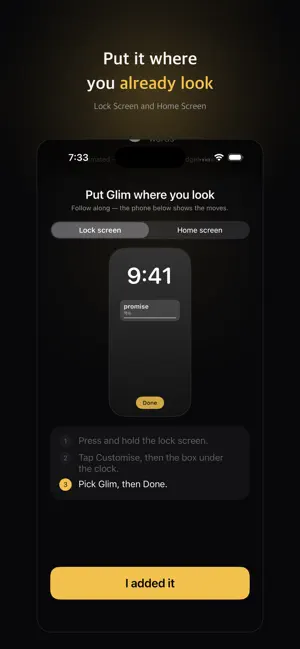
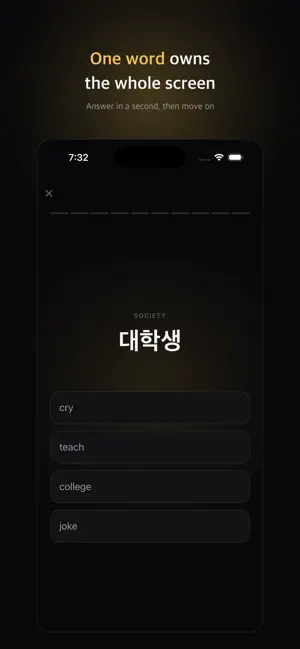
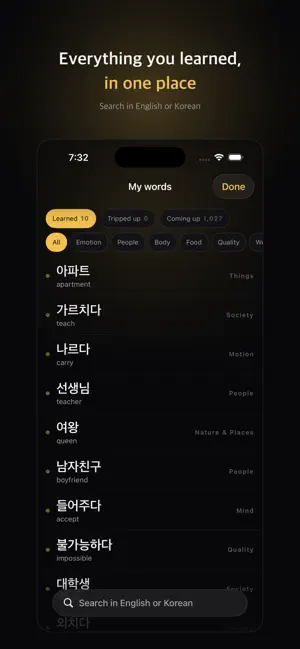
Learning that happens while you glance, not while you study. Glim puts one word on your Lock Screen and Home Screen. You check your phone dozens of times a day, and every one of those glances becomes a repetition. Learning continues on days you never open the app. ■ The widget is the product, not a feature The Lock Screen widget holds one word and one meaning. No progress bar, no streak, no app icon. Every pixel goes to the word — if it doesn't read in one second, the widget gets deleted. ■ Answer without opening the app Tap "Know" or "Not yet" right on the Home Screen widget. Your progress is recorded and the widget moves to the next word. The app never opens. ■ A different word each time you look The app precomputes a queue that the widget simply reads. No spinner on your Lock Screen, and it works with no network at all. ■ Your vocabulary map Twelve areas — emotion, food, work, nature and more — show what you already know in one screen. A one-minute test at the start fills the map in, so you never begin at zero. The empty tiles tell you what to do next. ■ A wrong answer becomes a sentence, not a penalty Glim takes the meaning you picked and writes the sentence it would actually produce, side by side with the real one. Sentences like "I ate a bank this morning" are hard to forget. ■ Feel Card momentum, a soft tap on a correct answer, and a tone that rises a semitone with every card in a row. You'll do this hundreds of times a day, so the feel of one swipe decides everything. Sound and haptics can be turned off completely. ■ Built on concepts, not language pairs A Korean learning English and an American learning Korean read the same data in opposite directions. Switching your target language doesn't erase what you've built. ■ Counted honestly iOS never tells an app whether a widget was actually seen. So Glim labels widget exposure as "brushed past (estimated)" rather than "viewed", and never weighs an estimate the same as real study. No account. Your progress stays on your device.
What’s new
Version 1.2 · Updated September 20, 2026
Fixed the Lock Screen word getting stuck. · If you didn't open the app for a few days, the widget froze on one word — it ran out of queued words and held on to the last one. The widget now keeps cycling on its own, even if you never open the app. · Tapping "I know it" on the widget sometimes hid a different word. Fixed. · Reviewed all 11,512 meanings and corrected 2,447 of them. "back" now shows 뒤 instead of 등, "right" shows 오른쪽 instead of 권리, "light" shows 빛 instead of 불. · Removed 143 entries that aren't worth memorizing, such as personal and place names. · Fixed Korean particles in the wrong-answer sentences.
App privacy
The developer, dae seung kim, reported these privacy practices to Apple.
Data Not Collected
The developer does not collect any data from this app.
Alternatives to Glim: Lock Screen Vocabulary
Looking for apps like Glim: Lock Screen Vocabulary? Here are 6 similar apps on the App Store. The highest rated is Lock Learn: Passive Learning! (5.0/5), and all 6 are free to download.
-
 LockVocab - Lock Screen Words
-
 Inkuntri
-
 Loro: Learn Languages Daily
-
 Lock Learn: Passive Learning!
5.0
Lock Learn: Passive Learning!
5.0
-
 Lexy: Word of the Day
5.0
Lexy: Word of the Day
5.0
-
 Voice Lingo: Speak & Learn
| App | Rating | Price | Last updated | Compare |
|---|---|---|---|---|
| Glim: Lock Screen Vocabulary | – | Free | September 20, 2026 | |
| LockVocab - Lock Screen Words | – | Free | Oct 2, 2026 | Compare |
| Inkuntri | – | Free | Sep 21, 2026 | Compare |
| Loro: Learn Languages Daily | – | Free | Aug 6, 2026 | Compare |
| Lock Learn: Passive Learning! | 5.0 / 5 (3) | Free | Jun 25, 2026 | Compare |
| Lexy: Word of the Day | 5.0 / 5 (1) | Free | Sep 29, 2026 | Compare |
| Voice Lingo: Speak & Learn | – | Free | Jul 12, 2026 | Compare |