

LockVocab - Lock Screen Words
Poyu Chiang Education iPhoneiPadiPod touch
LockVocab - Lock Screen Words is a free Education app for iPhone and iPad by Poyu Chiang. Requires iOS 17.0. Updated October 9, 2026.
- Price
- Free
- on the App Store
- Size
- 26 MB
- Age 4+
- Updated
- Oct 9
- 2026 · v1.9.4
Screenshots


About LockVocab - Lock Screen Words
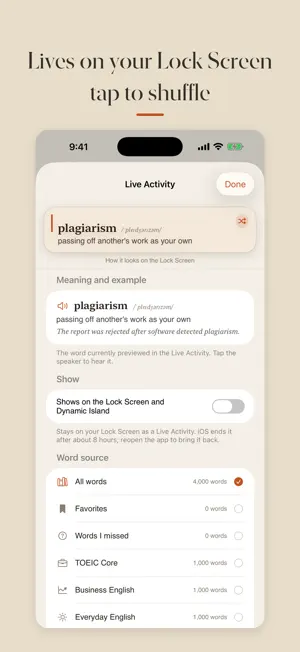
You wake your phone 80 times a day. What if each one taught you a word? LockVocab turns your Lock Screen into a vocabulary card you cannot miss. No app to open, no time to set aside — the word is simply there, where you already look. See it enough times and it sticks. Built for exams and for work: 5,200 words — 1,500 TOEIC core, 1,400 business English, 1,000 everyday English and 1,300 IELTS/TOEFL academic vocabulary. The TOEIC, business and academic lists are calibrated against published exam-corpus frequency lists, and every word comes with phonetics, a plain-English definition, synonyms, word origin and a natural example sentence. WHAT YOU GET • Vocabulary on your Lock Screen 21 paper-style templates (single word, example card, vertical, manuscript grid, multi-word lists, side-by-side translations and more), 8 accent colors and 4 typefaces, mixed however you like, on a built-in background or your own photo. A Shortcut swaps in fresh words on a schedule you choose. • Live Activity and Dynamic Island Turn on Live Activity and a word card stays on your Lock Screen and in the Dynamic Island — tap the corner for the next batch, without opening the app. • One-tap setup Add the ready-made Shortcut in a single tap, then follow the step-by-step guide, as pictures or as a short video, if you also want the wallpaper to change itself every day. Switch to the Shortcuts app mid-video and it keeps playing in Picture in Picture. • Learn and review Mark each card "got it" or "not yet", save favorites, tap to hear the pronunciation. Everything you missed collects into a review list you can also use as your wallpaper source. • Choose what you study Pick your source: all words, favorites, words you missed, TOEIC core, business English, everyday English, or IELTS/TOEFL. The wallpaper and the Live Activity can each use a different one. ABOUT PAYING The first 100 words, every template that shows 1–4 words (10 in all) and photo backgrounds are free. A single purchase unlocks every word, the topic word lists and the 5–10 word templates — no subscription, no auto-renewal, no ads. PRIVACY No account, no personal data, no ad tracking. Everything works offline except the setup videos. The app sends only anonymous usage statistics, with no personal data, to help improve it. Your progress stays on your device. Wake your phone. Learn a word.
What’s new
Version 1.9.4 · Updated October 9, 2026
• Smoother first setup: if you just added the Lock Screen shortcut, tapping "I already have the lock screen shortcut" now applies your new style right away instead of asking you to add it again • Small fixes
App privacy
The developer, Poyu Chiang, reported these privacy practices to Apple.
Data Not Linked to You
The following data, which may be collected but is not linked to your identity, may be used for the following purposes:
- Usage Data: Product Interaction
Used for: Analytics
Alternatives to LockVocab - Lock Screen Words
Looking for apps like LockVocab - Lock Screen Words? Here are 6 similar apps on the App Store. The highest rated is Hapax: Word of the Day Widget (5.0/5), and all 6 are free to download.
-
 Glim: Lock Screen Vocabulary
-
 高中英文單字7000 - 聽力拼寫測驗
-
 Vocabulary Builder · WallWords
-
 Hapax: Word of the Day Widget
5.0
-
 Vocab Builder: Live Words
-
 Glancealot: Vocabulary Widget
5.0
| App | Rating | Price | Last updated | Compare |
|---|---|---|---|---|
| LockVocab - Lock Screen Words | – | Free | October 9, 2026 | |
| Glim: Lock Screen Vocabulary | – | Free | Sep 20, 2026 | Compare |
| 高中英文單字7000 - 聽力拼寫測驗 | – | Free | Oct 11, 2026 | Compare |
| Vocabulary Builder · WallWords | – | Free | Feb 4, 2026 | Compare |
| Hapax: Word of the Day Widget | 5.0 / 5 (13) | Free | Oct 11, 2026 | Compare |
| Vocab Builder: Live Words | – | Free | May 20, 2026 | Compare |
| Glancealot: Vocabulary Widget | 5.0 / 5 (1) | Free | Sep 26, 2026 | Compare |