

PhotoPal AI - Photo Editor
David Leung Photo & Video iPhoneiPadiPod touch
PhotoPal AI - Photo Editor is a free Photo & Video app for iPhone and iPad by David Leung. Requires iOS 15.1. Updated September 11, 2026.
- Price
- Free
- on the App Store
- Size
- 41 MB
- Age 4+
- Updated
- Sep 11
- 2026 · v1.0
Screenshots
Save to Pinterest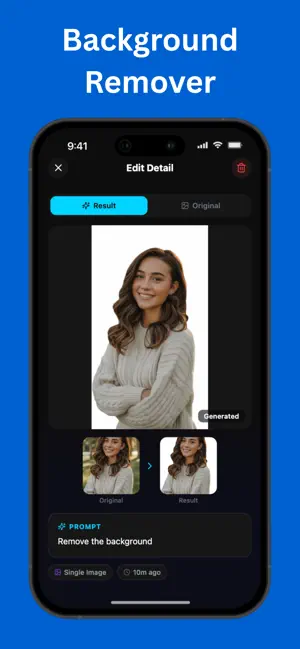

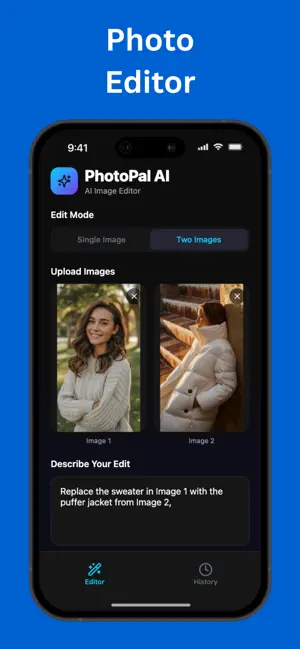
About PhotoPal AI - Photo Editor
PhotoPal AI – AI Photo Editor PhotoPal AI is your intelligent AI photo editing companion, designed to help you edit, enhance, and transform photos using simple text prompts. Whether you want to remove unwanted objects, change a background, enhance image quality, or create something completely new, PhotoPal AI makes advanced photo editing simple and easy. Key Features AI Photo Editing Upload a photo and describe the changes you want. PhotoPal AI uses AI to generate an edited version of your photo based on your instructions. Add or Remove Anything Easily add new elements to your photos or remove unwanted objects, people, and other distractions with simple text prompts. Background Removal & Replacement Remove backgrounds or describe a new background you want to create. Transform the setting of your photo without complicated editing tools. Photo Enhancement Improve your photos with AI-powered image enhancement. Ask PhotoPal AI to make an image clearer, sharper, or improve its overall appearance. Reference Image Editing Upload two images—your original photo and a reference image. Describe the changes you want, and PhotoPal AI can use the reference image to help guide the edit. AI-Powered Creativity Describe the result you want in your own words. From small adjustments to creative transformations, PhotoPal AI turns your ideas into edited images. How It Works 1. Upload a photo you want to edit 2. Describe the changes you want 3. Let PhotoPal AI generate your edited image 4. View and save your result For reference-based editing: 1. Upload your original image 2. Upload a reference image 3. Describe the changes you want 4. Let PhotoPal AI generate your new image Create. Edit. Transform. From quick photo fixes to creative AI transformations, PhotoPal AI gives you a simple way to bring your editing ideas to life. PhotoPal AI offers in-app purchases. Plans unlock AI image editing. Subscriptions renew automatically; manage any time in App Store account settings. **To access any of the app features users must pay** Download PhotoPal AI today and bring your creativity to life. Terms of Use (EULA): https://www.apple.com/legal/internet-services/itunes/dev/stdeula/ https://photopalaiapp.vercel.app/privacy https://photopalaiapp.vercel.app/terms
App privacy
The developer, David Leung, reported these privacy practices to Apple.
Data Not Collected
The developer does not collect any data from this app.
Alternatives to PhotoPal AI - Photo Editor
Looking for apps like PhotoPal AI - Photo Editor? Here are 6 similar apps on the App Store. The highest rated is Tintelier: Photo Colorizer (5.0/5), and all 6 are free to download.
-
 Tintelier: Photo Colorizer
5.0
-
 PerfectAiStudio: Photo & Video
5.0
-
 Monet: AI Photo Video Editor
-
 Restore Old Photos - Revive
4.6
-
 AI Photo Editor - Perfekt
-
 AI Photo Editor: Prompt Edit
| App | Rating | Price | Last updated | Compare |
|---|---|---|---|---|
| PhotoPal AI - Photo Editor | – | Free | September 11, 2026 | |
| Tintelier: Photo Colorizer | 5.0 / 5 (4) | Free | Nov 22, 2026 | Compare |
| PerfectAiStudio: Photo & Video | 5.0 / 5 (2) | Free | Jul 7, 2026 | Compare |
| Monet: AI Photo Video Editor | – | Free | Nov 25, 2026 | Compare |
| Restore Old Photos - Revive | 4.6 / 5 (12) | Free | Nov 16, 2026 | Compare |
| AI Photo Editor - Perfekt | – | Free | Sep 18, 2026 | Compare |
| AI Photo Editor: Prompt Edit | – | Free | Oct 19, 2026 | Compare |