

ZipScan - PDF Scanner + OCR
XU ZHENG Productivity iPhoneiPadiPod touch
ZipScan - PDF Scanner + OCR is a free Productivity app for iPhone and iPad by XU ZHENG. Rated 5.0/5 from 2 ratings. Requires iOS 17.0.
- Rating
- 5.0
- 2 ratings
- Price
- Free
- on the App Store
- Size
- 2 MB
- Age 4+
- Updated
- Oct 10
- 2026 · v1.2
Screenshots


About ZipScan - PDF Scanner + OCR
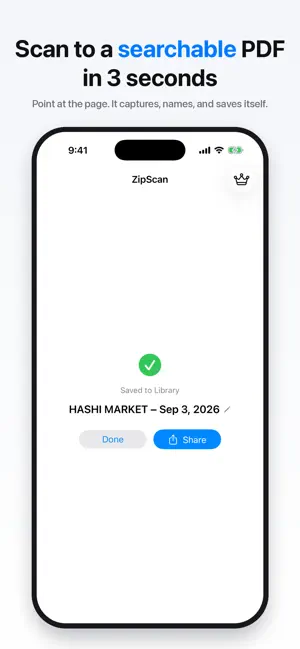
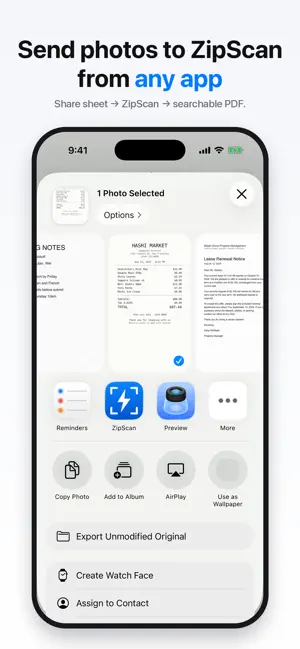
The 3-second scanner. Open ZipScan and the camera is already pointing at your document. It captures automatically, cleans up the page, and hands you a searchable PDF ready to share — before other apps finish loading. WHY ZIPSCAN • Instant by design — the app opens straight into the camera, so scanning starts before you've tapped anything. • Import from Photos — a photo of a page becomes a searchable PDF, same pipeline as the camera. Share to ZipScan straight from the Photos share sheet. • Your text is yours — Copy Text hands you the recognized words; export as PDF or JPEG; reorder, remove, or add pages anytime. • Sign and mark up — the system Markup tools, with your saved signatures, right on the PDF. • Searchable PDFs, always — on-device OCR embeds real text in every scan, so you can search inside your documents in Files, Mail, or any PDF reader. • Smart names — scans name themselves after what's on the page ("Hashi Market – Aug 13"), not "Scan_0142.pdf". • Small files — a full page is usually a few hundred KB, not several MB. Email-friendly, always. • Multi-page in one pass — keep pointing at pages; they stack into one PDF. PRIVATE BY ARCHITECTURE Everything happens on your iPhone. No account. No cloud. No tracking. Your documents never leave your device unless YOU share them. Scan in airplane mode if you like — it all works. HONEST PRICING 10 free scans every month — full quality, full OCR, no watermark, forever. Need more? One purchase unlocks unlimited scans for life. Prefer monthly? There's a small monthly plan, cancel anytime. No forced trials, no bait-and-switch, no features held hostage. BUILT INTO iOS • Lock Screen widget — scan without unlocking • Control Center button — swap your flashlight for a scanner • Action Button support (iPhone 15 Pro and later) • Siri & Shortcuts — "Scan a document with ZipScan" • Back Tap — double-tap your phone to scan WHAT ZIPSCAN DOESN'T DO No ads. No accounts. No cloud lock-in. No AI chatbots. No 47 features you'll never use. One thing, done fast: paper in, searchable PDF out. Questions? [email protected] — a real person answers. Terms of Use: https://www.apple.com/legal/internet-services/itunes/dev/stdeula/ Privacy Policy: https://swiftlynx.co/zipscan/privacy
What’s new
Version 1.2 · Updated October 10, 2026
Sign & Mark Up — sign and annotate any document with the system Markup tools. Your saved signatures are right there. Import any number of photos — the 20-photo limit is gone. Photos are processed one at a time, so long imports stay light. Copy Text keeps lines together — an item and its price on a receipt now come out on one line. Find in document scrolls to the match it counts.
App privacy
The developer, XU ZHENG, reported these privacy practices to Apple.
Data Not Collected
The developer does not collect any data from this app.
Alternatives to ZipScan - PDF Scanner + OCR
Looking for apps like ZipScan - PDF Scanner + OCR? Here are 6 similar apps on the App Store. The highest rated is Scanory: Document Scanner (5.0/5), and all 6 are free to download.
-
 PDF Scanner — PrivaScan
-
 EyeScan Pro OCR & PDF Scanner
-
 Privascan: PDF Scanner & OCR
-
 kaune: Shopping List & ToDo
-
 Scanory: Document Scanner
5.0
Scanory: Document Scanner
5.0
-
 VoiceKey Speech to Text
| App | Rating | Price | Last updated | Compare |
|---|---|---|---|---|
| ZipScan - PDF Scanner + OCR | 5.0 / 5 (2 ratings) | Free | October 10, 2026 | |
| PDF Scanner — PrivaScan | – | Free | Sep 3, 2026 | Compare |
| EyeScan Pro OCR & PDF Scanner | – | Free | Sep 8, 2026 | Compare |
| Privascan: PDF Scanner & OCR | – | Free | Sep 3, 2026 | Compare |
| kaune: Shopping List & ToDo | – | Free | Oct 15, 2026 | Compare |
| Scanory: Document Scanner | 5.0 / 5 (5) | Free | Sep 26, 2026 | Compare |
| VoiceKey Speech to Text | – | Free | Sep 14, 2026 | Compare |