

kaune: Shopping List & ToDo
Kimura Keisuke Productivity iPhoneiPadiPod touch
kaune: Shopping List & ToDo is a free Productivity app for iPhone and iPad by Kimura Keisuke. Requires iOS 16.6. Updated October 15, 2026.
- Price
- Free
- on the App Store
- Size
- 97 MB
- Age 4+
- Updated
- Oct 15
- 2026 · v3.2.0
Screenshots


About kaune: Shopping List & ToDo
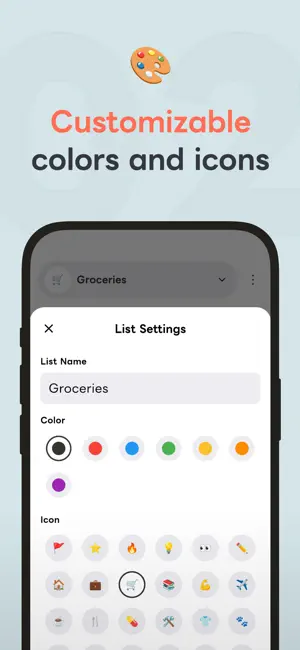
A shopping list you can share with family and friends. Paste shopping notes from chat to add every line at once, or let AI pull the items from a recipe screenshot or a photo. Check it right from a Home Screen widget. "kaune" is a simple and user-friendly Shopping & To-Do List app. ● Key Features of kaune ○ Share with Family and Friends: "Group Sharing" Invite people to a group and share both lists and notes. Anything someone adds or checks off shows up on everyone's screen right away, so you can stop texting "can you grab milk?" ○ Check Without Opening the App: "Widgets" See your remaining items at a glance on the Home Screen. Buttons on the Lock Screen and in Control Center open item entry or your list instantly. ○ Save Time with Copy & Paste: "Bulk Entry" Simply copy and paste shopping memos or tasks sent via chat or email. Each line becomes one item, so your whole list is ready in just a few taps. ○ Add Items from Photos and Text: "AI Scan" AI picks out just the item names from recipe screenshots, photos of shopping memos, or long messages. No more typing ingredients one by one. ○ Sorted by Store Aisle: "AI Sorting" AI sorts your items by category in aisle order. Start from a supermarket, drugstore, home improvement, convenience, or dollar store template, then adjust the categories to fit your store. ○ Linked to Your List: "Notes" Save text and images in notes to keep favorite brands, clothing sizes, prices, and recipes at hand. If an item in your list has the same name, open the note with one tap. Add keywords so it links even when written differently, such as "scallions" and "green onions." Sort notes with tags, and add a note's "Items to Add to List" to a list all at once. ○ Never Lose Your Data: "Backup & Sync" Sign in and your data is saved to the cloud, syncing in real time across your phone, tablet and other devices. When you switch to a new phone, everything comes with you. ○ Easy to Read, Your Way: "Customize" Set icons and colors for each list, such as "Groceries" or "Work Tasks." Choose from five text sizes and use Dark Mode at night. ○ Stay Organized: "Select Multiple Items" Checked items gather at the end of the list. Select items to move or delete them at once, and completed items clear themselves after 14 days (you can turn this off). ● Recommended for: ・Those who want to stop forgetting items at the supermarket. ・People who want to share a shopping list with family or friends. ・Anyone tired of texting "can you pick this up on your way home?" ・Anyone who wants to turn a recipe's ingredients into a shopping list. ・Anyone who prefers large, easy-to-read text. ・Those who want to register items and let AI handle the sorting automatically. ● Pricing The core features are free to use. kaune Premium (monthly or yearly) removes ads, lifts the limits on lists, notes, tags, sorting rules, and widgets, and raises the kaune AI (AI Sorting and AI Scan) usage limit. When a group owner subscribes, everyone in the group gets the Premium benefits. First-time subscribers can try the yearly plan free for 2 weeks. * Prices may vary by region. * Payment is charged to your store account (App Store). * Subscriptions can be managed and canceled at any time in your store account settings. * Unless canceled at least 24 hours before the renewal date or the end of the free trial, the subscription renews automatically. * Family Sharing / Family Library is not supported. ● Origin of the App Name "kaune" The name comes from the casual Japanese phrase "Kau ne" (買うね), meaning "I'll buy it!" It reflects our wish that you can add the shopping notes your family and friends share in one go, and shop without forgetting a thing. ● Other Information ・Contact Us https://keichapp.com/en/app/kaune/contact/ ・Privacy Policy https://keichapp.com/en/app/kaune/privacy/ ・Terms of Service https://keichapp.com/en/app/kaune/terms/ This app is developed by an independent developer. Thank you for your support!
What’s new
Version 3.2.0 · Updated October 15, 2026
Thank you for using kaune! We have made performance improvements and bug fixes to provide a smoother experience. If you have any feedback or requests, please let us know via the in-app contact form. ○ Update Details ・You can now select multiple items. Long-press a checkbox to start, then move the items to another list or delete them together. Drag along the checkboxes to keep selecting. ・Completed items are now deleted automatically 14 days after completion. You can turn this off for each list in the completed items sheet. ・Notes can now have "Items to Add to List." Pick from recipe ingredients, packing lists, and more, and add them to a list at once. ・You can now add tags to notes and filter the note list by tag. ・You can now select multiple notes to tag or delete them together. ・Added "Simple Mode" to the note editor, which shows only the fields you use most. ・Added a "Dollar Store" template to AI Sorting. ・Added a 2-week free trial to the yearly plan (for first-time Premium Plan subscribers). ・Note images now start uploading as soon as you choose them, so saving takes less time. ・Carrying over your data right after signing in is now clearer, and you'll be told if there are unsent changes when you log out. ・Fixed issues such as not being able to return to a shared group after switching devices or reinstalling, and other members' changes being reverted when editing at the same time. ・Refreshed the overall design and improved stability and performance.
App privacy
The developer, Kimura Keisuke, reported these privacy practices to Apple.
Data Used to Track You
The following data may be used to track you across apps and websites owned by other companies:
- Location: Coarse Location
- Identifiers: Device ID
- Usage Data: Product Interaction, Advertising Data
- Diagnostics: Crash Data, Performance Data
Data Linked to You
The following data, which may be collected and linked to your identity, may be used for the following purposes:
- Location: Coarse Location
- Identifiers: Device ID, User ID
- Usage Data: Product Interaction, Advertising Data
- Diagnostics: Performance Data
- Purchases: Purchase History
- Contact Info: Email Address, Name
- User Content: Photos or Videos, Other User Content
Used for: Third-Party Advertising, Analytics, App Functionality
Data Not Linked to You
The following data, which may be collected but is not linked to your identity, may be used for the following purposes:
- Diagnostics: Crash Data, Performance Data
Used for: Third-Party Advertising, Analytics
Alternatives to kaune: Shopping List & ToDo
Looking for apps like kaune: Shopping List & ToDo? Here are 6 similar apps on the App Store.
-
 ピックリスト - 写真とカテゴリで管理できる買い物リスト
-
 Togethery Family Shopping List
-
 超シンプルメモ - ロック画面ToDo
-
 MiniLista
-
 BLISS Glim: Daily Planner
-
 Remember To Do: Daily Routine
| App | Rating | Price | Last updated | Compare |
|---|---|---|---|---|
| kaune: Shopping List & ToDo | – | Free | October 15, 2026 | |
| ピックリスト - 写真とカテゴリで管理できる買い物リスト | – | Free | Jul 16, 2025 | Compare |
| Togethery Family Shopping List | – | Free | Oct 25, 2026 | Compare |
| 超シンプルメモ - ロック画面ToDo | – | Free | Oct 24, 2026 | Compare |
| MiniLista | – | Free | Aug 4, 2026 | Compare |
| BLISS Glim: Daily Planner | – | Free | Sep 19, 2026 | Compare |
| Remember To Do: Daily Routine | – | Free | Aug 31, 2026 | Compare |