

Camera Scale 簡単メジャー&距離測定
Noah's Ark Sapporo llc Utilities iPhoneiPadiPod touch
Camera Scale 簡単メジャー&距離測定 is a free Utilities app for iPhone and iPad by Noah's Ark Sapporo llc. Requires iOS 18.0. Updated August 21, 2026.
- Price
- Free
- on the App Store
- Size
- 6 MB
- Age 4+
- Updated
- Aug 21
- 2026 · v1.0.1
Screenshots
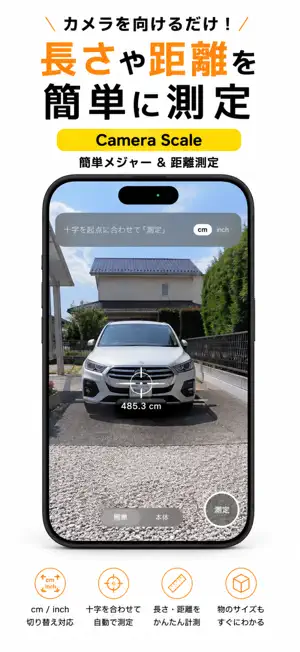

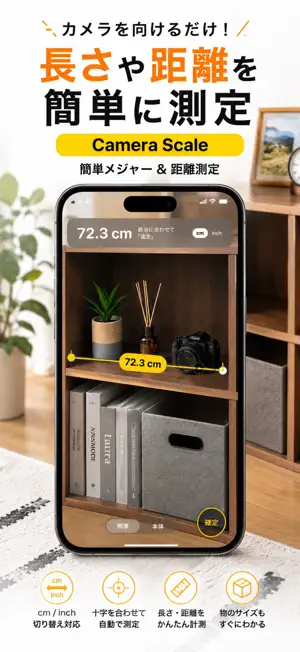
About Camera Scale 簡単メジャー&距離測定
Measure real-world lengths with your iPhone camera. No tape measure needed. ■ Two steps Put the crosshair on where you want to start, and tap Measure. Move your iPhone to the end point. That's it. The number updates live as you move, like pulling out a tape measure. ■ Two ways to measure [Target mode] Measure things you can't reach. A ceiling beam, wall to wall across a room, the gap where a piece of furniture has to fit. Requires an iPhone with a LiDAR scanner (Pro / Pro Max). [Device mode] Measures how far the iPhone itself moved. Touch it to one end, move it to the other. No depth sensor involved, so it works in a dark room and on glass or polished metal, where depth sensing struggles. ■ Steady aim Your hand shakes when you line up a point. The image is zoomed slightly, and the spare margin is used to cancel that shake. When your aim settles, the ring around the crosshair tightens — so you can see the right moment to tap. ■ Rangefinder When you're not measuring, the distance to whatever the crosshair points at is shown continuously. Distance to a wall, height of a ceiling, how far away something is. ■ Save the result When you're done, save a photo with the measurement line and the number drawn on top. Keep it as a note, or send it to someone as it is. ■ Good for • Checking whether furniture or an appliance will fit • Measuring a doorway before moving day • Sizing a shelf board or a curtain • Finding the distance to a wall or ceiling • Any time there's no tape measure around ■ Units Switch between centimeters and inches. The default follows your region. ■ Device support Target mode needs a LiDAR scanner (iPhone 12 Pro and later, Pro / Pro Max). On iPhones without LiDAR, Device mode still measures. Note: readings are approximate. For construction, trade, or anything where accuracy matters, use a real measuring tool.
What’s new
Version 1.0.1 · Updated August 21, 2026
Bug fixes.
App privacy
The developer, Noah's Ark Sapporo llc, reported these privacy practices to Apple.
Data Used to Track You
The following data may be used to track you across apps and websites owned by other companies:
- Identifiers: Device ID
- Usage Data: Product Interaction, Advertising Data
Data Not Linked to You
The following data, which may be collected but is not linked to your identity, may be used for the following purposes:
- Identifiers: Device ID
- Usage Data: Product Interaction, Advertising Data
- Diagnostics: Crash Data, Performance Data
Used for: Third-Party Advertising, Analytics, App Functionality
Alternatives to Camera Scale 簡単メジャー&距離測定
Looking for apps like Camera Scale 簡単メジャー&距離測定? Here are 6 similar apps on the App Store.
-
 AR Ruler & GPS Area: GMeasure
-
 Ruler ▸
-
 RulerMe - Ruler & AR Measure
-
 SpotRange
-
 Color Calendar Plus
-
 SlidePick
| App | Rating | Price | Last updated | Compare |
|---|---|---|---|---|
| Camera Scale 簡単メジャー&距離測定 | – | Free | August 21, 2026 | |
| AR Ruler & GPS Area: GMeasure | – | Free | Sep 18, 2026 | Compare |
| Ruler ▸ | – | Free | Sep 9, 2026 | Compare |
| RulerMe - Ruler & AR Measure | – | Free | Jun 29, 2026 | Compare |
| SpotRange | – | Free | Jul 25, 2026 | Compare |
| Color Calendar Plus | – | 1.99 USD | Dec 19, 2025 | Compare |
| SlidePick | – | Free | Mar 2, 2026 | Compare |