

Volter Electrical Diagrams
Asenko Productivity iPhoneiPadiPod touch
Volter Electrical Diagrams is a free Productivity app for iPhone and iPad by Asenko. Requires iOS 15.0. Updated October 22, 2026.
- Price
- Free
- on the App Store
- Size
- 8 MB
- Age 4+
- Updated
- Oct 22
- 2026 · v0.30.0
Screenshots



About Volter Electrical Diagrams
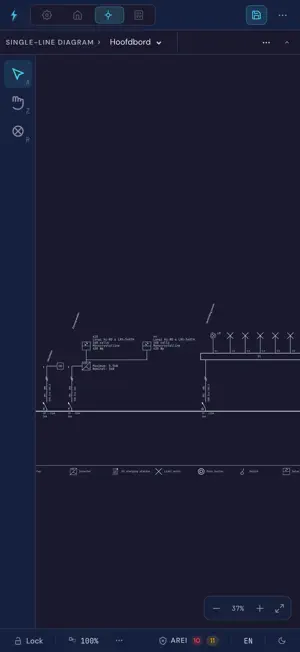
Volter is a drawing program for electrical diagrams according to the AREI, the Belgian electrical code, made for installers working in Belgium. You draw the floor plan with walls, doors and windows, place sockets, light points and switches, and spread them over your circuits. The single-line diagram follows by itself from what is on the plan. Change something on the plan and the diagram changes with it. Prefer to start from the single-line diagram? Then you place the components on the plan afterwards. WHAT VOLTER DOES - Floor plan with walls, doors, windows and rooms that recognise themselves - Single-line diagram derived directly from the placed components - AREI checks while you draw: circuits, residual current protection, smoke detectors and more - 67 electrical symbols, from switches to inverters and charging stations - Several floors and several distribution boards in one project - A DXF file or an image as background under your floor plan - Export to PDF, DXF, SVG, PNG and JPEG through the share sheet - Dutch, French, English and German - Light and dark theme FOR WHOM For electricians, installation companies and engineering firms that must deliver diagrams that pass inspection. Volter follows the terms of the AREI and the habits of the inspector, not those of a general drawing program. YOUR PROJECTS Projects belong to your Volter account and are ready on every device where you are signed in: iPad, Mac, Windows and the browser. Lose your connection for a while and you simply keep working; the app syncs as soon as you are back online. ACCOUNT You sign in with your Volter account, using Apple, Google or email. Without an account you can explore the demo. Volter is made by Asenko in Belgium.
What’s new
Version 0.30.0 · Updated October 22, 2026
• Show or hide layers on the plan, lock them, or show just one. • Hide the dimension per wall from the selection bar. • Mark a cable as having no earth conductor. The single-line diagram then shows 4x10 instead of 4G10. • Enter the installation date. For an old installation, the AREI check shows exceptions as warnings. • Add components to your favourites. They appear at the top of the list. You choose the order. • Choose the line style and weight of a connection. • Connections between components can now curve. • Choose the preferences for new connections in the settings. • Drag a dimension line to another place. • A circuit breaker can now also sit behind another breaker without components. • Set a board's supply when you create it, and change it later. • Enter the supply cable from meter to main switch. The single-line diagram shows it. • The PDF now includes the layout of each board. • Choose type B for an RCD, such as for a charging station. • The single-line diagram shows the type, characteristics and name of each RCD. • Esc switches the tool back to select. • Deleting an RCD no longer drops its circuits onto the main rail. • A single-line diagram behind a main breaker now spreads legibly over several pages.
App privacy
The developer, Asenko, reported these privacy practices to Apple.
Data Linked to You
The following data, which may be collected and linked to your identity, may be used for the following purposes:
- Contact Info: Physical Address, Email Address, Name, Other User Contact Info
- User Content: Photos or Videos, Other User Content
- Diagnostics: Crash Data
Used for: App Functionality
Alternatives to Volter Electrical Diagrams
Looking for apps like Volter Electrical Diagrams? Here are 6 similar apps on the App Store. The highest rated is DWG Viewer 2D - For DWG to PDF (1.0/5), and 5 of the 6 are free to download.
-
 Conduit Bend Free
-
 Conduit Bender: PipeMaster
-
 PipeSketch - Plumbing Planner
-
 Yuppa
-
 Infotemp Zeiterfassung
-
 DWG Viewer 2D - For DWG to PDF
1.0
| App | Rating | Price | Last updated | Compare |
|---|---|---|---|---|
| Volter Electrical Diagrams | – | Free | October 22, 2026 | |
| Conduit Bend Free | – | Free | Jun 22, 2026 | Compare |
| Conduit Bender: PipeMaster | – | Free | Sep 10, 2026 | Compare |
| PipeSketch - Plumbing Planner | – | Free | Oct 15, 2026 | Compare |
| Yuppa | – | Free | Jan 29, 2026 | Compare |
| Infotemp Zeiterfassung | – | Free | Nov 22, 2025 | Compare |
| DWG Viewer 2D - For DWG to PDF | 1.0 / 5 (1) | 6.99 USD | Mar 26, 2026 | Compare |