

PipeSketch - Plumbing Planner
Aydin Can Polatkan Productivity iPhoneiPadiPod touch
PipeSketch - Plumbing Planner is a free Productivity app for iPhone and iPad by Aydin Can Polatkan. Requires iOS 17.0. Updated October 15, 2026.
- Price
- Free
- on the App Store
- Size
- 10 MB
- Age 4+
- Updated
- Oct 15
- 2026 · v1.3
Screenshots



About PipeSketch - Plumbing Planner
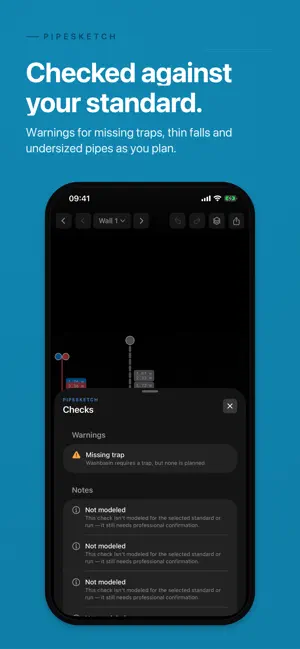
Plan your bathroom or whole-house plumbing on a wall or floor photo and hand your plumber a polished Plumbing Brief PDF. HOW IT WORKS Photo a wall or floor plan, start from a blank grid, or scan the space with LiDAR. Set the scale with one reference line. Place fixtures and the pipes route themselves to your supply, drain and vent points. Check the warnings. Export. AUTO-ROUTING Every fixture gets its hot and cold supply, its waste or soil drain and its vent run automatically. Drag any run to take it manual. Move a fixture and its pipes follow. FIXTURES AND ROUGH-IN 25 fixture types, from WC, basin, sink, shower, bath and bidet to appliances, valves, meter and floor drain, each with region-typical rough-in heights. RULES BY REGION Live warnings for missing traps, insufficient fall and undersized connections, checked against EN 806 and EN 12056 (EU), BS EN 806 with Building Regulations Part G and H (UK), IPC and UPC (US, as a planning reference only, not jurisdiction-compliant) and AS/NZS 3500 (AU/NZ). Where a check is not modelled for your region, the app says so. PROPERTIES One water system per place. Scan a whole house with LiDAR into a floor plan, then group rooms and bathrooms under a property with a shared region profile. THE PLUMBING BRIEF A PDF for your plumber with surface sketches, a fixture schedule, a pipe list with sizes and materials, the warnings and a "questions for my plumber" checklist. PNG and CSV export too. FLOOR HEATING (separate purchase, included in Trade) Plan underfloor heating on a LiDAR scan or on a floor plan file (.roomsketch) from PipeSketch or WireSketch. Sort rooms into storeys with a manifold each, choose the floor system and pipe, and get loop layouts. EU (EN standards) and UK homes also get room-by-room heat-load estimates and flow rates using the EN 12831 and EN 1264 methods with manufacturer-typical output coefficients, plus heat source advice; elsewhere, layout planning only. The Parts tab lists planning quantities, from pipe to manifolds, to check with your installer and share as CSV or PDF. Build-up advice says what the floor needs room for. PipeSketch does not size the heat source, pump or mixing valve. A read-only sample home shows a plan and its parts list before you buy. TRADE MODE (separate purchase) Turn a plan into a priced document: customers, a price book, estimates by default and binding offers when you choose, with PDF export. Offers can include the floor heating parts. You write the terms; the app never adds legal text. KNOWLEDGE BASE Plain-language entries on the standards and the formulas the app uses, including what it deliberately simplifies. 9 LANGUAGES English, German, French, Dutch, Turkish, Spanish, Italian, Polish, Portuguese. PRIVACY AND ADS Your planning data stays on your device. No accounts, no cloud. The free version is ad-supported, with consent where required, and any one-time purchase removes all ads. PipeSketch is a planning tool and does not replace a professional. All plumbing and heating work must be designed, verified and carried out by a qualified installer in accordance with local regulations.
What’s new
Version 1.3 · Updated October 15, 2026
Floor Heating now has a parts list. • A new Parts tab lists planning quantities: pipe in whole rolls or cut lengths, each loop in one piece, plus manifolds, fittings, edge strip and optional room control. • Edit any quantity and share the list as a CSV, or in a floor heating plan PDF with loops coloured hot to cold. The Plumbing Brief includes the list too. • Trade: add the parts to an offer, priced from your own price book, with installation per m². • The full list is for EU (EN standards) and UK homes. Elsewhere, the list has the pipe and the manifolds. Floor Heating plans homes with several storeys. • Each storey has its own manifold, and loops stay on their storey. • Heat loads allow for heated rooms above and below, and can use each room's own ceiling height. • A rescan keeps matching rooms and their settings. Choose your floor system, pipe and heat source. • Wet screed (tacker or knob panels), dry system boards and thin layer each have their own output figures and parts. Dry system boards and thin layer use one maker's unverified table each, marked Provisional. • Pipe names now show size and the material you choose, such as 16×2 PE-X. • Choose the heat source to see whether a mixing station is usually fitted. PipeSketch does not size the heat source, pump or mixing valve. • Heat loads and heat source settings cover EU (EN standards) and UK homes. Elsewhere, Floor Heating plans the layout. • Enter the height from bare floor to top of screed to see what the floor needs room for, such as insulation. Floor Heating is easier to start, with or without LiDAR. • After you buy Floor Heating, a new screen takes you straight to planning. • A "Plan floor heating" shortcut stays on your Plans list until your first plan is ready. • Without LiDAR, you can import a floor plan file (.roomsketch) shared from PipeSketch or WireSketch. • Before you buy, try a read-only sample home with its plan and parts list. • Loop counts read correctly, as in "1 loop". Pipe plans are easier to read, on screen and in the Plumbing Brief. • Hot and cold pipes from one supply point are drawn side by side, so cold no longer hides under hot. • Auto-routing puts hot on the left and cold on the right, as usually fitted. • With no vent point placed, the vent rises above the drain. • Length labels no longer pile up.
App privacy
The developer, Aydin Can Polatkan, reported these privacy practices to Apple.
Data Used to Track You
The following data may be used to track you across apps and websites owned by other companies:
- Identifiers: Device ID
Data Not Linked to You
The following data, which may be collected but is not linked to your identity, may be used for the following purposes:
- Location: Coarse Location
- Identifiers: Device ID
- Usage Data: Product Interaction, Advertising Data
- Diagnostics: Crash Data, Performance Data
Used for: Third-Party Advertising, Analytics
Alternatives to PipeSketch - Plumbing Planner
Looking for apps like PipeSketch - Plumbing Planner? Here are 6 similar apps on the App Store. The highest rated is Hjarni Notes: AI Memory (5.0/5), and all 6 are free to download.
-
 Basement Sketch 3D: Planner
-
 Volter Electrical Diagrams
-
 AutoAgenda
-
 Hjarni Notes: AI Memory
5.0
Hjarni Notes: AI Memory
5.0
-
 F-gas Invio CamereCom
-
 AppSat
| App | Rating | Price | Last updated | Compare |
|---|---|---|---|---|
| PipeSketch - Plumbing Planner | – | Free | October 15, 2026 | |
| Basement Sketch 3D: Planner | – | Free | Sep 22, 2026 | Compare |
| Volter Electrical Diagrams | – | Free | Oct 27, 2026 | Compare |
| AutoAgenda | – | Free | Jul 4, 2026 | Compare |
| Hjarni Notes: AI Memory | 5.0 / 5 (1) | Free | Oct 24, 2026 | Compare |
| F-gas Invio CamereCom | – | Free | Nov 11, 2024 | Compare |
| AppSat | – | Free | Oct 10, 2026 | Compare |