

Tsukuriba: Save Video Recipes
Main Void Ltd Food & Drink iPhoneiPadiPod touch
Tsukuriba: Save Video Recipes is a free Food & Drink app for iPhone and iPad by Main Void Ltd. Requires iOS 15.0. Updated September 24, 2026.
- Price
- Free
- on the App Store
- Size
- 40 MB
- Age 4+
- Updated
- Sep 24
- 2026 · v1.0
Screenshots



About Tsukuriba: Save Video Recipes
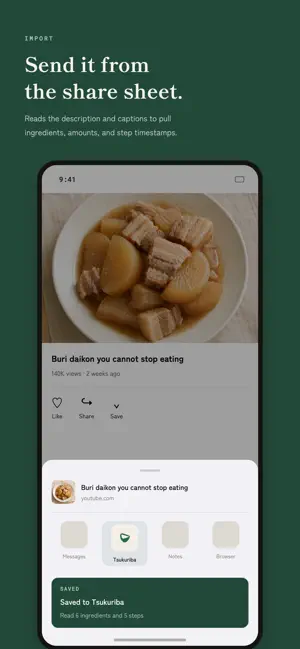
Keep the recipes you saw in a video until the day you actually cook them. Found something on YouTube, Instagram or TikTok? Send it from the share sheet. Tsukuriba pulls out the ingredients and steps, saves them, and keeps the day you cooked it and what you thought. ■ Two taps from the share sheet Save without stopping the video. No need to reopen the app. You can read the ingredients and steps later, right before you cook. ■ Ingredients and steps, read automatically Amounts and steps are pulled from the description, the caption and the subtitles. You see the result right after saving and can fix anything that looks wrong on the spot. Anything uncertain is marked, and everything stays editable later. ■ Find it by "that one from that person" Recipes also line up by creator, so you can get back to one from the memory of who made it. New posts from the creators you save most show up in the same place. ■ Your cooking log becomes next time's prep Rating, photo and tweaks live on one page. Next time you cook it, your own note from last time comes up first. The calendar shows what you made last week. ■ A week of meals, built from what you saved Pick the days and the breakfast, lunch and dinner slots, and a week is built from your saved recipes. The plan stays in the calendar, and the shopping list is gathered from its ingredients. ■ Keep your hands on the cooking Steps can be read out loud while you work, and a nutrition estimate comes from the ingredients. ■ Japanese and English Recipes are kept in the language you saved them in, and you can switch translated display on or off in settings. ■ Pricing The app is free to download. On the free plan you can save 25 recipes, run 5 automatic reads a month, build one AI week of meals, and look back over the last month in the calendar. Reaching a limit stops new saves and reads only — everything you already saved, and every cooking log, stays. PREMIUM (monthly or yearly) removes the save and automatic-read limits, and plans a new week every week, with breakfast and lunch as well as dinner. Swapping meals and the full calendar history are PREMIUM too. Prices are shown on the purchase screen in the app. Payment is charged to your Apple ID account at confirmation of purchase. A subscription renews automatically unless auto-renew is turned off at least 24 hours before the end of the current period. You can manage or cancel your subscription in Settings > Apple ID > Subscriptions after purchase. If the original video is taken private, the ingredients, steps and cooking logs stay — only playback stops working. Terms of Use: https://tsukuriba-c0e87c.gitlab.io/terms.html Privacy Policy: https://tsukuriba-c0e87c.gitlab.io/privacy.html
App privacy
The developer, Main Void Ltd, reported these privacy practices to Apple.
Data Linked to You
The following data, which may be collected and linked to your identity, may be used for the following purposes:
- Purchases: Purchase History
- Contact Info: Email Address
- User Content: Photos or Videos, Other User Content
- Identifiers: User ID
Used for: App Functionality
Alternatives to Tsukuriba: Save Video Recipes
Looking for apps like Tsukuriba: Save Video Recipes? Here are 6 similar apps on the App Store.
-
 レシコレ - レシピ保存・管理
-
 CotoCoto (コトコト): 献立・レシピ・買い物
-
 Recipe Scrap - Save & Organize
-
 MoguPort: Recipe Saver
-
 なに食べた?
-
 CookDrawer
| App | Rating | Price | Last updated | Compare |
|---|---|---|---|---|
| Tsukuriba: Save Video Recipes | – | Free | September 24, 2026 | |
| レシコレ - レシピ保存・管理 | – | Free | Oct 18, 2026 | Compare |
| CotoCoto (コトコト): 献立・レシピ・買い物 | – | Free | Sep 1, 2026 | Compare |
| Recipe Scrap - Save & Organize | – | Free | Oct 15, 2026 | Compare |
| MoguPort: Recipe Saver | – | Free | Aug 28, 2026 | Compare |
| なに食べた? | – | Free | Jul 1, 2026 | Compare |
| CookDrawer | – | Free | Oct 8, 2026 | Compare |