

CookDrawer
Morikawa Tatsunosuke Food & Drink iPhoneiPadiPod touch
CookDrawer is a free Food & Drink app for iPhone and iPad by Morikawa Tatsunosuke. Requires iOS 15.0. Updated October 8, 2026.
- Price
- Free
- on the App Store
- Size
- 71 MB
- Age 4+
- Updated
- Oct 8
- 2026 · v1.6.1
Screenshots



About CookDrawer
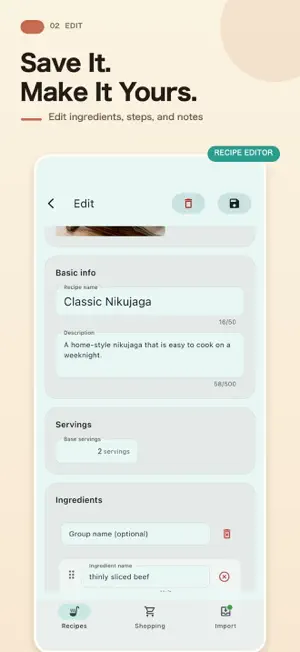
Turn recipes from social posts, websites, and paper into your own recipe collection, with ingredients and steps together. CookDrawer helps you import, edit, and organize recipes, then turn ingredients into shopping lists. Keep family favorites and new discoveries ready for the next time you cook. IMPORT RECIPES YOU FIND Create editable recipes from public Instagram and TikTok captions, YouTube descriptions, and compatible webpages. You can also paste text or recognize recipe text with the camera, an image, or a screenshot. REVIEW AND MAKE IT YOURS Preview ingredients and directions before saving. When you import a single recipe, choose Save and edit to adjust its ingredients, steps, and notes right away. FIND RECIPES WITH TAGS AND SEARCH Organize by quick meals, meal prep, favorites, and more. Search your collection and choose a list or grid view. TURN INGREDIENTS INTO SHOPPING LISTS Review the destination list and ingredient count before adding. Create a new list or add everyday shopping items by hand. BACK UP TO ICLOUD DRIVE Back up and restore recipes, tags, and shopping lists. Image files themselves are not included in backups. FREE FEATURES AND IMPORT ALLOWANCES Manually adding, viewing, and editing recipes, organizing with tags, and using shopping lists are free. Eligible devices can try 3 imports as a one-time offer. Registering again or reinstalling the app does not grant another trial on the same device. Camera, image, and screenshot text recognition is free. Creating a recipe from recognized text uses your import allowance. OPTIONAL PURCHASES • Monthly Plus An automatically renewing subscription with 50 imports each month while active, plus all Plus features. Your first purchase permanently unlocks Plus features, which remain available after the subscription ends. The monthly import allowance ends, but unused trial imports and purchased imports remain. • Lifetime Plus features A one-time payment unlocks Plus features permanently, with no automatic renewal. This purchase does not add any imports. • 10 extra imports Buy 10 imports when you need them, with no automatic renewal or expiration. Available to both free and Plus users. Connecting your account with Apple is required before purchasing. This purchase does not unlock Plus features. Plus features include serving-size adjustments, CSV export, color customization, and keeping the screen awake while cooking. See the app for prices and purchase details. IMPORT NOTES Even public posts may be unavailable because of age verification or access restrictions. YouTube imports use the video description. If recipe text appears in a video or comment, try recognizing it from a screenshot. Review imported content and edit it as needed. Keep every recipe you want to cook again within easy reach.
What’s new
Version 1.6.1 · Updated October 8, 2026
Improved account deletion, purchases, and sign-in. • Fixed account deletion for users signed in with Apple. • After deleting your account, keep viewing and editing recipes saved on your device in offline-only mode. Resume online use from the Account screen when you choose. • Clearer notices before purchase and deletion explain that unused extra imports are lost when you delete your account. • Before deletion, see a reminder that monthly subscriptions must be canceled separately, with a link to subscription management. • Fixed an issue where restoring purchases after account deletion could grant extra imports from past purchases again. • Linking Apple after resuming online use now updates the sign-in status on screen immediately. • Fixed permanent Plus access unlocked through a monthly plan so it remains available after the plan ends. • Improved the usage guide and error messages for URL imports.
App privacy
The developer, Morikawa Tatsunosuke, reported these privacy practices to Apple.
Data Linked to You
The following data, which may be collected and linked to your identity, may be used for the following purposes:
- Identifiers: User ID
Used for: App Functionality
Data Not Linked to You
The following data, which may be collected but is not linked to your identity, may be used for the following purposes:
- Location: Coarse Location
- Identifiers: Device ID
- Usage Data: Product Interaction
- Diagnostics: Performance Data, Other Diagnostic Data, Crash Data
- Purchases: Purchase History
Used for: Analytics, App Functionality
Alternatives to CookDrawer
Looking for apps like CookDrawer? Here are 6 similar apps on the App Store.
-
 SNSレシピメモ - 動画レシピを保存・整理
-
 Recipe Pocket: Save & Cook
-
 レシコレ - レシピ保存・管理
-
 RecipeKeep: Save Any Recipe
-
 レシプル|料理動画のレシピノート・まとめて保存
-
 Repimame: Recipe Saver
| App | Rating | Price | Last updated | Compare |
|---|---|---|---|---|
| CookDrawer | – | Free | October 8, 2026 | |
| SNSレシピメモ - 動画レシピを保存・整理 | – | Free | Oct 19, 2026 | Compare |
| Recipe Pocket: Save & Cook | – | Free | Sep 12, 2026 | Compare |
| レシコレ - レシピ保存・管理 | – | Free | Oct 18, 2026 | Compare |
| RecipeKeep: Save Any Recipe | – | Free | Apr 11, 2026 | Compare |
| レシプル|料理動画のレシピノート・まとめて保存 | – | Free | Oct 7, 2026 | Compare |
| Repimame: Recipe Saver | – | Free | Oct 18, 2026 | Compare |
Compare CookDrawer with the top alternatives: ratings, updates, ASO score and keyword gaps →