

FirstWeeks: Baby Tracker
WA GAMES LIMITED Health & Fitness iPhoneiPadiPod touch
FirstWeeks: Baby Tracker is a free Health & Fitness app for iPhone and iPad by WA GAMES LIMITED. Requires iOS 17.0. Updated September 17, 2026.
- Price
- Free
- on the App Store
- Size
- 30 MB
- Age 12+
- Updated
- Sep 17
- 2026 · v1.3
Screenshots


About FirstWeeks: Baby Tracker
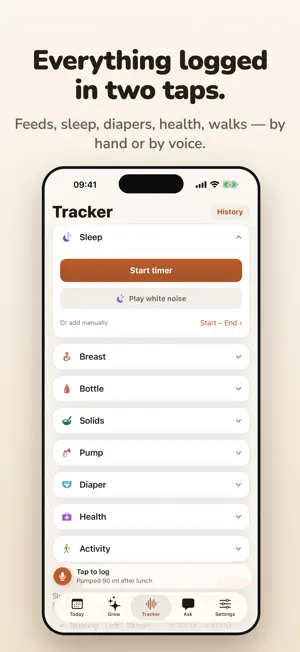
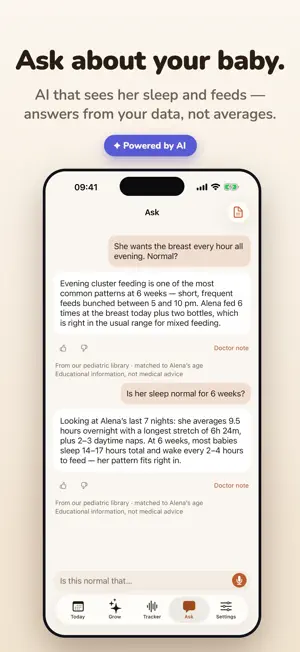
Say how the day went and FirstWeeks turns the sentence into entries. "Slept seven to eight, diaper at three, 90 ml at four" becomes four logs in about two seconds. Free, no ads, no subscription. Hands full, lights off, one arm around the baby — that's the moment this app was built for. LOG BY VOICE, OR IN ONE TAP Feeds, sleep, diapers and pumping. Timers keep running while the phone is locked, and a sleep timer stops right from the Lock Screen. Every entry stays editable, and your whole history exports to CSV whenever you want it. ASK "IS THIS NORMAL?" AT 3 AM Describe what's happening in your own words and get an answer matched to your baby's age — not a search result about someone else's baby. Plain "call your pediatrician if" signs, and a question list you can bring to the next visit. Educational, not medical advice. KNOW WHAT THIS WEEK IS ABOUT Every week opens with two short blocks: what's happening right now, and what to do about it. Five concrete points each, with the source named underneath — WHO, CDC, AAP, NHS. Week by week from day one to two years, with corrected age if your baby came early. WHITE NOISE THAT STOPS ITSELF One button. It starts softly, keeps playing with the screen off, and switches off after 45 minutes. REMINDERS THAT KNOW WHEN TO STOP The new week, milestones, a morning check on last night's sleep, an evening bedtime prompt. Every one is a switch you control, and anything you keep ignoring goes quiet on its own. WATCH THEM GROW Weight, length and head circumference on WHO growth curves with percentiles, plus a weekly sleep picture built from your own logs. FREE, AND WE MEAN IT No ads. No paywall. No subscription. Sign in with Apple or Google and your history syncs across both parents' devices; delete it any time and it's gone. FirstWeeks provides general educational information about infant care and development. It does not diagnose or treat, and it does not replace your pediatrician. If something worries you, call your doctor — or emergency services if it's urgent. Promotional image designed by Magnific — www.magnific.com
What’s new
Version 1.3 · Updated September 17, 2026
LOG FROM THE LOCK SCREEN Sleep and nursing timers now live on the Lock Screen and in the Dynamic Island: see the time, stop and log, switch sides — without unlocking. When you stop, a "Saved" card stays for a few minutes with an Open button that takes you straight to the entry to add a note. SIMPLER TIMERS No more pause. Sleep has one big "Stop & log"; nursing has "Stop & log" and "Switch side". Every save ends with one clean card: "Saved · Sleep", a Note field, and Save. EVERYTHING SYNCS BY ITSELF Entries reach your other devices and your partner's phone a few seconds after you log them — no more tapping sync. The app also syncs when it comes back to the foreground and every few minutes in the background. THE WEEK AT A GLANCE The badge on Today now shows the same stretch the calendar does — "Sep 4 – Oct 8 · Calm week" — and opens the calendar with one tap. The calendar legend explains each stretch: calm, growth, fussy, the development leap window, your logged days. ALSO Skills: tap the text to read the full description, tap the circle to mark it. The voice bar gently pulses so it's easy to find. The doctor note is written in the language of your last message. Editing times on a voice entry no longer blocks saving. Sources under the guide are short: WHO, CDC, NHS.
App privacy
The developer, WA GAMES LIMITED, reported these privacy practices to Apple.
Data Linked to You
The following data, which may be collected and linked to your identity, may be used for the following purposes:
- Contact Info: Name, Email Address
- Health & Fitness: Health
- User Content: Audio Data, Other User Content
- Identifiers: User ID
Used for: Third-Party Advertising, Developer’s Advertising or Marketing, Product Personalization, App Functionality, Other Purposes
Data Not Linked to You
The following data, which may be collected but is not linked to your identity, may be used for the following purposes:
- Identifiers: Device ID
- Usage Data: Product Interaction
- Diagnostics: Crash Data, Performance Data
Used for: Analytics, App Functionality
Alternatives to FirstWeeks: Baby Tracker
Looking for apps like FirstWeeks: Baby Tracker? Here are 6 similar apps on the App Store.
-
 Menor-Baby Tracker
-
 Firstweeks: Postpartum Care
-
 BabyLogly: Baby Tracker
-
 Bitty: Baby Tracker & Feed Log
-
 BabyCare: Baby Tracker Log
-
 Baby Journal - AI Tracker
| App | Rating | Price | Last updated | Compare |
|---|---|---|---|---|
| FirstWeeks: Baby Tracker | – | Free | September 17, 2026 | |
| Menor-Baby Tracker | – | Free | Sep 26, 2026 | Compare |
| Firstweeks: Postpartum Care | – | Free | Aug 28, 2026 | Compare |
| BabyLogly: Baby Tracker | – | Free | Oct 15, 2026 | Compare |
| Bitty: Baby Tracker & Feed Log | – | Free | Sep 28, 2026 | Compare |
| BabyCare: Baby Tracker Log | – | Free | Jan 17, 2026 | Compare |
| Baby Journal - AI Tracker | – | Free | Feb 18, 2026 | Compare |