

Restyla: AI Interior Design
Anton Gariachii Graphics & Design iPhoneiPadiPod touch
Restyla: AI Interior Design is a free Graphics & Design app for iPhone and iPad by Anton Gariachii. Rated 5.0/5 from 2 ratings. Requires iOS 17.0.
- Rating
- 5.0
- 2 ratings
- Price
- Free
- on the App Store
- Size
- 25 MB
- Age 4+
- Updated
- Sep 1
- 2026 · v1.0
Screenshots


About Restyla: AI Interior Design
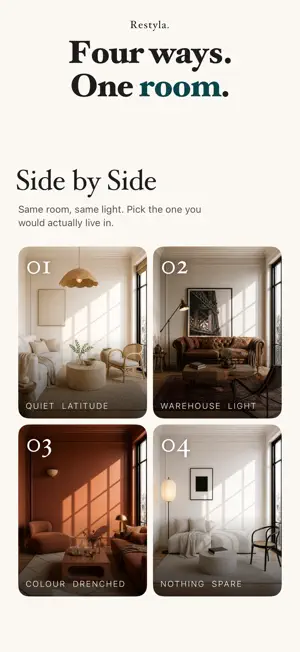
Restyla restyles the room you already live in. Photograph it from the doorway, choose a scheme, and see it finished — with your walls, your windows, your doors and your proportions where they were. Drag the slider, or hold the picture, to see the room as it is and check for yourself. That is the whole point: a beautiful room that is not yours is no use to anyone planning a renovation. FIFTY-FOUR SCHEMES Quiet Latitude. The Long Afternoon. Chalk & Timber. Evening Petrol. Warehouse Light. Jewel Box. Sunday Linen — and forty-seven more, including three written for a nursery or a child's room. Each is written as a specification — palette, materials, light, and how the room is composed — rather than as an adjective, because adjectives produce pastiche and specifications produce rooms. Every result names its materials in words, so you can read what it is made of. OR NOT A SCHEME AT ALL Bring a picture you like and Restyla takes its colours and its materials, never its layout. Or describe the room you want in your own words — on its own, or on top of a scheme you have already chosen. SIDE BY SIDE Run up to three schemes on the same photograph at once and put them on one screen at the same size. Later, in the archive, up to four saved versions of a room can be set beside each other the same way. Choosing is the job; a carousel cannot do it. CHANGE ONE THING Clear the clutter. Empty the room. Furnish an empty one. Evening light. Paler walls. One tap each, no style decision, and everything else stays where it is. WHERE THE MONEY SHOULD GO Say roughly what you mean to spend and Restyla sets out the shares — the rug, the lighting, the textiles — in proportions of your own figure, worked out on this phone in your own currency. It never puts a price on a result, because it cannot know what a sofa costs where you live. PROJECTS Rooms group under a name you choose — a flat, a floor, a client. A project sends as a single PDF: a cover, then one spread per room, today and as it could be at size, with the specification. One thing to hand a builder or an agent. HOW IT WORKS, AND WHAT LEAVES YOUR PHONE No account, no login, nothing to remember. Your photograph is sent to our own server, restyled, and sent back. It goes nowhere else. The original is deleted after two hours and the result after twenty-four. Your finished rooms live on this phone only. No analytics service sees your photographs, because the app contains none. The results are AI visualisations of a real room. They show one possible scheme; they are not photographs of completed work, and nothing in them is quoted or guaranteed. CREDITS Your first credit is free, and no card is needed for it. After that one credit is one generation — a restyle, or a single change — and it is spent only when a picture actually arrives: a failure charges nothing. Take a plan of 40 credits a week, or 180 credits a month; or buy a pack of 20, 50, 100 or 150 credits outright, which never renews and never expires. Anything you do not use stays on your balance while your plan is active. A plan renews until you stop it, and you can stop it at any time in your Apple Account settings. Terms of Use: https://byanton.dev/restyla/terms Privacy Policy: https://byanton.dev/restyla/privacy
App privacy
The developer, Anton Gariachii, reported these privacy practices to Apple.
Data Not Linked to You
The following data, which may be collected but is not linked to your identity, may be used for the following purposes:
- Purchases: Purchase History
- User Content: Photos or Videos
Used for: Analytics, App Functionality
Alternatives to Restyla: AI Interior Design
Looking for apps like Restyla: AI Interior Design? Here are 6 similar apps on the App Store. The highest rated is Nextroom - AI Home Room Design (5.0/5), and all 6 are free to download.
-
 Homeful: AI Interior Design
-
 Nextroom - AI Home Room Design
5.0
Nextroom - AI Home Room Design
5.0
-
 Room Design AI: Roomsy
5.0
Room Design AI: Roomsy
5.0
-
 MyHome: AI Interior Design
-
 AI Room Design & Makeover
-
 Interior Design AI - Home AI
5.0
Interior Design AI - Home AI
5.0
| App | Rating | Price | Last updated | Compare |
|---|---|---|---|---|
| Restyla: AI Interior Design | 5.0 / 5 (2 ratings) | Free | September 1, 2026 | |
| Homeful: AI Interior Design | – | Free | Sep 29, 2026 | Compare |
| Nextroom - AI Home Room Design | 5.0 / 5 (2) | Free | May 5, 2026 | Compare |
| Room Design AI: Roomsy | 5.0 / 5 (1) | Free | Sep 23, 2026 | Compare |
| MyHome: AI Interior Design | – | Free | Mar 19, 2026 | Compare |
| AI Room Design & Makeover | – | Free | May 4, 2026 | Compare |
| Interior Design AI - Home AI | 5.0 / 5 (9) | Free | Oct 19, 2026 | Compare |