

Homeful: AI Interior Design
Patryk Wichrowski Graphics & Design iPhoneiPadiPod touch
Homeful: AI Interior Design is a free Graphics & Design app for iPhone and iPad by Patryk Wichrowski. Requires iOS 16.4. Updated September 29, 2026.
- Price
- Free
- on the App Store
- Size
- 34 MB
- Age 4+
- Updated
- Sep 29
- 2026 · v1.1.0
Screenshots


About Homeful: AI Interior Design
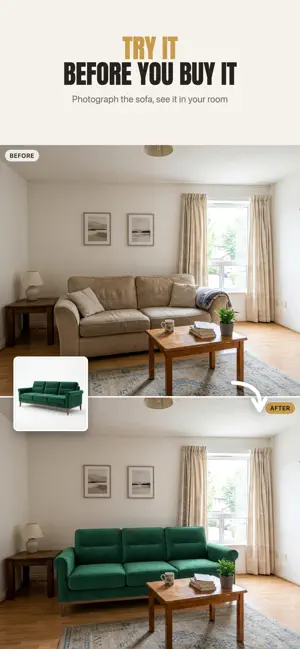
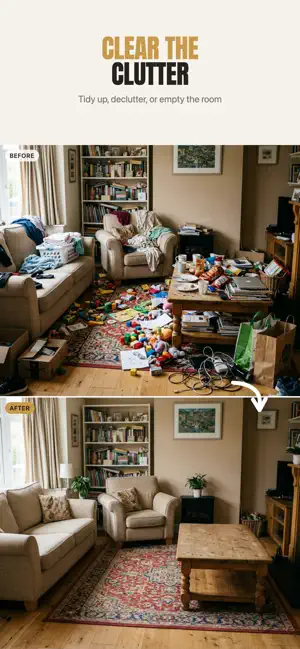
Redesign your own room from a photo. Explore a new style, try furniture and compare wall and floor finishes in Homeful for iPhone. See it before you buy it: choose what to change and compare a before-and-after visualization before planning your next purchase. SEVEN WAYS TO CHANGE YOUR HOME Swap: put real products in your room. Photograph the sofa, bed or rug you are considering, add a note, and see it standing in your own space before you spend anything. Rearrange: a new layout with the same furniture. Re-stage what you already own and find the arrangement you would never have thought of. Styles: one tap to a whole new look. Japandi, Scandinavian, Boho, Industrial, Mid-century, Coastal and more, matched to the kind of room you are actually in. Or upload the inspiration photos you have been saving and let Homeful dress your room in that look. Declutter: tidy up, clear the clutter, or empty the room completely. Ideal for listing photos and virtual staging. Surfaces: repaint walls, change the floor, retile, refinish trim and doors, all without moving a single piece of furniture. Upload a photo of your own paint sample or panel and see it applied. Exterior: facade, roof, windows and garden. Add a terrace, a pool, a pergola or a new driveway and judge the curb appeal before you commit. Floor Plan: upload a 2D plan and furnish the whole place at once, either a photorealistic render for every room or a single 3D cutaway view of the entire home. THREE TAPS 1. Take a photo, or pick one from your gallery. Use a clear photo that shows the area you want to change. 2. Choose what to change, or simply describe it in your own words. 3. Get a photoreal result in seconds. Drag to compare before and after, adjust it with one more line of text, and save the ones you love. IT STAYS YOUR ROOM Homeful aims to preserve your room’s geometry, lighting and perspective while changing the elements you request. Results are visual ideas: details, proportions and colors may differ. Check measurements and real material samples before buying; visualizations are not construction drawings. YOUR PHOTOS STAY PRIVATE Photos are stored privately and never made public. Location data is stripped when you upload. Delete your account and your photos and results go with it. SUBSCRIPTIONS Choose Weekly, Monthly or Yearly for an allowance of designs. Floor Plan requires Monthly or Yearly; variants require Yearly. • Homeful Weekly: weekly subscription, 15 designs a week • Homeful Monthly: monthly subscription, 50 designs a month, plus Floor Plan • Homeful Yearly: annual subscription, 60 designs a month, plus Floor Plan and variants Eligible new subscribers can start Weekly with a 3-day free trial. Current prices are shown in the app and may vary by country or region. Payment is charged to your Apple Account at confirmation of purchase. The subscription renews automatically unless it is canceled at least 24 hours before the end of the current period, and your account is charged for renewal within 24 hours of the end of the period. You can manage and cancel your subscription in your Apple Account settings after purchase. Any unused part of a free trial is forfeited when you buy a subscription. Terms of Service: https://gethomeful.com/terms/ Privacy Policy: https://gethomeful.com/privacy/
What’s new
Version 1.1.0 · Updated September 29, 2026
Find more ideas for your own home. • Explore 43 interior styles, each with a refreshed photo preview. • Choose from 432 options across walls, floors, trims, windows, doors, facades, roofs, gardens and additions, including 255 new options. • Compare new photo previews before choosing a finish or an exterior change. Exterior windows now have their own outdoor previews. Upload your photo, choose a change and compare the result with your original.
App privacy
The developer, Patryk Wichrowski, reported these privacy practices to Apple.
Data Linked to You
The following data, which may be collected and linked to your identity, may be used for the following purposes:
- Purchases: Purchase History
- Contact Info: Email Address, Name
- User Content: Photos or Videos
- Identifiers: User ID, Device ID
Used for: App Functionality
Alternatives to Homeful: AI Interior Design
Looking for apps like Homeful: AI Interior Design? Here are 6 similar apps on the App Store. The highest rated is Restyla: AI Interior Design (5.0/5), and all 6 are free to download.
-
 Roomique: AI Interior Design
-
 Mosaic: AI Interior Design
-
 Luna Home - AI Interior Design
-
 Restyla: AI Interior Design
5.0
Restyla: AI Interior Design
5.0
-
 Room Reboot: AI Room Designer
5.0
Room Reboot: AI Room Designer
5.0
-
 Room Planner & Design: Roomsy
5.0
Room Planner & Design: Roomsy
5.0
| App | Rating | Price | Last updated | Compare |
|---|---|---|---|---|
| Homeful: AI Interior Design | – | Free | September 29, 2026 | |
| Roomique: AI Interior Design | – | Free | Sep 7, 2026 | Compare |
| Mosaic: AI Interior Design | – | Free | Aug 13, 2026 | Compare |
| Luna Home - AI Interior Design | – | Free | Sep 28, 2026 | Compare |
| Restyla: AI Interior Design | 5.0 / 5 (2) | Free | Sep 1, 2026 | Compare |
| Room Reboot: AI Room Designer | 5.0 / 5 (1) | Free | Jun 18, 2026 | Compare |
| Room Planner & Design: Roomsy | 5.0 / 5 (1) | Free | Oct 26, 2026 | Compare |