

Audio Compressor: Compress Mp3
Sreenu Kistapuneni Music iPhoneiPadiPod touch
Audio Compressor: Compress Mp3 is a free Music app for iPhone and iPad by Sreenu Kistapuneni. Requires iOS 17.0. Updated August 25, 2026.
- Price
- Free
- on the App Store
- Size
- 40 MB
- Age 4+
- Updated
- Aug 25
- 2026 · v1.0
Screenshots


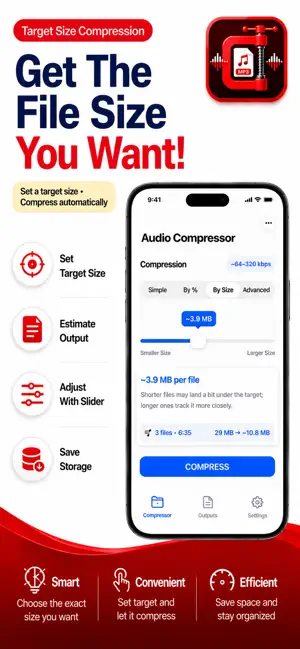
About Audio Compressor: Compress Mp3
Audio Compressor - Reduce Audio File Size Easily Compress audio files and reduce audio size with this audio compressor for iPhone and iPad. Whether you need to compress MP3, WAV, AAC, FLAC, M4A, or OGG, this MP3 compressor and audio compressor MP3 tool works quickly offline. Searches like audio compressor, audio compressor: mp3 reducer, audio compressor - mp3 shrink, audio compressor - shrink mp3, audio compressor: mp3 m4a, audio compressor mp3 converter, and mp3 compressor all mean smaller files without uploading private recordings. This audio file compressor helps with reducing audio file size while keeping useful listening quality. Perfect when you need to compress audio for WhatsApp, email, or Messages. Use the bitrate reducer to shrink audio files, make audio files smaller with an audio size reducer, and batch-compress many tracks. What Can You Do? • Audio compressor for major formats on iPhone and iPad • Compress MP3 files and reduce MP3 file size with an MP3 compressor • Reduce audio file size for sharing and storage cleanup • Bitrate reducer with custom kbps settings • Compress audio for WhatsApp and messaging apps • Shrink audio files and shrink MP3 tracks without a heavy editor • Batch audio compressor plus percentage or target size modes • Audio size reducer for music, podcasts, and voice memos Supported Audio Formats Compress MP3 with this MP3 compressor and audio compressor mp3 workflow. Compress WAV with a WAV audio compressor when exports are too large for email. Compress AAC with an AAC audio file compressor. Compress M4A with an M4A audio size reducer for audio compressor: mp3 m4a needs. Compress FLAC, OGG, OPUS, and WMA with matching bitrate reducer options. Compression Modes Simple Mode offers six levels from Maximum 32 kbps for voice memos and High 64 kbps for podcasts, through Medium 128 kbps for everyday balance, up to Minimum 320 kbps for quality-focused exports. By Percentage keeps a chosen percent of each file’s original size. By Size sets a target size per file for WhatsApp or email limits. Advanced Mode adds bitrate 32-320 kbps, sample rates 22.05 / 32 / 44.1 / 48 kHz, mono or stereo, and AAC-LC, HE-AAC, or HE-AAC v2 where supported. Why Use This Audio Compressor? • Compress audio files in seconds with an offline audio compressor • Audio file compressor with privacy: files stay on your device • MP3 compressor with broad format support • Reduce audio size for email attachments and cloud storage savings • Shrink audio files before sharing demos, podcasts, or lectures • Compress audio for WhatsApp sharing and batch playlist cleanup Key Features Support MP3, WAV, AAC, M4A, FLAC, OGG, OPUS, and WMA so you can compress audio from common libraries in one place. Choose Simple, Percentage, Size, or Advanced modes, run the batch audio compressor, import from Files, review outputs, then share. No account is required to shrink audio files. Who Uses This Audio Compressor? • Anyone who needs to compress audio for WhatsApp or Messages • Musicians using an MP3 compressor for demos • Podcasters who need an audio file compressor before publishing • Students shrinking lecture recordings and interviews • Anyone who wants to reduce audio file size and reclaim storage How to Use Open Audio Compressor → Select audio files → Choose Simple, By %, By Size, or Advanced → Compress → Share. Start compressing audio files on your iPhone today. Reduce audio file size for sharing on WhatsApp, email, or cloud storage. This MP3 compressor and audio compressor: mp3 reducer workflow covers audio compression needs with batch audio compressor and offline audio compressor support on iPhone and iPad. Terms of Use: https://www.apple.com/legal/internet-services/itunes/dev/stdeula/ Privacy Policy: https://modern-tools-privacy.netlify.app/?id=c2f8d9a3
App privacy
The developer, Sreenu Kistapuneni, reported these privacy practices to Apple.
Data Used to Track You
The following data may be used to track you across apps and websites owned by other companies:
- Identifiers: Device ID
- Usage Data: Advertising Data
Data Not Linked to You
The following data, which may be collected but is not linked to your identity, may be used for the following purposes:
- Identifiers: Device ID
- Usage Data: Advertising Data
Used for: Developer’s Advertising or Marketing
Alternatives to Audio Compressor: Compress Mp3
Looking for apps like Audio Compressor: Compress Mp3? Here are 6 similar apps on the App Store. The highest rated is MIXvs (5.0/5), and all 6 are free to download.
-
 Audio Compressor MP3 Converter
-
 Audio Converter: MP3 & More
-
 M4A to MP3 WAV Converter
4.0
-
 MIXvs
5.0
-
 Music Separator - Remove vocal
5.0
-
 ProRemote Light Edition
3.2
| App | Rating | Price | Last updated | Compare |
|---|---|---|---|---|
| Audio Compressor: Compress Mp3 | – | Free | August 25, 2026 | |
| Audio Compressor MP3 Converter | – | Free | Oct 27, 2026 | Compare |
| Audio Converter: MP3 & More | – | Free | Oct 7, 2026 | Compare |
| M4A to MP3 WAV Converter | 4.0 / 5 (4) | Free | Sep 18, 2026 | Compare |
| MIXvs | 5.0 / 5 (1) | Free | Sep 21, 2025 | Compare |
| Music Separator - Remove vocal | 5.0 / 5 (1) | Free | Mar 14, 2026 | Compare |
| ProRemote Light Edition | 3.2 / 5 (5) | Free | Apr 1, 2025 | Compare |