

M4A to MP3 WAV Converter
Cuneyt Kilic Music iPhoneiPadiPod touch
M4A to MP3 WAV Converter is a free Music app for iPhone and iPad by Cuneyt Kilic. Rated 4.0/5 from 4 ratings. Requires iOS 15.6. Updated October 29, 2026.
- Rating
- 4.0
- 4 ratings
- Price
- Free
- on the App Store
- Size
- 151 MB
- Age 4+
- Updated
- Oct 29
- 2026 · v1.3.5
Screenshots
About M4A to MP3 WAV Converter
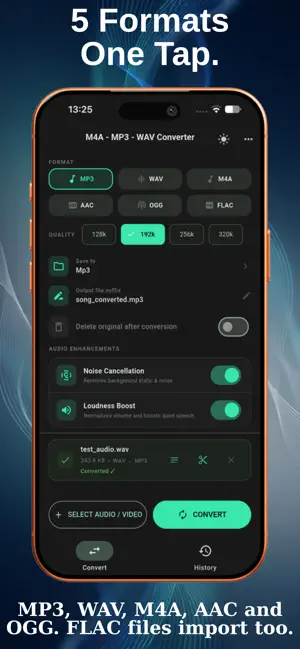
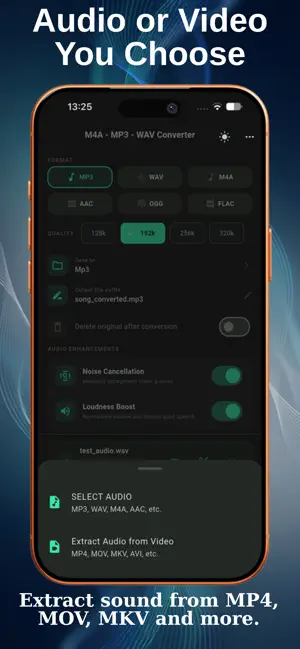
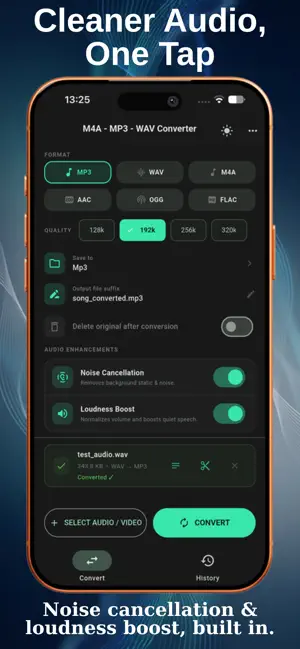
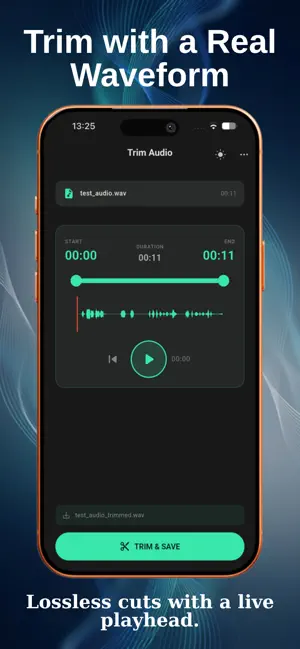
Convert, trim, and transcribe audio, all in one simple app. M4A to MP3 Converter is an audio toolkit for converting files quickly, cleaning up recordings, and turning speech into text, without uploading anything to the cloud. CONVERT AUDIO FILES Convert MP3, WAV, M4A, AAC, OGG, and FLAC files to MP3, WAV, M4A, AAC, or OGG. For MP3, M4A, AAC, and OGG you can choose the quality (128k, 192k, 256k, or 320k). Select several files and convert them in one go. You can also add a suffix to the new file names and optionally delete the originals after converting. EXTRACT AUDIO FROM VIDEO Pull the audio track out of MP4, M4V, MOV, MKV, WebM, and AVI videos and save it in the format you choose. Videos without a sound track cannot be converted, and the app tells you so. ONE-TAP AUDIO ENHANCEMENTS Optional filters you can switch on before converting: • Noise Cancellation reduces constant background noise and hiss • Loudness Boost evens out volume and lifts quiet speech TRIM WITH A WAVEFORM See the full waveform, move the start and end handles, and follow along with a live playhead. Trimming cuts the file without re-encoding, so the audio quality stays the same. TRANSCRIBE SPEECH TO TEXT, OFFLINE Turn voice recordings into text with the on-device Whisper model. The spoken language is detected automatically, no internet connection is needed, and your audio never leaves your phone. Copy the text or save it as a TXT file. Works best with clear speech. HISTORY Every conversion is saved to your History, so you can find and share past files again. YOUR FILES STAY ON YOUR DEVICE Converted files are saved on your device and can be found in the Files app. Conversions and transcriptions happen entirely on your device. No account or sign-up is needed. TRANSLATED INTO 60+ LANGUAGES The app interface is available in more than 60 languages. FREE, WITH OPTIONAL AD REMOVAL The app is free and shows ads. A one-time purchase removes them. Every feature is included either way. Download now and convert your first file in seconds.
What’s new
Version 1.3.5 · Updated October 29, 2026
Fixed cases where the app could get stuck on loading. Clearer error message for videos without an audio track, a fixed Privacy Policy link, and other stability improvements. FLAC is no longer offered as an output format (FLAC files can still be imported).
App privacy
The developer, Cuneyt Kilic, reported these privacy practices to Apple.
Data Used to Track You
The following data may be used to track you across apps and websites owned by other companies:
- Identifiers: Device ID
- Usage Data: Product Interaction
Data Not Linked to You
The following data, which may be collected but is not linked to your identity, may be used for the following purposes:
- Identifiers: Device ID
- Usage Data: Product Interaction
- Diagnostics: Crash Data
Used for: Third-Party Advertising, Analytics
Alternatives to M4A to MP3 WAV Converter
Looking for apps like M4A to MP3 WAV Converter? Here are 6 similar apps on the App Store. The highest rated is Exploring the Space (5.0/5), and all 6 are free to download.
-
 Mp3ly: M4A to MP3
-
 Dismusic: Music Distribution
4.0
Dismusic: Music Distribution
4.0
-
 Exploring the Space
5.0
Exploring the Space
5.0
-
 Sounds of the World
-
 Outgrown: Curate Your Music
5.0
Outgrown: Curate Your Music
5.0
-
 Synced: Music Sync
5.0
Synced: Music Sync
5.0
| App | Rating | Price | Last updated | Compare |
|---|---|---|---|---|
| M4A to MP3 WAV Converter | 4.0 / 5 (4 ratings) | Free | October 29, 2026 | |
| Mp3ly: M4A to MP3 | – | Free | Sep 24, 2026 | Compare |
| Dismusic: Music Distribution | 4.0 / 5 (1) | Free | Oct 27, 2026 | Compare |
| Exploring the Space | 5.0 / 5 (1) | Free | Jan 18, 2026 | Compare |
| Sounds of the World | – | Free | Jul 31, 2026 | Compare |
| Outgrown: Curate Your Music | 5.0 / 5 (2) | Free | Oct 14, 2026 | Compare |
| Synced: Music Sync | 5.0 / 5 (1) | Free | Jul 13, 2026 | Compare |