

Pellet - Notes, Tasks, PKM
Buildraai LLC Productivity iPhoneiPadiPod touch
Pellet - Notes, Tasks, PKM is a free Productivity app for iPhone and iPad by Buildraai LLC. Rated 5.0/5 from 1 ratings. Requires iOS 16.4.
- Rating
- 5.0
- 1 ratings
- Price
- Free
- on the App Store
- Size
- 64 MB
- Age 4+
- Updated
- Oct 22
- 2026 · v0.26.0
Screenshots


About Pellet - Notes, Tasks, PKM
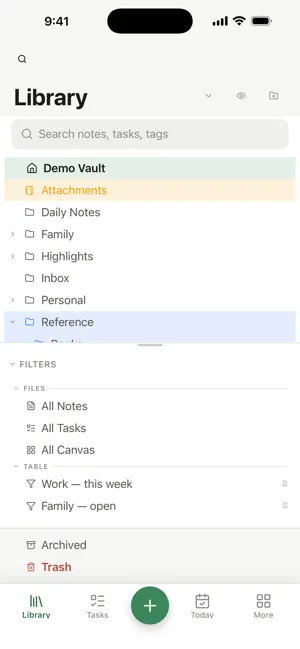
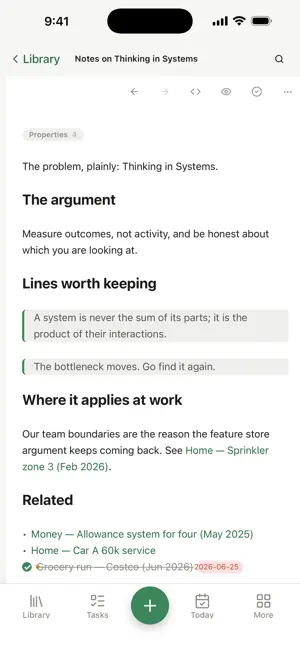
Pellet keeps your notes as plain markdown files in a folder you own. No account, no server, no proprietary format — open the same folder in any other editor and everything is still there. AN EDITOR THAT STAYS OUT OF THE WAY Write in markdown with live preview, wiki-style links between notes, backlinks, tags and full-text search. Your vault is just files, so nothing is trapped behind an export button. A TASK MANAGER THAT LIVES IN YOUR NOTES Tasks are ordinary markdown files with front matter, so a task can be a note and a note can be a task. Due dates, recurrence, subtasks, checklists and kanban boards — all reading from the same folder. CALENDAR ALONGSIDE YOUR WORK See your day next to your notes. Connect Google Calendar or your existing calendar accounts, or work entirely offline with dated notes. CANVAS, HANDWRITING AND VOICE Sketch on an infinite canvas, write by hand with Apple Pencil, and record voice notes. Handwriting and recordings can be turned into searchable text so they join the rest of your vault instead of sitting in a corner. SYNC YOU CONTROL Sync between your devices is end-to-end encrypted and runs through a relay you choose or host yourself. There is no Pellet account and no Pellet server holding your notes. WORKS OFFLINE, ALWAYS Everything works with no network. Nothing is fetched to open a note, and nothing phones home. Pellet reads and writes ordinary markdown, so it fits alongside whatever else you already use.
What’s new
Version 0.26.0 · Updated October 22, 2026
Here's what's new in this release: • Linked mentions. Turn on Settings › General › Show linked mentions at the end of notes, and each note lists the passages in other notes that link to it. • Pin a tab. Right-click a tab and choose Pin tab. It moves to the front, drops its close button, and a note you open from it opens in a new tab. • More template variables. {{yesterday}}, {{tomorrow}}, {{date+1w}}, {{weekday}}, {{folder}}, {{cursor}}, {{selection}} and more, plus date codes like MMM and Do. Type {{ in a note in your Templates folder to see them all. • One filter box for Notes, Search, Tags and Properties, with match case and a copy menu. • Images in a note open full size when you click them. Right-click to copy one. • Archive a whole folder in one step, and make a new folder right from the Move dialog. • Delete without being asked. Set Settings › General › Ask before moving to Trash to Never. It's on Always unless you change it. • The sync relay cleans up after itself. It clears old versions once every device has caught up, and only keeps a file until every device has it. • Sync fixes. Deletions now sync in folders that hold a note with an accented name like "für", large files make it over slow connections, and opening a big vault on Windows should no longer freezes Pellet.
App privacy
The developer, Buildraai LLC, reported these privacy practices to Apple.
Data Not Collected
The developer does not collect any data from this app.
Alternatives to Pellet - Notes, Tasks, PKM
Looking for apps like Pellet - Notes, Tasks, PKM? Here are 6 similar apps on the App Store. The highest rated is Cairn Tasks (5.0/5), and all 6 are free to download.
-
 Checkly — Calendar Checklist
-
 OwnNotes - Private AI Note
-
 Cairn Tasks
5.0
Cairn Tasks
5.0
-
 Dailyboard
-
 Labyrinth: Tasks & Notes
-
 Cairn — Markdown Tasks
5.0
Cairn — Markdown Tasks
5.0
| App | Rating | Price | Last updated | Compare |
|---|---|---|---|---|
| Pellet - Notes, Tasks, PKM | 5.0 / 5 (1 rating) | Free | October 22, 2026 | |
| Checkly — Calendar Checklist | – | Free | Aug 12, 2026 | Compare |
| OwnNotes - Private AI Note | – | Free | Sep 17, 2026 | Compare |
| Cairn Tasks | 5.0 / 5 (3) | Free | Apr 10, 2026 | Compare |
| Dailyboard | – | Free | May 1, 2026 | Compare |
| Labyrinth: Tasks & Notes | – | Free | Aug 10, 2026 | Compare |
| Cairn — Markdown Tasks | 5.0 / 5 (1) | Free | Oct 21, 2026 | Compare |