

Tael - Expense Tracker
Tael Technology, LLC Finance iPhoneiPadiPod touch
Tael - Expense Tracker is a free Finance app for iPhone and iPad by Tael Technology, LLC. Rated 5.0/5 from 4 ratings. Requires iOS 18.4.
- Rating
- 5.0
- 4 ratings
- Price
- Free
- on the App Store
- Size
- 38 MB
- Age 4+
- Updated
- Oct 13
- 2026 · v1.18
Screenshots


About Tael - Expense Tracker
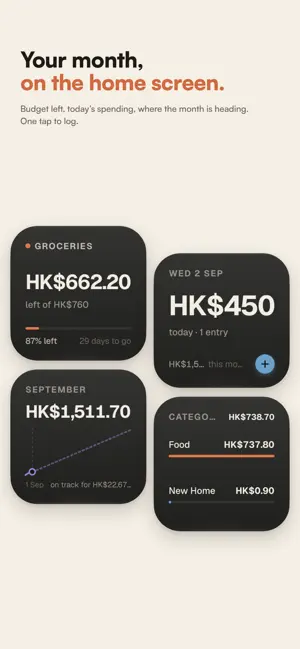
Categories say what. Tael says what for. Two seconds now. An answer you'll badly want at the end of the month. Tap twice when you buy something — or teach Tael a rule and watch it file itself. Then, whenever you wonder what the Japan trip really cost, or whether that client was worth the trouble, the number is already waiting. No bank login. No setup evening. Nothing ever leaves your phone. IT TRACKS WHAT YOU ACTUALLY THINK ABOUT Not Shopping. Not Miscellaneous. The Japan trip. The kitchen renovation. Sundays with your dad. How good it felt. One purchase can belong to several at once — that supermarket run was part groceries, part the dinner party, part the trip — so you never have to pick. SO YOU CAN FINALLY ANSWER • What the whole trip cost — flights, that dinner, the taxi, the 1am souvenir • Whether this client is worth it, once the lunches and the software are in • What the hobby actually costs over a year, and whether you'd miss it • Which purchases you're still glad about a month later Not after a weekend of reconciling. On a Tuesday, in four seconds. IT LEARNS, SO YOU STOP HAVING TO Show it once that your Tuesday coffee is client work, and every Tuesday coffee after that files itself — your Shortcut fires, your rule matches, and it's logged without you opening the app. Everything else is two taps from the lock screen. Correct it once and it remembers. Every correction is one fewer decision, permanently. Nothing to configure on day one — Tael suggests the rules and you say yes. Or open them up and write your own, if that's more your thing. You could do all this in a spreadsheet. People do, for about three weeks. This is the version that survives a busy fortnight. NOBODY SEES THIS BUT YOU No account. No sign-up. Your ledger — every purchase, note, category and rating — is stored on your device and stays there. We never receive it and have no way to read it. Tael never collects your transactions, amounts, notes or categories. Which is why you'll actually record that the dinner was a 3 out of 10, or that you're still annoyed about the jacket. That's the honest version, and the honest version is the one worth having. EVERY CURRENCY, ONE LEDGER Pay in yen, log in yen. Tael does the maths, so a trip is one number instead of four. WHAT'S IN IT • Two-tap capture from the lock screen • Log from anywhere with Shortcuts and automations • Your own categories, that cross each other • One purchase, split across everything it belongs to • Rules suggested from your corrections, or written by you • Multi-currency, one ledger • Works offline, always WHO IT'S FOR People who want their money to make sense on their own terms — whether that means a proper system or just knowing what the holiday cost. Not for people who want an app to drain a bank feed and budget for them with no involvement at all. Tael asks for a little of you early on, but delivers a lot for you later. Tael is free to use. Tael Pro is an optional subscription that unlocks unlimited smart rules and enhanced capabilities — see in-app for details. Apple Terms of Use (EULA): https://www.apple.com/legal/internet-services/itunes/dev/stdeula/ Tael Terms of Use: https://usetael.com/terms Privacy Policy: https://usetael.com/privacy
What’s new
Version 1.18 · Updated October 13, 2026
Tael Pro is now one payment, for life. No subscription. Repeats, rebuilt • Set a repeat right in the add screen: tap Repeat, pick how often, and choose when to be reminded. • Every repeat logs itself on its day, fixed amount or not. • The calendar shows what's coming, with totals on each day. • The Bills page is gone. Everything it did now lives in Repeats and the calendar. Clearer rules • When two rules match the same payment, the longer name wins. If they're tied, you pick which one wins. • Income and spending rules are kept apart, so they never clash. • Free now includes 12 rules. Smaller things • Refunds from your bank's notifications log as money in, not as another charge. • A budget alert opens that budget. • Home Screen widgets open the right page every time. • Faster lists, calendar and rules on large ledgers. • Fixes for reminders, notifications and smaller iPhones.
App privacy
The developer, Tael Technology, LLC, reported these privacy practices to Apple.
Data Not Linked to You
The following data, which may be collected but is not linked to your identity, may be used for the following purposes:
- Identifiers: Device ID
- Usage Data: Product Interaction, Other Usage Data
- Diagnostics: Crash Data, Performance Data, Other Diagnostic Data
Used for: Analytics, App Functionality
Alternatives to Tael - Expense Tracker
Looking for apps like Tael - Expense Tracker? Here are 6 similar apps on the App Store.
-
 Spendly AI: Budget & Expenses
-
 Clarify Expenses
-
 Lumi - Smart Expense Tracker
-
 Group Spending
-
 Expensly: Auto Budget Tracker
-
 Reece: Receipt Scanner
| App | Rating | Price | Last updated | Compare |
|---|---|---|---|---|
| Tael - Expense Tracker | 5.0 / 5 (4 ratings) | Free | October 13, 2026 | |
| Spendly AI: Budget & Expenses | – | Free | Sep 20, 2026 | Compare |
| Clarify Expenses | – | 3.99 USD | Oct 23, 2026 | Compare |
| Lumi - Smart Expense Tracker | – | Free | Oct 9, 2026 | Compare |
| Group Spending | – | Free | Sep 29, 2026 | Compare |
| Expensly: Auto Budget Tracker | – | Free | Oct 22, 2026 | Compare |
| Reece: Receipt Scanner | – | Free | Oct 24, 2026 | Compare |