

Parent Planner - LittleWeek AI
向冬 朱 Productivity iPhoneiPadiPod touch
Parent Planner - LittleWeek AI is a free Productivity app for iPhone and iPad by 向冬 朱. Rated 5.0/5 from 2 ratings. Requires iOS 15.0.
- Rating
- 5.0
- 2 ratings
- Price
- Free
- on the App Store
- Size
- 59 MB
- Age 4+
- Updated
- Sep 17
- 2026 · v1.1.0
Screenshots


About Parent Planner - LittleWeek AI
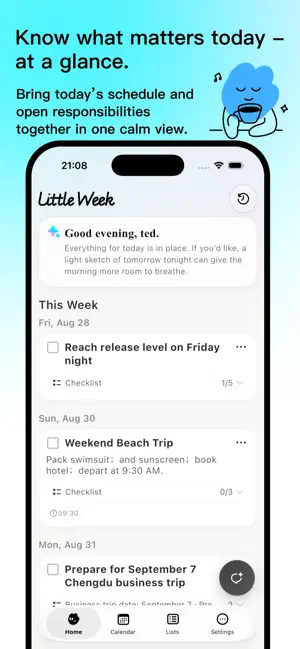
A planner for parents: class schedules, shared calendars, to-dos, and shopping lists—organized with AI. Family plans rarely arrive in one neat place. They show up in school notices, screenshots, files, and last-minute messages. LittleWeek AI turns those scattered details into clear, reviewable plans—and keeps the adults in your household on the same page. LET AI HANDLE THE FIRST PASS Paste text or add an image or file. LittleWeek AI pulls out dates, places, to-dos, checklists, reminders, and details that need confirmation. You see an editable draft first. Nothing becomes part of your family plan until you review and save it. BRING CLASS SCHEDULES INTO YOUR FAMILY CALENDAR Take a photo of a timetable or import a screenshot or PDF. Review and edit the recognized lessons before saving. See saved classes in Home and Calendar alongside your family's other plans. KEEP EVERYONE IN SYNC Share one household space with another adult. See the same schedule, assign specific to-dos, and keep completion status up to date—without turning family life into a project-management system. KNOW WHAT MATTERS TODAY Today’s Brief brings together today’s schedule, open responsibilities, things to bring, and reminders in a calm, readable view. The full picture stays in Calendar. PLANS, LISTS, AND NOTES STAY WHERE THEY BELONG • See the week, month, or year in a shared family calendar • Assign to-dos and keep progress visible • Build shared shopping, packing, and everyday lists • Save reference details as notes instead of forcing them into tasks • Choose the reminders and daily summaries that work for you BUILT FOR REVIEW, NOT BLIND AUTOMATION AI can miss or misread details. LittleWeek AI keeps the source attached so you can check names, dates, places, and next steps before anyone acts on them. Less to remember. More room for family. Terms of Use (EULA): https://www.apple.com/legal/internet-services/itunes/dev/stdeula/ Privacy Policy: https://littleweekai.com/privacy
What’s new
Version 1.1.0 · Updated September 17, 2026
New in 1.1.0 - Class schedules: Import a timetable from a photo, screenshot, or PDF. Review and edit the lessons before saving, then see them in Home and Calendar. - Easier family coordination: Share plans with another adult, assign to-dos, and keep track of shared lists together. - A clearer App Store name: Parent Planner - LittleWeek AI. The same LittleWeek AI, with a name that makes its purpose easier to recognize.
App privacy
The developer, 向冬 朱, reported these privacy practices to Apple.
Data Linked to You
The following data, which may be collected and linked to your identity, may be used for the following purposes:
- Purchases: Purchase History
- Identifiers: User ID, Device ID
- Usage Data: Product Interaction, Other Usage Data
- Other Data: Other Data Types
- Location: Coarse Location
- Contact Info: Email Address, Name, Phone Number
- User Content: Photos or Videos, Customer Support, Other User Content
Used for: Analytics, App Functionality
Alternatives to Parent Planner - LittleWeek AI
Looking for apps like Parent Planner - LittleWeek AI? Here are 6 similar apps on the App Store. The highest rated is Lumi: AI Family Planner (5.0/5), and all 6 are free to download.
-
 Lumi: AI Family Planner
5.0
-
 MoveMyBox - Box Inventory
4.3
-
 Vitality Family App
-
 Nokosu - Folder Notes
-
 PersonAI: To-Do & Life Planner
5.0
-
 Notes, To-Do List & Planner
4.7
| App | Rating | Price | Last updated | Compare |
|---|---|---|---|---|
| Parent Planner - LittleWeek AI | 5.0 / 5 (2 ratings) | Free | September 17, 2026 | |
| Lumi: AI Family Planner | 5.0 / 5 (1) | Free | Oct 10, 2026 | Compare |
| MoveMyBox - Box Inventory | 4.3 / 5 (7) | Free | Aug 22, 2026 | Compare |
| Vitality Family App | – | Free | Mar 24, 2026 | Compare |
| Nokosu - Folder Notes | – | Free | Oct 22, 2026 | Compare |
| PersonAI: To-Do & Life Planner | 5.0 / 5 (16) | Free | Oct 2, 2026 | Compare |
| Notes, To-Do List & Planner | 4.7 / 5 (111) | Free | Sep 17, 2026 | Compare |