

Nokosu - Folder Notes
Yuto Sasaki Productivity iPhoneiPadiPod touchMac
Nokosu - Folder Notes is a free Productivity app for iPhone and iPad by Yuto Sasaki. Requires iOS 26.0. Updated October 15, 2026.
- Price
- Free
- on the App Store
- Size
- 29 MB
- Age 4+
- Updated
- Oct 15
- 2026 · v3.0.1
Screenshots


About Nokosu - Folder Notes
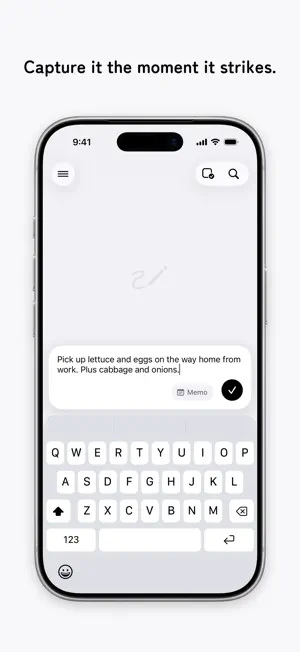
Nokosu is an app for instantly "keeping" memos, to-dos, camera photos, album images, and more. With its simple, effortless feel, you can jot down your thoughts just as they come. ■ Capture the moment One button in the bottom-right corner. Text, a photo you snap on the spot, or an image from your library — save it the instant it comes to mind. ■ Memos and to-dos Text you want to keep goes in a memo; things to get done go in a to-do. Both are just as quick to save the moment they come to mind — and you can switch between memo and to-do anytime. ■ Stack to organize Just stack one memo onto another and a new folder is created automatically. Things tidy themselves with a simple touch. ■ Drag & drop, freely Move memos and folders anywhere with drag & drop. Reorder them, move them in and out of folders — everything just as you like. ■ Look back on the calendar You can browse your memos on a calendar, by the date they were created. ■ iCloud sync Sync your memos in real time across devices signed in with the same Apple Account, including Nokosu for Mac. ■ Bookmarks Bookmark important memos and call them up anytime from the Bookmarks list. ― Nokosu Pro ― A monthly plan that bundles features for keeping things even more conveniently. ■ Nested folders The free version lets you create folders at the top level only; with Pro, you can also create folders on deeper levels. ■ Locked Folder Lock sensitive memos, images, and folders with Face ID. Nothing in the Locked Folder appears on Home, in search, or in any list, and you can move existing memos, images, and folders into it. ■ Full history in Memos & Images On the Memos and Images pages, look back at memos and images older than one month. ■ All themes available In addition to the default Light theme, dress up the app with Dark, Beige, Navy, and White. ■ Customize how folders look Set a color and an icon for each folder. The free version comes with the basic colors, and Pro unlocks every color and every icon. ■ Quick input The keyboard appears the moment you open the app, so you can start writing right away without tapping the input button. ■ Lock Screen widget Create a note or add a photo with a single tap from the Nokosu widget on your Lock Screen. ■ Control Center widget Create a note or add a photo with a single tap from the Nokosu widget in Control Center or on the Action button. ■ Save to Photos too When you capture a photo memo in the app, you can also copy the photo to your Photo Library. Terms of Use https://nokosu.app/en/terms/ Privacy Policy https://nokosu.app/en/privacy/
What’s new
Version 3.0.1 · Updated October 15, 2026
・Nokosu for Mac is here. With the same Apple Account, your iPhone memos sync just as they are, and you can use Nokosu Pro on your Mac too. ・Plus various small improvements and bug fixes.
App privacy
The developer, Yuto Sasaki, reported these privacy practices to Apple.
Data Linked to You
The following data, which may be collected and linked to your identity, may be used for the following purposes:
- Purchases: Purchase History
- Identifiers: User ID, Device ID
- Usage Data: Product Interaction, Other Usage Data
- Diagnostics: Crash Data, Other Diagnostic Data
Used for: Analytics, App Functionality
Alternatives to Nokosu - Folder Notes
Looking for apps like Nokosu - Folder Notes? Here are 6 similar apps on the App Store. The highest rated is Stash: Save Links for Later (5.0/5), and all 6 are free to download.
-
 Stash: Save Links for Later
5.0
Stash: Save Links for Later
5.0
-
 Minbi – Your Memory Inbox
-
 Bookmarks: Manage & Read Later
5.0
Bookmarks: Manage & Read Later
5.0
-
 Tuckii - Save Links & Bookmark
-
 ThisDay: Planner & Reminders
5.0
ThisDay: Planner & Reminders
5.0
-
 Brainee: Second Brain Notes
5.0
Brainee: Second Brain Notes
5.0
| App | Rating | Price | Last updated | Compare |
|---|---|---|---|---|
| Nokosu - Folder Notes | – | Free | October 15, 2026 | |
| Stash: Save Links for Later | 5.0 / 5 (1) | Free | Oct 17, 2026 | Compare |
| Minbi – Your Memory Inbox | – | Free | Sep 11, 2026 | Compare |
| Bookmarks: Manage & Read Later | 5.0 / 5 (3) | Free | Sep 26, 2026 | Compare |
| Tuckii - Save Links & Bookmark | – | Free | Oct 16, 2026 | Compare |
| ThisDay: Planner & Reminders | 5.0 / 5 (1) | Free | Oct 10, 2026 | Compare |
| Brainee: Second Brain Notes | 5.0 / 5 (3) | Free | Oct 17, 2026 | Compare |