

ClipHist
Yakir Edry Giladi Productivity iPhoneiPadiPod touch
ClipHist is a free Productivity app for iPhone and iPad by Yakir Edry Giladi. Requires iOS 16.0. Updated September 7, 2026.
- Price
- Free
- on the App Store
- Size
- 1 MB
- Age 4+
- Updated
- Sep 7
- 2026 · v1.2.0 (50)
Screenshots
Save to Pinterest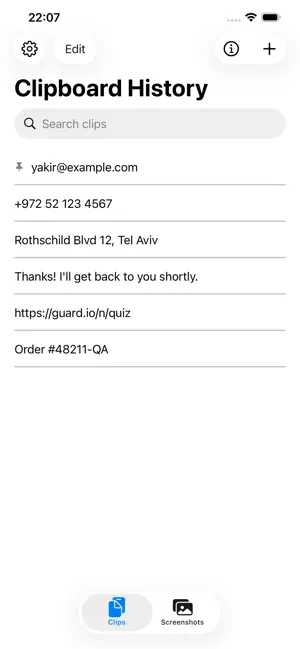


About ClipHist
Keep the text you paste all the time exactly where you can reach it. Your email address. Your home address. That link you send people constantly. The reply you type out ten times a week. ClipHist keeps them all in one simple list, and copies any of them to your clipboard with a single tap. NO CLUTTER A clean list of your snippets and nothing else. No accounts, no sign-up, no onboarding carousel, no ads. ONE TAP TO COPY Tap any clip and it's on your clipboard, ready to paste wherever you need it. A brief confirmation lets you know it worked. MAKE IT YOURS • Add clips by typing, or pull in whatever you copied last • Edit any clip whenever you like • Swipe to delete what you no longer need • Drag your clips into whatever order suits you — the arrangement sticks LIGHT OR DARK Choose Light, Dark, or let ClipHist follow your system setting. YOUR CLIPS STAY ON YOUR DEVICE This matters, so here is exactly how it works. Your clips are written to a single file inside ClipHist's own private storage on your iPhone. iOS keeps that storage sandboxed, so other apps cannot read it. ClipHist contains no networking code whatsoever. There are no servers, no account, no sign-in, and no sync. Your clips are never uploaded, and they are never shared with the developer or any third party. There is no analytics, no tracking, and no advertising, and the app includes no third-party code of any kind. Worth knowing: if you use iPhone backups, your clips are included in your own backup, which is how they survive when you move to a new phone. Those backups belong to you and are handled by Apple, not by this app. Clipboard access happens only when you act. ClipHist writes to your clipboard when you tap a clip to copy it, and reads from it only when you tap Paste from Clipboard. It never watches your clipboard in the background. Simple, fast, and yours.
What’s new
Version 1.2.0 (50) · Updated September 7, 2026
• ClipHist Keyboard — reach your saved clips while typing in any app • Screenshots — save a screenshot straight to ClipHist and delete it from Photos; tap any saved screenshot to copy it • Save Text as Clips — pull the text out of a screenshot on device • Faster keyboard launch and a refreshed About screen
App privacy
The developer, Yakir Edry Giladi, reported these privacy practices to Apple.
Data Not Collected
The developer does not collect any data from this app.
Alternatives to ClipHist
Looking for apps like ClipHist? Here are 6 similar apps on the App Store. The highest rated is Zinnect: Contact Centric To-do (5.0/5), and all 6 are free to download.
-
 Clipboard Boost Assistant
-
 TaggyNote
2.0
-
 Zinnect: Contact Centric To-do
5.0
-
 KeepText: Snippet Keyboard
-
 NowTodo: Lock Screen Tasks
-
 Atelier Tables
| App | Rating | Price | Last updated | Compare |
|---|---|---|---|---|
| ClipHist | – | Free | September 7, 2026 | |
| Clipboard Boost Assistant | – | Free | Feb 5, 2026 | Compare |
| TaggyNote | 2.0 / 5 (1) | Free | Apr 22, 2026 | Compare |
| Zinnect: Contact Centric To-do | 5.0 / 5 (3) | Free | Aug 7, 2026 | Compare |
| KeepText: Snippet Keyboard | – | Free | Jul 30, 2026 | Compare |
| NowTodo: Lock Screen Tasks | – | Free | Aug 17, 2026 | Compare |
| Atelier Tables | – | Free | Nov 14, 2026 | Compare |
Compare ClipHist with the top alternatives: ratings, updates, ASO score and keyword gaps →