

Clipwell: Snippets & Clips
Tom Weiss Productivity iPhoneiPadiPod touch
Clipwell: Snippets & Clips is a free Productivity app for iPhone and iPad by Tom Weiss. Requires iOS 18.0. Updated September 5, 2026.
- Price
- Free
- on the App Store
- Size
- 2 MB
- Age 4+
- Updated
- Sep 5
- 2026 · v1.0.1
Screenshots



About Clipwell: Snippets & Clips
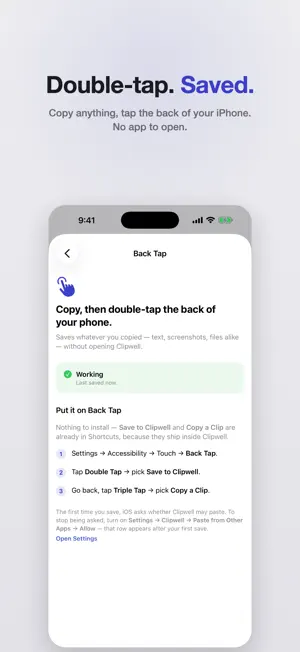
Clipwell keeps the things you reuse within reach — wherever you are on your iPhone. Addresses. Replies. Email signatures. Links. Templates. Markdown notes. The little pieces of information you keep hunting for, or typing again. Save them once. Bring them back without stopping what you're doing. DOUBLE-TAP TO SAVE Copy anything, then double-tap the back of your iPhone. It's saved. No app to open, no keyboard to switch to, and nothing to set up beyond pointing Back Tap at Clipwell once. GET A CLIP WITHOUT SWITCHING APPS Triple-tap the back of your iPhone and choose from your Clips. Pick one and it's copied, ready to paste right where you already are. You can also put Clipwell on the Action Button, use Siri or Shortcuts, or open it from Control Center. YOUR CLIPS ON YOUR HOME SCREEN Keep recent Clips or your Favorites on your Home Screen. Tap one and it's copied instantly — Clipwell doesn't even open. CREATE CLIPS OF YOUR OWN Clipwell isn't only for things you've copied. Write reusable replies, templates, lists and notes directly in the app, with Markdown formatting when you want it. SAVE FROM ANY APP Share text, links, images or files to Clipwell from any app's Share Sheet. Nothing to set up, and it never touches your clipboard. KEEP WHAT MATTERS Recent Clips clean themselves up automatically — after a day, three, a week or a month, whichever you choose. Keep anything you want indefinitely, and favorite the things you reach for most. AN OPTIONAL KEYBOARD If you want to paste without leaving the app you're in, Clipwell includes a keyboard: press and hold the globe key, pick Clipwell, tap a Clip and it's inserted. It's entirely optional — everything above works without it. PRIVATE BY CONSTRUCTION Clipwell contains no networking code. It cannot send your data anywhere, because there is nothing in it that can. No account, no sign-in, no analytics, no ads, no tracking. Everything stays on your iPhone. Clipwell doesn't monitor your clipboard. It only remembers what you explicitly save. PAY ONCE Clipwell Pro is a one-time purchase that unlocks unlimited Clips plus images and files. Not a subscription — buy it once, keep it.
What’s new
Version 1.0.1 · Updated September 5, 2026
• The upgrade screen no longer lets you tap Purchase while the App Store is unreachable — it now says so instead of failing. • Reliability improvements.
App privacy
The developer, Tom Weiss, reported these privacy practices to Apple.
Data Not Collected
The developer does not collect any data from this app.
Alternatives to Clipwell: Snippets & Clips
Looking for apps like Clipwell: Snippets & Clips? Here are 6 similar apps on the App Store. The highest rated is SpillStack (5.0/5), and all 6 are free to download.
-
 NoteManagerPro
-
 Later? Brain Dump Notes
-
 WhereTimeGo: Time Tracker
-
 SpillStack
5.0
-
 Block in Time
5.0
-
 Yeliner: Outline, Notes, Tasks
| App | Rating | Price | Last updated | Compare |
|---|---|---|---|---|
| Clipwell: Snippets & Clips | – | Free | September 5, 2026 | |
| NoteManagerPro | – | Free | Oct 27, 2026 | Compare |
| Later? Brain Dump Notes | – | Free | Sep 22, 2026 | Compare |
| WhereTimeGo: Time Tracker | – | Free | Oct 5, 2026 | Compare |
| SpillStack | 5.0 / 5 (9) | Free | Dec 10, 2025 | Compare |
| Block in Time | 5.0 / 5 (3) | Free | Feb 19, 2026 | Compare |
| Yeliner: Outline, Notes, Tasks | – | Free | May 26, 2026 | Compare |