

Shopping Note: Grocery List
HIROKI TOMIMURA Productivity iPhoneiPadiPod touch
Shopping Note: Grocery List is a free Productivity app for iPhone and iPad by HIROKI TOMIMURA. Requires iOS 17.0. Updated August 21, 2026.
- Price
- Free
- on the App Store
- Size
- 4 MB
- Age 4+
- Updated
- Aug 21
- 2026 · v1.1
Screenshots


About Shopping Note: Grocery List
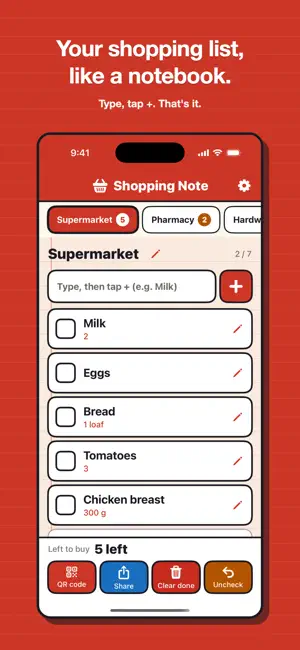
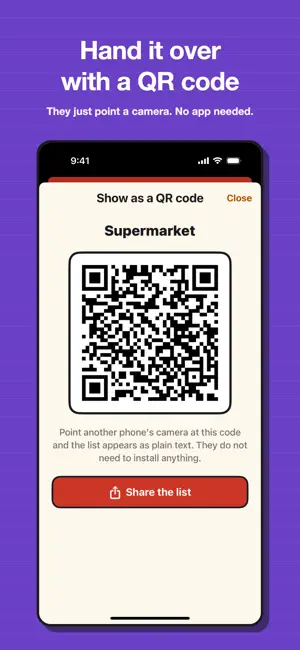
Your shopping list, like a notebook. Write it, tick it off, flip the page. That is the whole app. No recipes, no pantry tracking, no loyalty points, no budgeting — just the list of what you need, always in front. ■ Add with + Type in the field and tap +. The cursor stays put, so you can keep adding as fast as things come to mind. No categories, no tagging. ■ In the aisle, just tap the box Tap anywhere on a row and the big box becomes a tick. Tapped by mistake? Tap again. When you are done, Clear done sweeps the ticked items away — and Undo brings them straight back if you were too quick. ■ Swipe between pages Like the pages of a notebook, swipe left and right between the supermarket, the pharmacy and the hardware store. Each page takes one of eight colours, so you know where you are at a glance, and the tabs along the top carry the remaining count. ■ Hand it over by QR or share Open QR code in the bottom menu and let another phone's camera read it, or use Share to send the list by message or mail. The code holds plain text, so nobody has to install this app. ■ Big type, thick outlines Item names are bold and body text never drops below 17pt. Settings offers Large and Extra large, and it really does enlarge the whole app — readable in a dim aisle. ■ No account, no ads No login, no email address. What you write is stored only on this iPhone and never reaches our servers. There are no ads. ■ All of it is free No page limit, no in-app purchases, no ads. Instead of money: a rating if it helped, and a look at the other apps by the same maker (there is a link in Settings). Languages: English, Japanese, French, German, Spanish, Italian, Korean, Ukrainian Terms of Use (Apple standard EULA): https://www.apple.com/legal/internet-services/itunes/dev/stdeula/
What’s new
Version 1.1 · Updated August 21, 2026
You can now hide what you have already bought. - Tap once to hide the items you have ticked, so only what is left shows - Today's shopping gathers everything still unbought across your shops, and a shop disappears as you finish it - Fixed a bug where adding or saving while the keyboard was still converting text stored the unconverted reading and left the field looking doubled
App privacy
The developer, HIROKI TOMIMURA, reported these privacy practices to Apple.
Data Not Collected
The developer does not collect any data from this app.
Alternatives to Shopping Note: Grocery List
Looking for apps like Shopping Note: Grocery List? Here are 6 similar apps on the App Store. The highest rated is OCR Memo - Scan Handwriting (5.0/5), and all 6 are free to download.
-
 Shopping Memo App
-
 あと何日? - 期限カウントダウン管理・日数計算予定
-
 Kargo! - Voice Shopping List
-
 Days Left: Calendar Countdown
-
 OCR Memo - Scan Handwriting
5.0
OCR Memo - Scan Handwriting
5.0
-
 WeeList: Grocery List
| App | Rating | Price | Last updated | Compare |
|---|---|---|---|---|
| Shopping Note: Grocery List | – | Free | August 21, 2026 | |
| Shopping Memo App | – | Free | Mar 5, 2026 | Compare |
| あと何日? - 期限カウントダウン管理・日数計算予定 | – | Free | Jun 10, 2026 | Compare |
| Kargo! - Voice Shopping List | – | Free | Aug 19, 2026 | Compare |
| Days Left: Calendar Countdown | – | Free | Oct 18, 2026 | Compare |
| OCR Memo - Scan Handwriting | 5.0 / 5 (1) | Free | Jul 9, 2026 | Compare |
| WeeList: Grocery List | – | Free | Oct 14, 2026 | Compare |