

Days Left: Calendar Countdown
Naoki Hotta Productivity iPhoneiPadiPod touch
Days Left: Calendar Countdown is a free Productivity app for iPhone and iPad by Naoki Hotta. Requires iOS 26.2. Updated October 18, 2026.
- Price
- Free
- on the App Store
- Size
- 4 MB
- Age 4+
- Updated
- Oct 18
- 2026 · v1.0.8
Screenshots

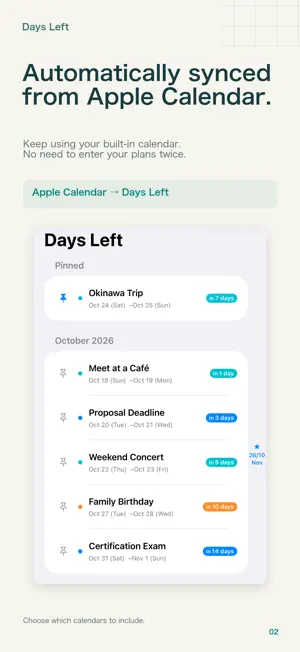


About Days Left: Calendar Countdown
Your next big day, at a glance. Turn your Apple Calendar events into Home Screen countdowns. Days Left automatically reads events from the built-in Calendar app on your iPhone or iPad and shows the days, hours, or minutes remaining in a widget. Keep adding and editing plans in Apple Calendar. There is no need to enter the same event twice. COUNT DOWN ON YOUR HOME SCREEN Trips, birthdays, concerts, exams, and deadlines: see what's coming up without opening the app. As an event approaches, the countdown switches to hours or minutes. AUTOMATICALLY SYNC FROM APPLE CALENDAR Allow calendar access to read your existing events. Choose the calendars you want to include, whether for work, family, or personal plans. Set the look-ahead period to 1, 2, 3, or 5 years. CHOOSE A VIEW THAT FITS Use small and medium list widgets, or Big Countdown to give one event a larger display. Choose the view that suits your plans and the space on your Home Screen. KEEP WHAT MATTERS AT THE TOP Pin an important event to prioritize it in your event list and widgets. Keep a trip or special date in sight, even when your calendar gets busy. SEE MORE PLANS WITH THE LARGE WIDGET Unlock the large list widget with a one-time in-app purchase. Small and medium widgets and Big Countdown are free. The number of visible events depends on widget size, event details, and text size. CHECK YOUR LOCK SCREEN, TOO Add Next Event, Large Countdown, or Two Events to your Lock Screen. On a compatible iPhone, use StandBy to display your clock and Big Countdown side by side while charging in landscape orientation. GET HELP ADDING YOUR WIDGETS Explore size previews and illustrated guides for the Home Screen, Lock Screen, and StandBy. You can also unlock the large widget or restore your purchase from the widget guide. BEFORE YOU START • Calendar access is required to display your events. • Add and edit events in Apple Calendar. • StandBy requires a compatible iPhone. • Widget updates are managed by iOS and iPadOS, so calendar changes may take time to appear. Open Days Left and sync to load the latest events. • Available in English and Japanese. Event and calendar names appear as you entered them.
What’s new
Version 1.0.8 · Updated October 18, 2026
• Added full English support, including localized dates and countdowns. The app appears as Days Left in English. • Added Next Event, Large Countdown, and Two Events widgets for the Lock Screen. • Added Big Countdown for StandBy and the Home Screen. • Updated the widget guide with size previews, illustrated setup steps, and examples for the Lock Screen and StandBy. • Improved compact English countdowns in small widgets and made the guides easier to use with larger text.
App privacy
The developer, Naoki Hotta, reported these privacy practices to Apple.
Data Not Linked to You
The following data, which may be collected but is not linked to your identity, may be used for the following purposes:
- Identifiers: Device ID
- Diagnostics: Other Diagnostic Data
Used for: App Functionality
Alternatives to Days Left: Calendar Countdown
Looking for apps like Days Left: Calendar Countdown? Here are 6 similar apps on the App Store.
-
 task-count-down
-
 Shopping Note: Grocery List
-
 Auto Delete: Del24
-
 Deadline Timer 〜締切日までカウントダウン〜
-
 LectureWatch
-
 Just Tap Shopping List
| App | Rating | Price | Last updated | Compare |
|---|---|---|---|---|
| Days Left: Calendar Countdown | – | Free | October 18, 2026 | |
| task-count-down | – | Free | Jun 2, 2026 | Compare |
| Shopping Note: Grocery List | – | Free | Aug 21, 2026 | Compare |
| Auto Delete: Del24 | – | Free | Aug 5, 2026 | Compare |
| Deadline Timer 〜締切日までカウントダウン〜 | – | Free | Aug 21, 2026 | Compare |
| LectureWatch | – | Free | Aug 5, 2026 | Compare |
| Just Tap Shopping List | – | Free | Jan 6, 2025 | Compare |