

Papertuck: Document Vault
Varun Adiyeri Parambath Productivity iPhoneiPadiPod touch
Papertuck: Document Vault is a free Productivity app for iPhone and iPad by Varun Adiyeri Parambath. Requires iOS 17.0. Updated August 26, 2026.
- Price
- Free
- on the App Store
- Size
- 68 MB
- Age 4+
- Updated
- Aug 26
- 2026 · v1.1
Screenshots
About Papertuck: Document Vault
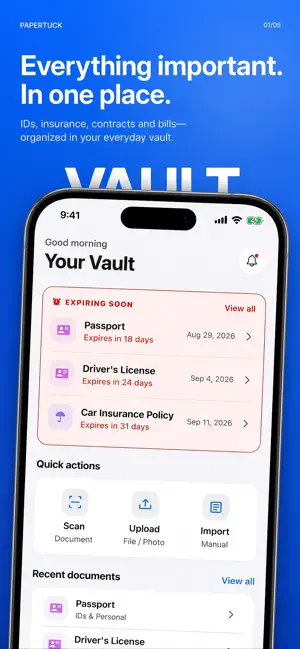
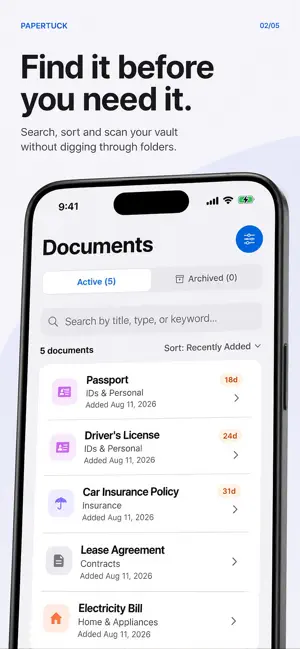
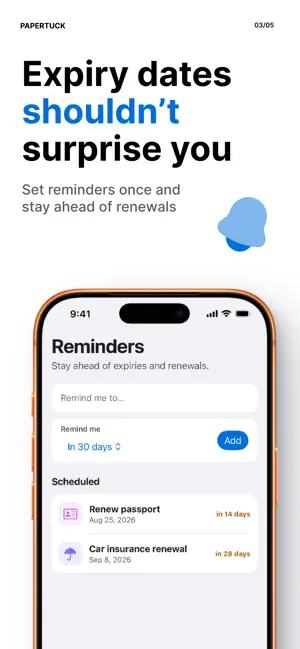
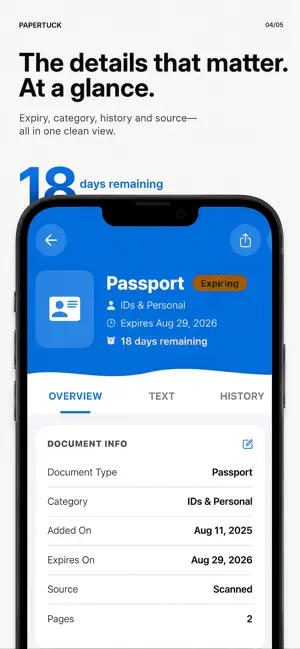
Paperwork feels unimportant - until it suddenly matters. Papertuck keeps receipts, warranties, IDs, insurance papers, contracts, tax records, and other household documents ready for the moment you need them. Scan or import a paper, use on-device text extraction to make it searchable, and set reminders for expiries and renewals. SCAN, ORGANIZE, FIND • Scan with your camera or import photos and PDFs • Keep multi-page documents together • Extract text on device with OCR • Search by title, category, merchant, or words in the document • Automatically suggest practical categories from extracted text • Track dates, amounts, notes, and warranty details • Archive or share a document when you need it STAY AHEAD OF IMPORTANT DATES Add reminders for passport expiries, insurance renewals, warranty deadlines, return windows, and more. Local notifications help you act before a document becomes urgent. LOCAL FIRST Start free without creating an account. Your free vault supports up to 50 active documents and stays on your device. There are no ads and no cross-app tracking. On supported devices, you can protect the app with Face ID or Touch ID. PAPERTUCK PRO Upgrade for unlimited documents, secure cloud backup, multi-device sync, and household vault sharing. Pro cloud sync is optional and requires an account. Synced documents are encrypted in transit and at rest, but cloud sync is not end-to-end encrypted. Papertuck Pro is available as a monthly or annual auto-renewable subscription. Any free trial and your local price are shown before purchase. Payment is charged to your Apple Account when you confirm. Subscriptions automatically renew unless canceled at least 24 hours before the end of the current period. Manage or cancel your subscription in your App Store account settings. Your papers, ready when life asks. Privacy Policy: https://papertuck.com/privacy Terms of Use (EULA): https://www.apple.com/legal/internet-services/itunes/dev/stdeula/ Additional Terms of Service: https://papertuck.com/terms Support: [email protected]
What’s new
Version 1.1 · Updated August 26, 2026
- Added Lifetime Personal, a one-time purchase that unlocks unlimited documents and personal iCloud sync. - The free plan now supports up to 30 active documents. - Added clearer plan comparisons between Lifetime Personal and Papertuck Pro. - Existing documents remain safe if your library exceeds the free limit. You can still view, edit, archive and export them. - Improved purchase restoration and fixed minor bugs.
App privacy
The developer, Varun Adiyeri Parambath, reported these privacy practices to Apple.
Data Not Collected
The developer does not collect any data from this app.
Alternatives to Papertuck: Document Vault
Looking for apps like Papertuck: Document Vault? Here are 6 similar apps on the App Store. The highest rated is Pockli Scan: Document Scanner (5.0/5), and all 6 are free to download.
-
 WitNote: AI Markdown Notes
-
 Pockli Scan: Document Scanner
5.0
-
 Before You Go: Checklists
5.0
-
 Monolog: Text Your Thoughts
5.0
-
 LocalLLM: Offline AI Chat
3.0
-
 Pixcall - Sync Your Assets
5.0
| App | Rating | Price | Last updated | Compare |
|---|---|---|---|---|
| Papertuck: Document Vault | – | Free | August 26, 2026 | |
| WitNote: AI Markdown Notes | – | Free | Sep 30, 2026 | Compare |
| Pockli Scan: Document Scanner | 5.0 / 5 (1) | Free | Jul 6, 2026 | Compare |
| Before You Go: Checklists | 5.0 / 5 (1) | Free | Sep 5, 2025 | Compare |
| Monolog: Text Your Thoughts | 5.0 / 5 (3) | Free | Nov 3, 2026 | Compare |
| LocalLLM: Offline AI Chat | 3.0 / 5 (2) | Free | Oct 12, 2026 | Compare |
| Pixcall - Sync Your Assets | 5.0 / 5 (1) | Free | Oct 29, 2026 | Compare |